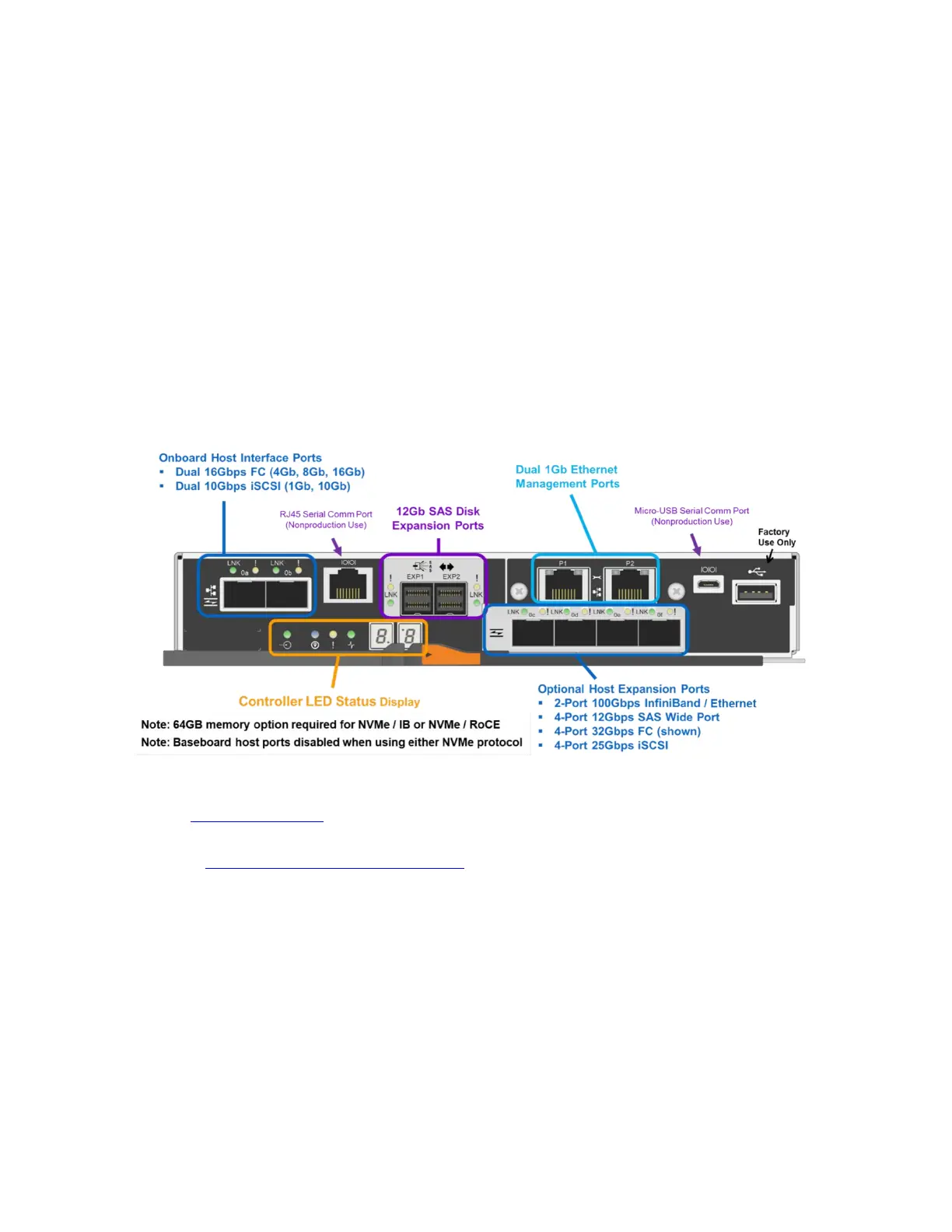
This package includes two built-in host ports on each controller, either two 16Gb FC or two 10Gb iSCSI,
and your choice of the following optional HICs:
• 4-port 12Gb SAS (mini-SAS 3 connector)
• 4-port 32Gb FC (OM4 fiber required)
• 4-port 25Gb iSCSI (OM4 fiber required)
• 2-port 100Gb IB (requires 100Gb-capable cables and host channel adapters [HCAs])
Note: A software feature pack can be downloaded and installed in the field to change the host
protocol of the optical baseboard ports from FC to iSCSI or from iSCSI to FC. In addition, the
100Gb HIC protocol can be changed to one of four choices: iSCSI Extensions for RDMA
(iSER), SCSI RDMA Protocol (SRP), NVMe/IB, or NVMe/RoCE. The 32Gb FC HIC can be
changed to run NVMe/FC.
Only one protocol can be active on the 100Gb HIC at one time, and the on-board host interface ports are
disabled when an NVMe based protocol is activated. Figure 3 identifies the various interface ports on the
EF570 controller.
Figure 3) EF570 controller with ports identified.
For optical connections, appropriate SFPs must be ordered for the specific implementation. Consult the
NetApp Hardware Universe for a full listing of available host interface equipment.
For detailed instructions about how to change host protocols, go to the Upgrading > Hardware Upgrade
section at https://mysupport.netapp.com/eseries.
The EF570 continues the E-Series legacy of being fast, simple, reliable, and flexible SAN storage
regardless of the workload. E-Series EF570 all-flash arrays can support the workload if the following
conditions are met:
• Hosts are qualified with E-Series arrays (most common host types are supported).
• The hosts use SAN access to the storage, whether directly connected or fabric connected.
• The storage is managed at the host or file system level.
In fact, some of the world’s most demanding online transactional workloads run on EF-Series arrays
because these arrays are blazing fast, simple to install and operate, and are extremely reliable (up to
99.9999% data availability). These highly flexible SAN building blocks can be applied when you need
them and can be plugged-in to your current application environment on demand without disrupting your
primary storage management strategy. EF-Series arrays can operate in a space as small as 2RU,


 To Next Page