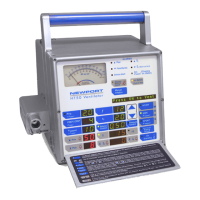
4 Press the button below the “Trig” window then the display will
start blinking.
5 While the display is blinking, turn the Adjustment Knob to
change the setting from “
d0” to “d3”. Then press the “Accept”
button to acknowledge. The Message ID will change to “11”.
6 Press the button “Select” above the “Flow/t Insp” window
and press the “Accept” button to select
Flow.
7 Press the “Manual Inflation” button to enable manual flow
adjustment. The message ID will change to “
12”.
8 Press the button below the “Flow / t Inst” window then the
display will start blinking.
9 While the display is blinking, turn the Adjustment Knob to
change the setting from “
0” to “3”. Then press the “Accept”
button to acknowledge. This is to obtain a flow of 3 L/min.
10 Verify the value of “Air Gas Supply” is 15.5 ±0.5 psig.
Adjust
the Air Inlet Pressure Regulator if not within specification.
11 To adjust the Air Inlet Pressure Regulator, use a 5/16” open-
ended wrench to loosen the bottom lock nut (see Figure 5-3).
Using a 1/4” open-ended wrench, rotate the top adjustment
bolt to adjust the pressure. Rotate the bolt clockwise to
increase the pressure and counter clockwise to decrease the
pressure. When the value of “Air Gas Supply” is 15.0
±0.5
psig, secure the bottom lock nut.
Figure 5-3 Air/Oxygen Pressure Regulators Adjustment
12
Adjust Flow as shown below and verify that the expected
regulated pressure for each flow setting is within tolerance.
CALIBRATION PROCEDURES
Lock nut
Adjustment bolt
5-10 SER360 A1106


 To Next Page