EasyManua.ls Logo

Nikon D90 - Page 124

Nikon D90
359 pages
Print Icon
To Next Page IconTo Next Page
To Previous Page IconTo Previous Page
Loading...
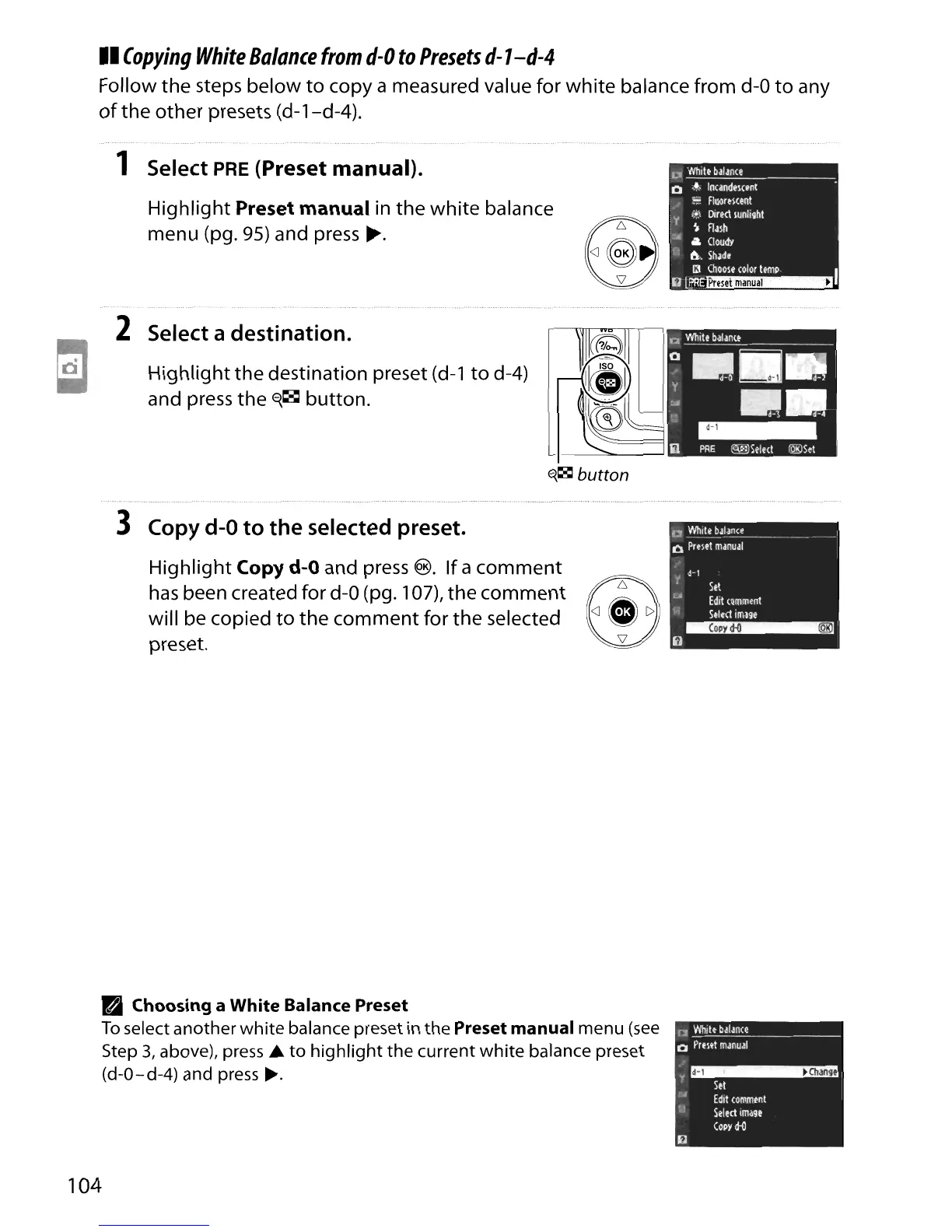
II
Copying
White
Balance
from
d-O
to
Presets
d-1-d-4
Follow
the
steps below
to
copy a measured value for
white
balance from
d-O
to
any
of
the
other
presets (d-1-d-4).
1 Select PRE (Preset manual).
Highlight
Preset manual in the
white
balance
menu (pg.
95)
and press
~.
U
Whitt
balance
o
,~"
InundelCtnt
~
Fluorment
i,+)
Direct
lunli~ht
y
~
Flalh
:lll
A
aoudY
{:j
a..
Shlde
(J
(hoole
color
temp
I
~lP.R~~
2 Select a destination.
Highlight
the
destination preset (d-1
to
d-4)
and press the
E{~
button.
~~
button
3 Copy
d-O
to
the
selected preset.
Highlight
Copy d-O and press
®.
If
a
comment
has
been created for
d-O
(pg. 107),
the
comment
E!J6
will
be copied
to
the
comment for
the
selected
\!),
preset. 1Ii"''''1II1II1II
PI
Choosing a White Balance Preset
To
select another
white
balance preset in
the
Preset manual menu
(see
Step
3,
above), press ...
to
highlight
the
current
white
balance preset
(d-O-d-4) and press
~.
104
r2
White
balance
o
Preset
manual
.~
.,
Stt
~A
Edit
comment
101
Sel
ect
ima9t
(opy
d-()

Table of Contents

Other manuals for Nikon D90

Related product manuals