EasyManua.ls Logo

Nikon D90 - Page 127

Nikon D90
359 pages
Print Icon
To Next Page IconTo Next Page
To Previous Page IconTo Previous Page
Loading...
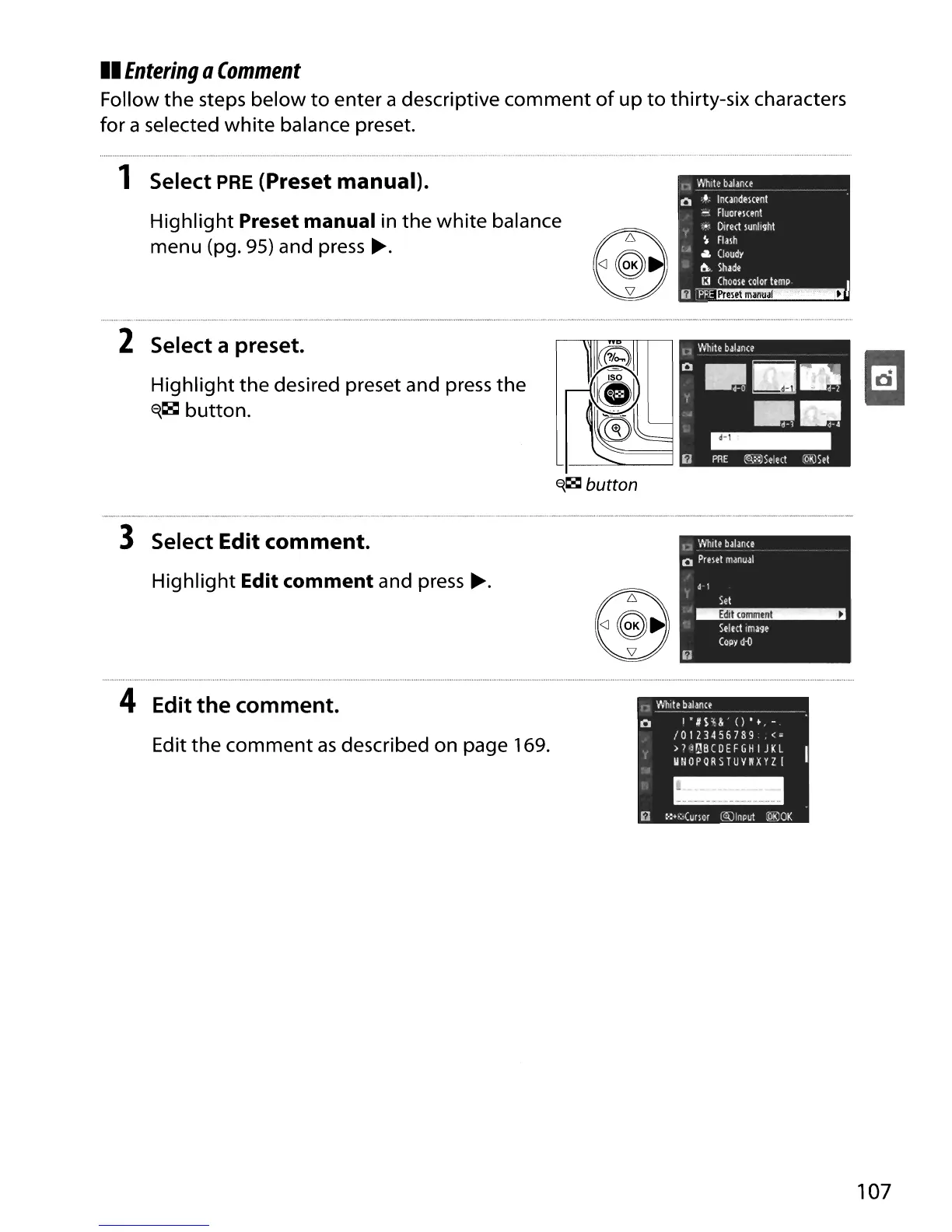
II
Entering
Q
Comment
Follow
the
steps
below
to
enter a descriptive
comment
of
up
to
thirty-six characters
for
a selected
white
balance preset.
1 Select
PRE
(Preset manual).
Highlight
Preset manual in
the
white
balance
menu (pg. 95) and press
~.
n
Whit~
balan(t
.
__
.
._._._
o
..•..
In(andemnt
..
Fluormenl
.•
,
DIrect
lunlight
~
Flalh
,
...
lit.
Cloudy
&.
Shade
iJ~1
2 Select a preset.
Highlight
the
desired preset and press
the
~~
button.
~~
button
3 Select Edit comment.
Highlight
Edit comment and press
~.
u
'MI,le
balan(e
o
Prelel
manual
d·1
Sel
'~
Select
image
COpy
d-iJ
4 Edit
the
comment.
Edit
the
comment
as
described on page 169.
107

Table of Contents

Other manuals for Nikon D90

Related product manuals