EasyManua.ls Logo

Nikon D90 - Page 126

Nikon D90
359 pages
Print Icon
To Next Page IconTo Next Page
To Previous Page IconTo Previous Page
Loading...
II
Selecting
a
White
Balance
Preset
To
set
white
balance
to
a preset value:
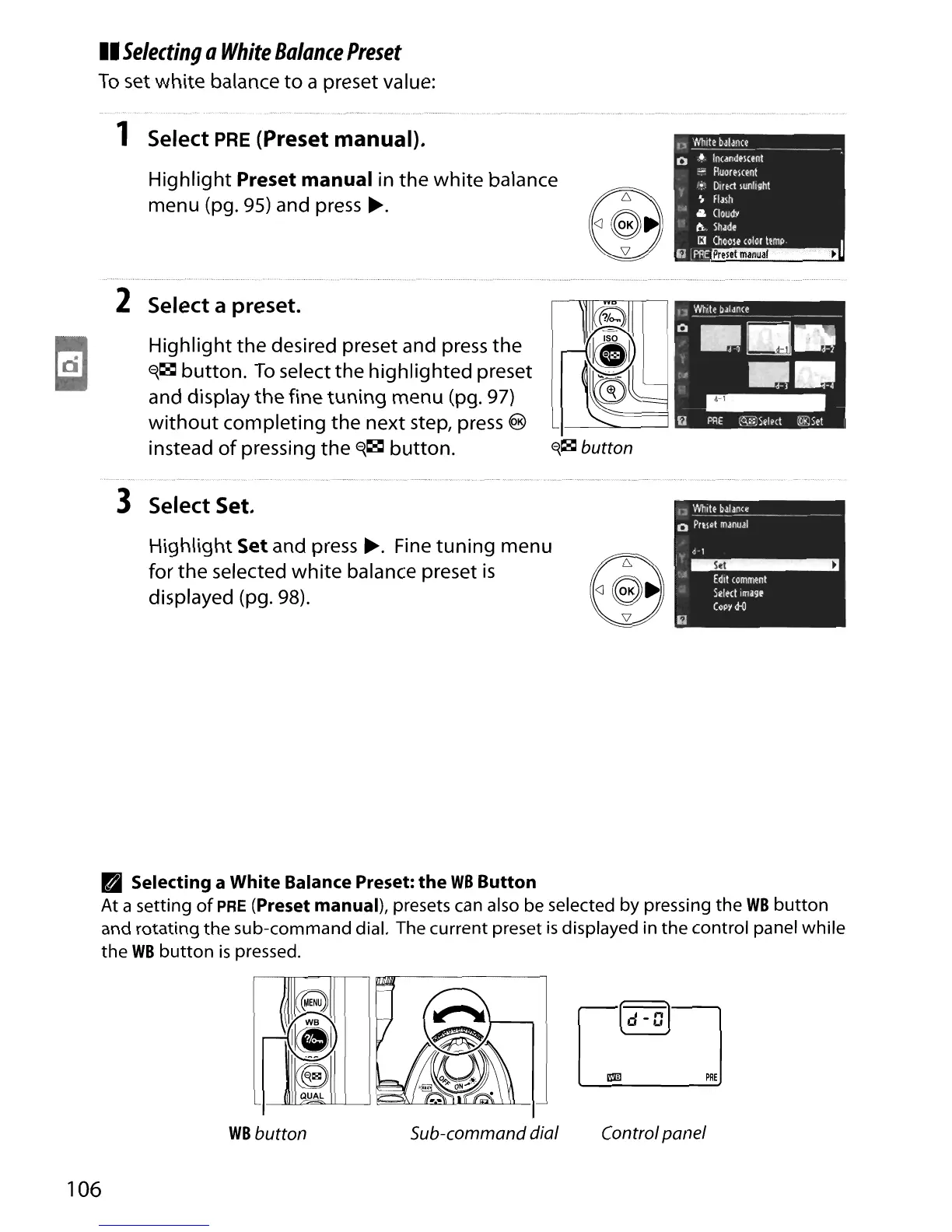
1 Select
PRE
(Preset manual).
Highlight Preset manual in
the
white
balance
menu (pg.
95)
and press
~.
n
'Nhit!
bJlance
o
.~.
Incandment
-
FluorPlCtnt
;~:
DIrect
lunllght
~
FIJlh
&
CloudY
ti.
ShJde
. IJ
ChOOIHolor
lemp
I
i1,PRE~
2 Select a preset.
Highlight
the desired preset and press the
~~
button.
To
select
the
highlighted preset
and display
the
fine
tuning
menu (pg. 97)
without
completing the next step, press @
instead
of
pressing the
~~
button.
f{~
button
3 Select Set.
Highlight
Set and press
~.
Fine
tuning
menu
for
the
selected
white
balance preset
is
displayed (pg.
98)
.
Selecting a White Balance Preset:
the
WB
Button
At
a setting
of
PRE
(Preset manual), presets can also
be
selected by pressing
the
WB
button
and
rotating
the
sub-command
dial. The current preset
is
displayed
in
the
control panel while
the
WB
button
is
pressed.
106
WB
button
Sub-command dial
mil
PRE
Control panel

Table of Contents

Other manuals for Nikon D90

Related product manuals