ENGLISH
SERVICE MANUAL
52
909 6424 000(3)2007-12 BR 601 / BR 651 / BR 751 / BR 751 C
PARKING BRAKE SYSTEM
ELECTROMAGNETIC BRAKE AND DISC WITH BRAKING MASSES DISASSEMBLY/ASSEMBLY
(Machines after January 2007)
Disassembly
Drive the machine to the appointed disposal area, and empty the recovery water tank (58) with the hose (22).
Empty the solution/washing water tank (59) with the tap (36).
Place the machine on a hoisting system (if available).
Otherwise, drive the machine on a level fl oor.
Turn the ignition key (12) to "0".
Carefully lift the tank assembly (60).
Disconnect the battery connector (63).
Apply proper wedges to right and left rear wheels (43), so that the machine cannot move when the electromagnetic brake (39)
is disassembled.
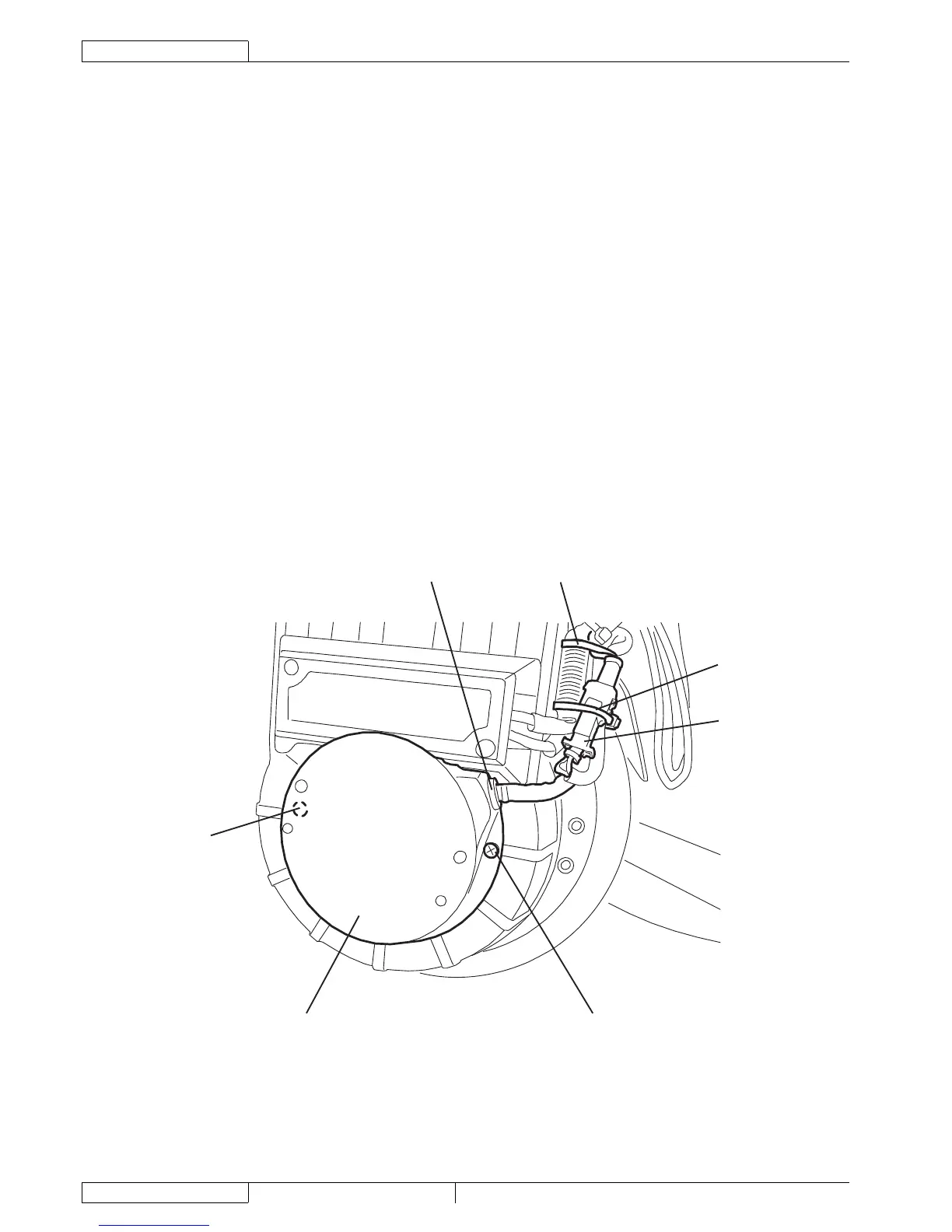
Cut the fastening clamps (A).
Disconnect the electromagnetic brake connector (B).
Remove the screws (C), then remove the case (D) by disengaging the wiring harness grommet (E).
Remove the screws (F), then remove the electromagnetic brake (G).
Remove the disc with braking masses (H). Check the thickness (J) of the braking masses (K) and, if it is lower than 0.039 in (1
mm), the disc (H) must be replaced.
If necessary, remove the fl ange (I).
Assembly
Assemble the components in the reverse order of disassembly, and note the following:
Before assembling the electromagnetic brake (G), clean it with compressed air; then install the threaded dowels (N) so that
they are fl ush with the surface (O).
After assembling the electromagnetic brake (G), check that the air gap (L) is 0.007 to 0.012 in (0.19 to 0.31 mm); if
necessary adjust the air gap (L) by using the adjusting spacers (M).
Check the parking brake (see the procedure in the relevant paragraph).
A
B
A
E
C
D
C
S301641
1.
2.
3.
4.
5.
6.
7.
8.
9.
10.
11.
12.
13.
14.
•
•
15.





 To Next Page