3-17
CHAPTER 3 REPAIR PROCEDURES
3.1.26 Changing Servomotor on High Capacity Top Loader Balance
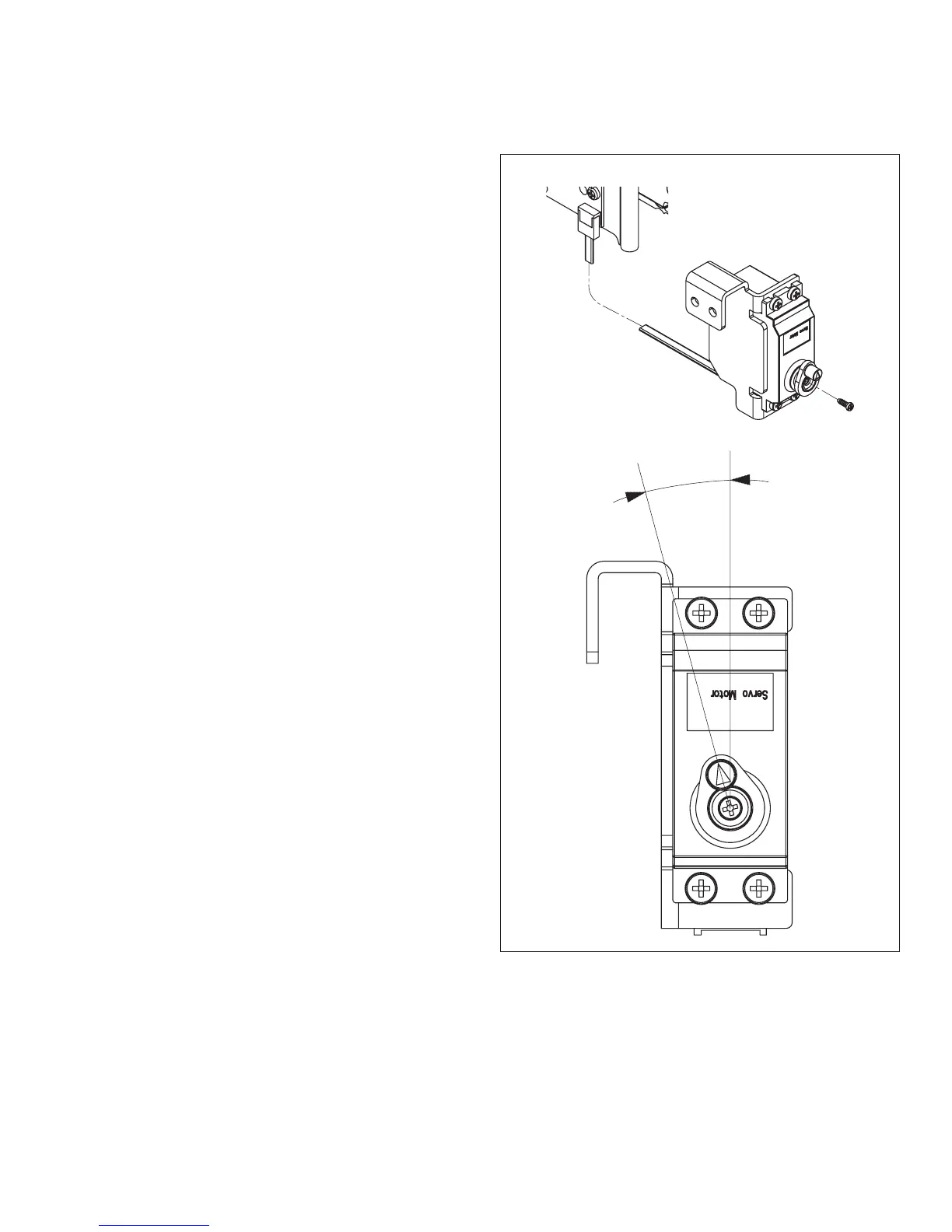
Figure 3-24. Servomotor Installation.
a
NOTE:
The replacement motor is supplied without eccen-
tric and without motor holder, the corresponding
parts of the old motor should be used.
1.Refer to paragraph 3.1.20 and remove Servomo-
tor.
2.Detach eccentric and motor holder from the mo-
tor (needed for the new motor).
3.Unscrew fastener screw of the eccentric from the
new motor.
4.Attach eccentric to new motor loosely.
5.Carefully by hand, turn motor shaft to top posi-
tion.
6.Position eccentric on the motor spindle so that it
is shifted one lock-in position counterclockwise
(a). Screw eccentric firmly in place and then
fasten motor holder. See Figure 3-24.
7.Install motor and calibration bracket. During
installation, ensure there is sufficient play be-
tween the eccentric of the motor and the calibra-
tion bracket.
8.Insert calibration weights. Align calibration
weight holder parallel with the edge of the
frame profile and screw firmly so that a slight
pressure causes the holders to rest on the
weights.
TOP POSITION













 To Next Page