3-29
CHAPTER 3 REPAIR PROCEDURES
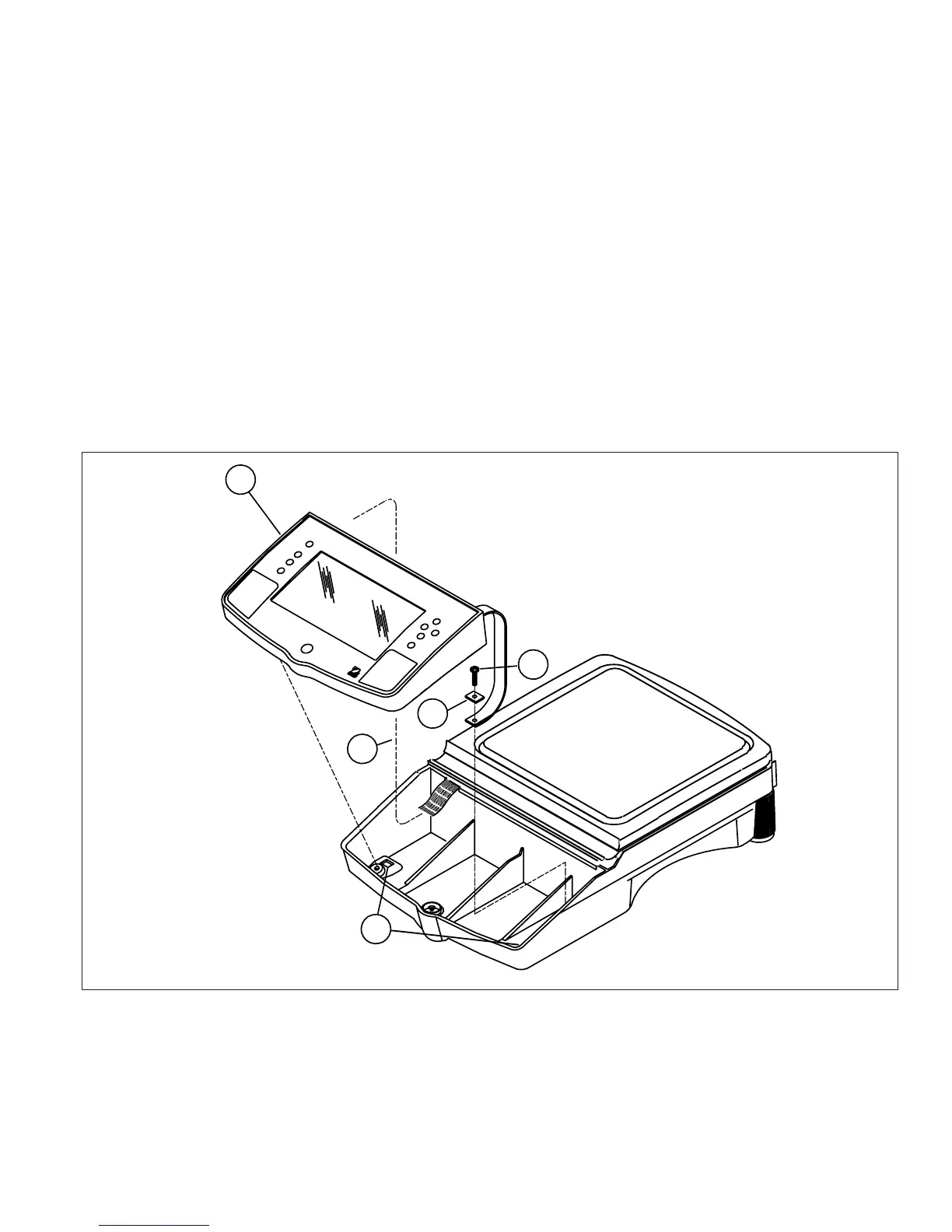
3.2.11 Removing the Display Module Voyager and Explorer Pro Models
(See Figure 3-23)
1.Remove power from the balance.
2.Underneath the front of the balance, press the two tabs (1) towards the rear of the balance, this will release
the display.
3.Carefully lift the display (2) up from the balance and swing towards the rear. You will notice a grounding strap
which is screwed into the base of the balance.
4.Remove screw (3) and flat washer (4) from the grounding strap.
5.Carefully unplug the Main PCB Assembly Ribbon Cable (5) from the connector on the Display PCB Assembly
of the display module.
CAUTION:
Be careful not to pull the RIBBON cable out of the connector on the
main PCb assembly inside the balance.
Figure 3-30. Display Removal/Installation.
>O/T<
>O/T<
3
2
1
4
5













 To Next Page