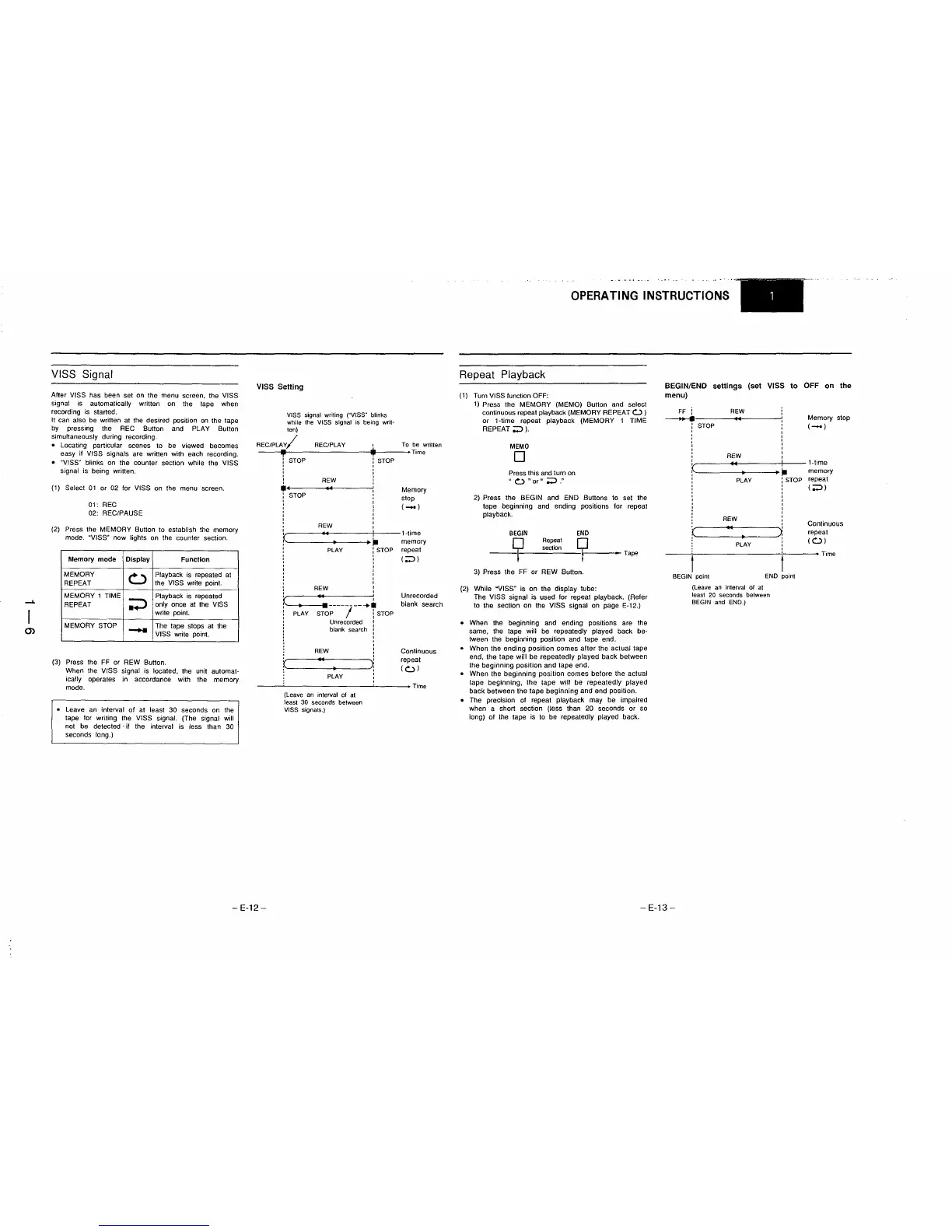
VISS Signal
After VISS has been set
on
the menu screen, the VISS
signal
is
automatically written
on
the tape when
recording is started.
It
can also be written at the desired position
on
the tape
by
pressing the REC Button and PLAY Button
simultaneously during recording.
• Locating particular scenes
to
be viewed becomes
easy if
VI
SS signals are written with each recording.
o "VISS" blinks on the counter section while the VISS
signal is being written.
(t)
Select
at
or 02 for VISS on the menu screen.
at:
REC
02: REC/PAUSE
(2)
Press the MEMORY Button to establish the memory
mode. "VISS" now lights on the counter section.
Memory
mode
Display Function
MEMORY
0
Playback
is
repeated
at
REPEAT
the VISS write paint.
MEMORY 1 TIME
Playback
is
repeated
REPEAT
;J
only once
at
the VISS
write
pOint.
MEMORY STOP
-
The tape stops at the
VISS write point.
(3)
Press the FF or REW Button.
When the
VISS signal is located, the unit automat-
ically operates in accordance with the memory
mode.
o Leave
an
interval
of
at least 30 seconds
on
the
tape for writing the VISS signal. (The signal will
not
be
detected'
if the interval
is
less than 30
seconds long.)
VISS
Setting
VISS
signal writing
rVISS
R
blinks
while the VISS signal
is
being writ-
ten)
REC/PLAV/
REC/PLAY
.l.
To
be
written
----~.
__
----------------_t~~-----+Time
i,
STOP
REW
•••
--------+
••
~------~
: STOP
,
,
REW
STOP
Memory
stop
(-)
~========:.~.=:.======:..-t~------~~~~ry
: PLAY
~
STOP
repeat
: (;;»
, ,
,
,
,
REW
I
~
.~
:
~--<.~---.------
--
....
:
PLAY
STOP
I I
STOP
I
Unrecorded
:
: blank search :
I
REW
,
,
u
~
•
~~-----~
PLAY
(Leave
an
interval
of
at
least
30
seconds
between
VISS
signals.)
,
,
Unrecorded
blank search
Continuous
repeat
(<:..:»
• Time
-
E-12-
OPERATING
INSTRUCTIONS
Repeat Playback
(1)
Turn VISS function OFF:
1)
Press the MEMORY (MEMO) Button and select
continuous repeat playback
(MEMORY REPEAT
<:..:>
)
or
1-time repeat playback (MEMORY 1 TIME
REPEAT;;>
).
MEMO
o
Press this and turn on
"
<:..:>
"or"
;;>."
2) Press the BEGIN and END Buttons to set the
tape beginning and ending positions for repeat
playback.
BEGIN
END
section
Repeat
~
1--------
Tape
3) Press the FF or REW Button.
(2)
While "VISS" is on the display tube:
The
VISS signal is used for repeat playback. (Refer
to the section on the VISS signal
on
page E-12.)
o When the beginning and ending positions are the
same, the tape will be repeatedly played back be-
tween the beginning position and tape end.
o When the ending position comes after the actual tape
end, the tape will be repeatedly played back between
the beginning position and tape end.
o When the beginning position comes before the actual
tape beginning, the tape will be repeatedly played
back between the tape beginning and end position.
o The precision of repeat playback may be impaired
when a short section (less than 20 seconds or so
long) of the tape is to be repeatedly played back.
BEGIN/END
settings
(set VISS
to
OFF
on
the
menu)
FF i
REW
---+
u
,
STOP
,
,
,
,
REW
,
I
U
I
r
•
.~
,
PLAY
:
STOP
,
,
,
,
,
REW
i
,
~
.. 4
~
•
PLAY
t
BEGIN
point
END
point
(Leave
an
interval
01
al
least
20
seconds
between
BEGIN
and
END.)
Memory stop
(-)
1-time
memory
repeat
( ;;»
Continuous
repeat
(<:..:»
Time
-
E-13-











 To Next Page