tJ)
I-
z
w
:2
I-
tJ)
::J
...,
c
«
...J
<C
()
a:
I-
()
w
...J
W
4-3-12. VHS RECORDING CURRENT
ADJ.
BOARD
VIDEO
1
C.B.A.
/
HEAD
AMP
C.B.A.
TP
TP5003(H)(B-4),
TP5002(L)(B-4)
ADJ
VR3008(C-1
)
TAPE
BLANK
TAPE
INPUT
COLOUR
BAR
SIGNAL
MODE
REC/PLAY
M.EQ
OSCILLOSCOPE
SPEC
150mVp-p
± 10mVp-p
Note: This adjustment should be always completed
after
S-VHS Recording Current Adjustment.
[SET UP]
S-VHS
SW
INPUT
OFF
LINE
1.
Supply the colour bar signal to video input.
2.
Connect the oscilloscope to
TP5003 (HOT) and
TP5002 (GND).
3.
Place the unit in recording mode with colour bar
signal.
4.
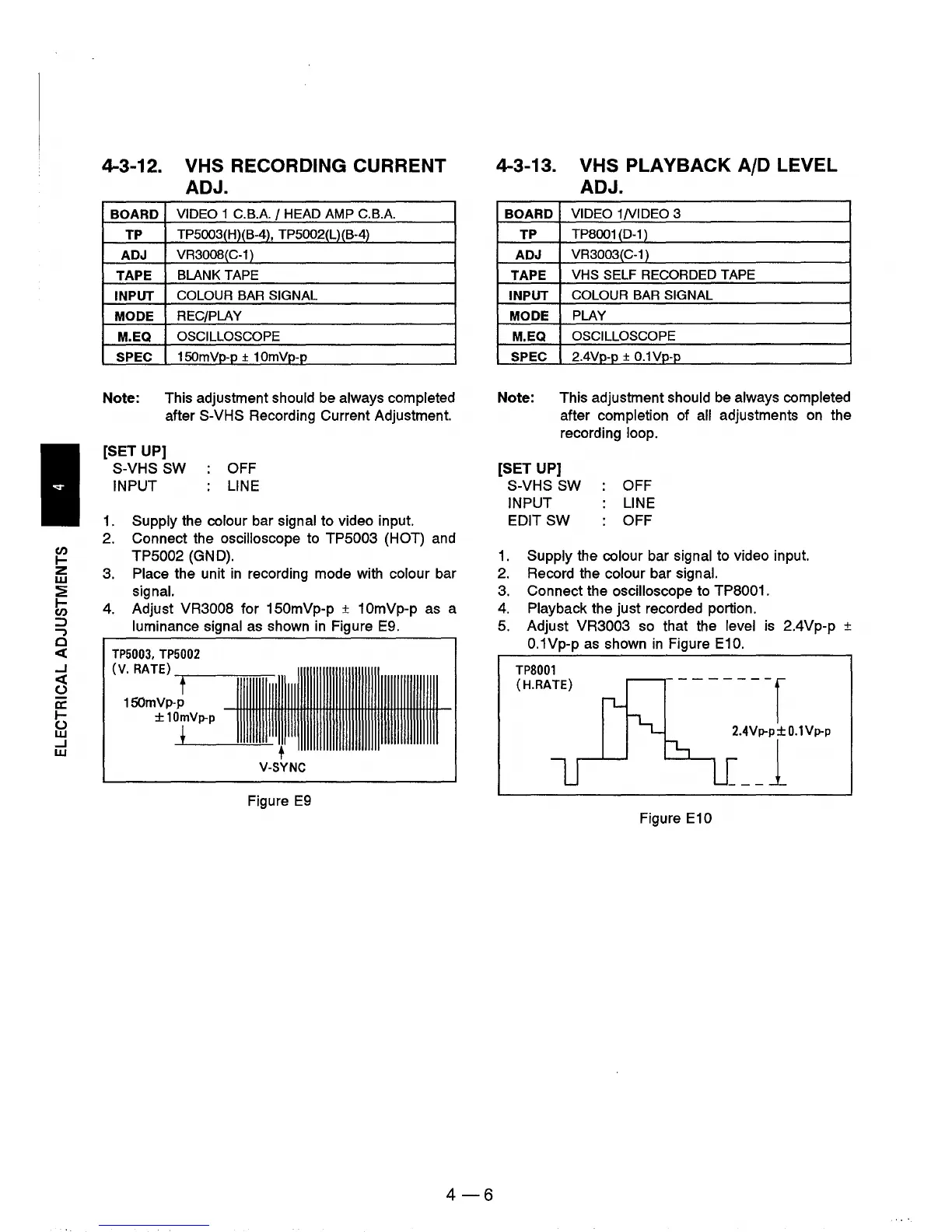
Adjust VR3008 for 150mVp-p ± 10mVp-p as a
luminance signal as shown in Figure E9 .
TP5003,
TP5002
(v.
RATE)
1111111111111111111III11111111111111111111111111111111111111111
t
150mVp-p
±10mVp-p
!
t
V-SYNC
Figure
E9
4-6
4-3-13. VHS PLAYBACK AID LEVEL
ADJ.
BOARD
VIDEO
1N1DEO
3
TP
TP8001
(D-1
)
ADJ
VR3003(C-1
)
TAPE
VHS
SELF
RECORDED
TAPE
INPUT
COLOUR
BAR
SIGNAL
MODE
PLAY
M.EQ
OSCILLOSCOPE
SPEC
2.4Vp-p ±
O.1Vp-p
Note: This adjustment should be always completed
after completion of all adjustments on the
recording loop.
[SET UP]
S-VHS SW
INPUT
EDIT
SW
OFF
LINE
OFF
1. Supply the colour bar signal to video input.
2. Record the colour bar signal.
3. Connect the oscilloscope to
TP8001.
4. Playback the
just
recorded portion.
5. Adjust
VR3003 so that the level is 2.4Vp-p ±
O.1Vp-p as shown
in
Figure E10.
TP8001
(H.RATE)
Figure E10











 To Next Page