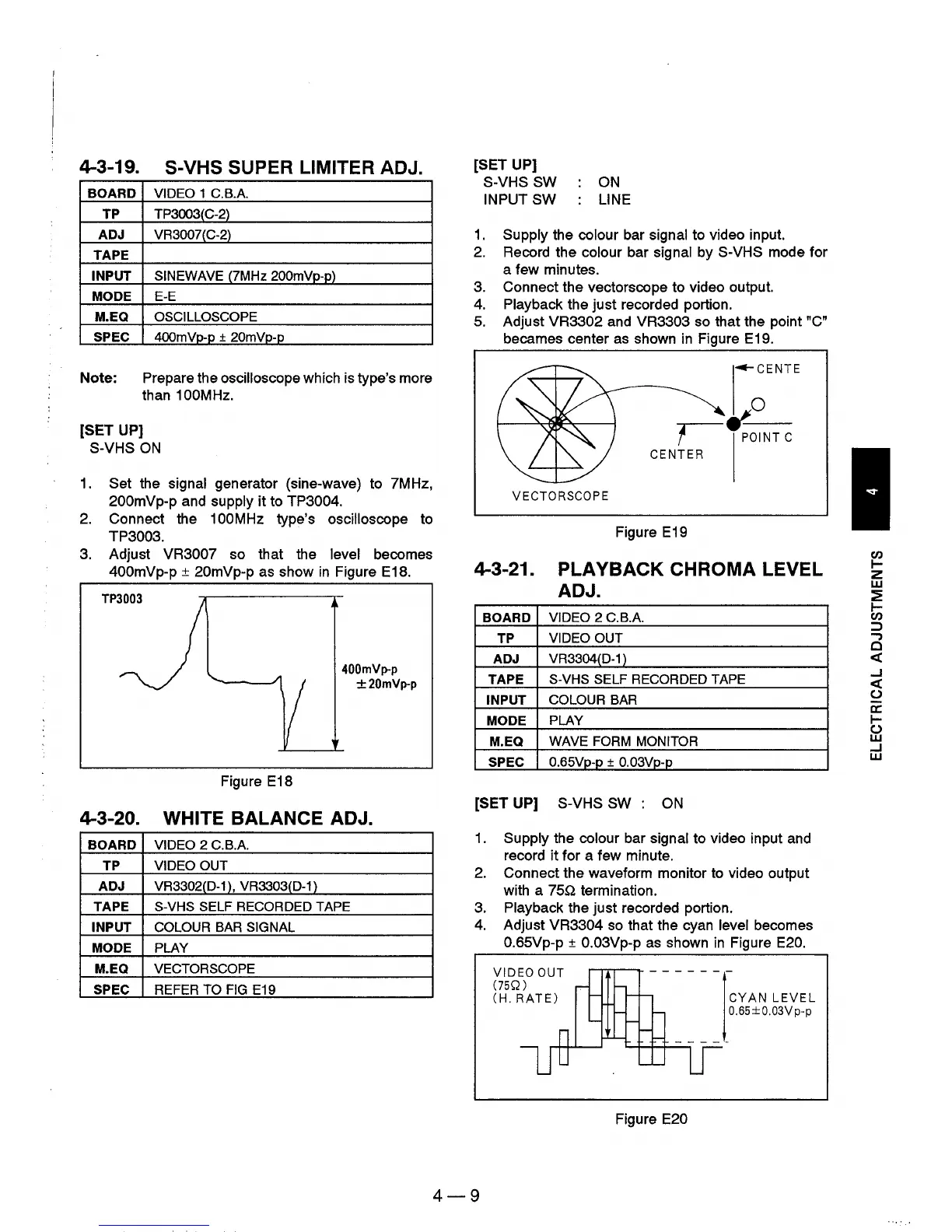
4-3-19. S-VHS SUPER LlMITER ADJ.
BOARD VIDEO 1
C.BA
TP
TP3003(C-2)
ADJ
VR3007(C-2)
TAPE
INPUT
SINEWAVE
(7MHz 200mVp-p)
MODE E-E
M.EQ
OSCILLOSCOPE
SPEC
4OOmVp-p
+ 20mVp-p
Note: Prepare the oscilloscope which is type's more
than 1
OOM
Hz.
[SET UP]
S-VHS
ON
1.
Set the signal generator (sine-wave) to 7MHz,
200mVp-p and supply it to TP3004.
2.
Connect the 100MHz type's oscilloscope to
TP3003.
3.
Adjust VR3007 so that the level becomes
400mVp-p ± 20mVp-p
as
show
in
Figure E18.
Figure E18
400mVp-p
±20mVp-p
4-3-20. WHITE BALANCE ADJ.
BOARD VIDEO 2
C.BA
TP VIDEO OUT
ADJ
VR3302(D-1), VR3303(D-1)
TAPE S-VHS SELF RECORDED TAPE
INPUT
COLOUR
BAR SIGNAL
MODE PLAY
M.EQ VECTORSCOPE
SPEC
REFER TO
FIG
E19
[SET UP]
S-VHS SW
INPUT SW
ON
LINE
1.
Supply the colour bar signal to video input.
2.
Record the colour bar signal by S-VHS mode for
a few minutes.
3.
Connect the vectorscope to video output.
4.
Playback the just recorded portion.
5.
Adjust VR3302 and VR3303 so that the point "C"
becames center
as
shown
in
Figure E19 .
....
CENTE
,--_V-
0
,
POINT
C
CENTER
VECTORSCOPE
Figure E19
4-3-21.
PLAYBACK
CHROMA LEVEL
ADJ.
BOARD
VIDEO 2
C.BA
TP
VIDEO OUT
ADJ
VR3304(D-1 )
TAPE
S-VHS SELF RECORDED TAPE
INPUT COLOUR BAR
MODE
PLAY
M.EQ WAVE FORM MONITOR
SPEC
O.65Vp-p
± O.03Vp-p
[SET UP] S-VHS
SW:
ON
1.
Supply the colour bar signal to video input and
record
it
for a few minute.
2.
Connect the waveform monitor to video output
with a
75Q termination.
3.
Playback the just recorded portion.
4.
Adjust VR3304
so
that the cyan level becomes
O.65Vp-p
± O.03Vp-p
as
shown
in
Figure E20.
4-9
VIDEO
OUT
(75Q)
(H.
RATE)
r--r-r-.--......
- - - - - - -
- - - -
~
'-+-++--.
Figure E20
CYAN
LEVEL
0.65 ± 0.03V p-p
Cl)
~
z
w
~
~
Cl)
=>
...,
Cl
«
..J
«
()
a::
~
()
W
..J
W











 To Next Page