94
2
Taking Pictures
You can set the sensitivity to suit the brightness of the surroundings.
The sensitivity can be set to AUTO or within a sensitivity range
equivalent to ISO 100 to 12800 in increments of 1 EV or 1/3 EV. The
default setting is AUTO.
1
Press the four-way controller (3) in capture mode.
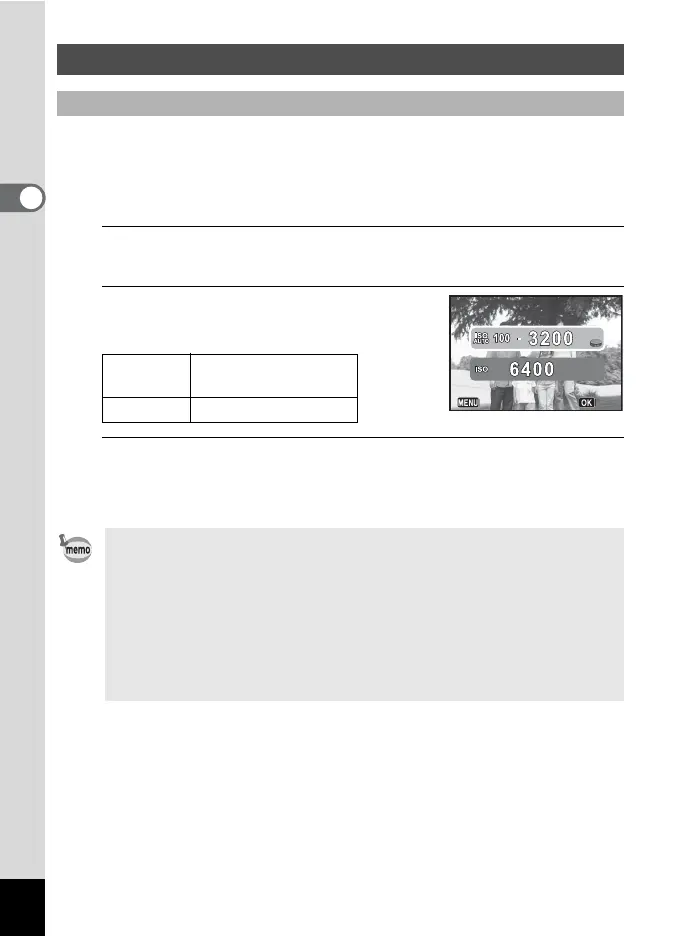
The Sensitivity setting screen appears.
2
Use the four-way controller (23)
to select [ISO AUTO] or [ISO].
3
Use the four-way controller (45) or the e-dial to
change the sensitivity value, and press the 4 button.
The camera is ready to take a picture.
Setting the Exposure
To Set the Sensitivity
ISO AUTO
Sets the range to be
adjusted automatically.
ISO Sets the fixed value.
• When the capture mode is set to p, the sensitivity is fixed to AUTO
and cannot be changed.
• When the mode dial is set to a (Manual Exposure), [ISO AUTO] is not
displayed. When the sensitivity is set to AUTO and the mode dial is set
to a, the sensitivity is fixed to the last set value.
• The minimum sensitivity is doubled when [Highlight Correction]
(p.104) is set to [On].
• The sensitivity steps can be changed to [1EV] or [1/3EV] with [8.
Sensitivity Steps] (p.67) in the [A Custom 2] menu.
Cancel
OK


 To Next Page