44
7. CORRECTION MODE
7.1 Changing the target constant
Changing the Target Constant can be performed only when the Reflector sheet and Prism
Constant setting are “INPUT” in Initial Setting 1.
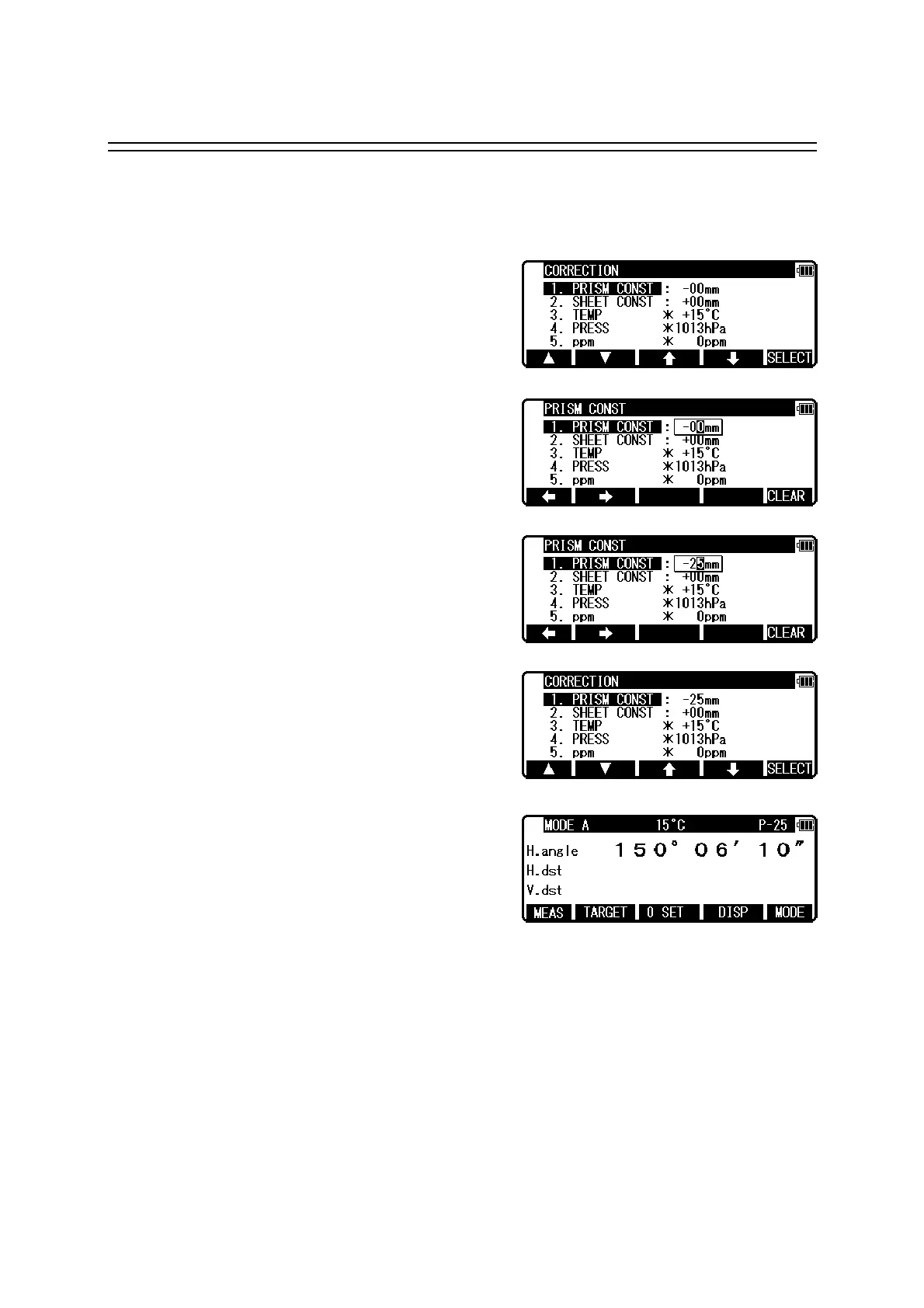
Example: Prism Constant - 25mm setting
Press [F4] [CORR] in MODE B.
(If the instrument is in MODE A,
press [F5] [MODE] to enter MODE B.)
Press the [F5] [SELECT] to enable
the Prism Constant to be changed.
Clear the exiting values by pressing [F5] [CLEAR].
Input -25 by pressing the numeric keys.
Press the [ENT] key to accept the Prism
Constant to -25mm.
Pressing the [ENT] key returns the instrument
to MODE A.
• To set the Reflector sheet constant to “0mm”select “0mm”for “SHEETCONST”in “Initial
Setting 1”
• To set the Prism constant to “0mm”or “-30mm” select “0mm” or “-30mm” for “PRISM
CONST” in “Initial Setting 1”.
• When the “Sheet Constant” has been set to “0mm” in “Initial Setting 1” and “PRISM
CONST” has been set to “0mm” or “-30mm”, “*” is displayed to the left of “0mm” or
“-30mm” on the correction menu screen. When “*” is on the screen, the Constant cannot be
changed (by entering a numeric key).
• Once set, the Reflector sheet Constant and Prism Constant remains on the measurement
screen as “S 0” or “P 0”.
• The factory initial of Reflector sheet Constant and Prism Constant are 0.
• Once set, each Constant remains in memory even after the power is turned off.



 To Next Page
 Loading...