57
9. ACCESSING THE FUNCTIONS
9.1 Accessing by help key
You can use the [HELP] key to display specific
initial setting (such as the prism constant and priority
mode).
Press the [lLLU]+[ESC] key in MODE A or B.
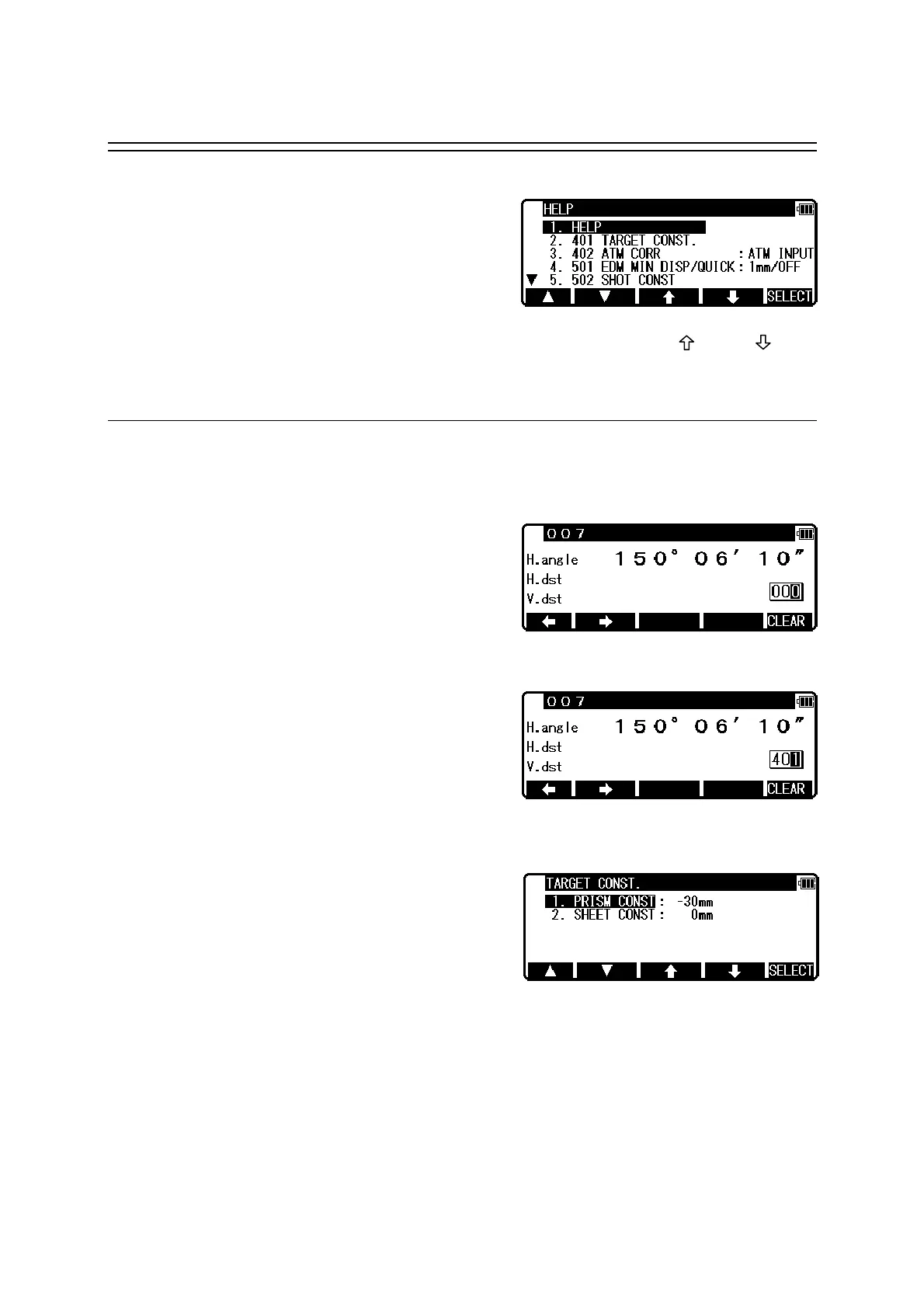
The help menu will then be displayed. Press [F1] [ △ ] [F2] [ ▽ ] or [F3] [ ] [F4] [ ] to
position the cursor to the desired item.
9.2 Accessing by 007
The R-2500DN allows you to enter a special code of 007 with the alphanumeric keys to
display specific initial setting.
Press the numeric keys [0] [0] [7] in MODE A or B.
The screen will then change to the command input
screen.
Press the numeric keys for the desired command
number in the Command No. Table.
(For example, press [4] [0] [1] for TARGET
CONST.)
Press the [ENT] key to access the TARGET
CONST.



 To Next Page
 Loading...