176
Serial Port Profiles
z UDP Port - This is the UPD port to which the serial data will be forwarded as well as the UPD
port from which data originating on the LAN will be accepted from. For a direction of "Both",
there are two valid option for the UDP Port as follows;
zAuto Learn - The first UDP message received will be used to define which port we are going
to accept UDP data from. Once learned, only data from this UDP port will be accepted and
serial data being forwarded to the LAN will be sent to this UDP port. Until the port is
learned, data from the serial port intended to be sent to the LAN will be discarded.
zPort - Serial data being forwarded to the LAN from the serial device will sent to this UDP port.
Only data originating from the UDP port configured here (as well as originating from a host
in the IP range defined for this entry) will be forwarded to the serial device.
Special values for "Start IP address"
z 0.0.0.0 - This is the "auto learn IP address” value which is valid only in conjunction with the
"LAN to Serial" setting. The first UDP packet received for this serial port will set the IP address
from which we will accept future UDP packets to be forwarded to the serial port. For this setting,
leave the "End IP Address" as 0.0.0.0.
z 255.255.255.255 - This selection is only valid in conjunction with the "LAN to Serial" setting. It
will accept all UDP packets received for this serial port regardless of the originating IP address.
For this setting, leave the "End IP Address" as 0.0.0.0.
z Subnet directed broadcast - You can use the “Start IP Address” field to enter a subnet directed
broadcast address. This is done by specifying the subnet address with the host portion filled with
1s. For example, if you are on the subnet 172.16.x.x with a subnet mask of 255.255.254.0 than
you would specify an IP address of 172.16.1.255 (all ones for host portion). For this setting,
leave the "End IP Address" as 0.0.0.0. For any “LAN to Serial” ranges you have defined for this
serial port, you must ensure that IP address of this IOLAN is not included in the range. If your IP
address is within the range, you will receive the data you send via the subnet directed broadcasts
as data coming in from the LAN.
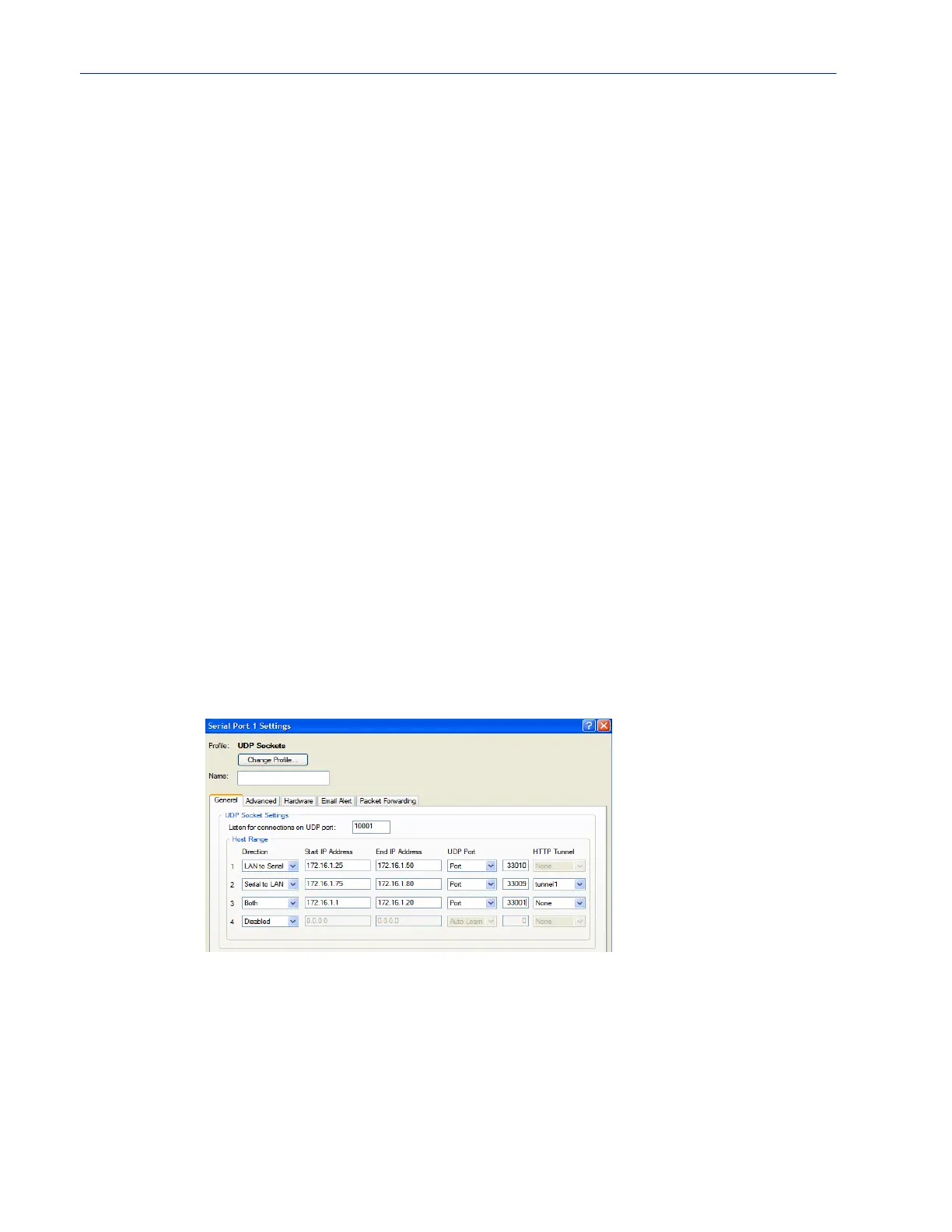
An example UDP configuration is described based on the following window.
The UDP configuration window, taken from the DeviceManager, is configured to:
z UDP Entry 1
All UDP data received from hosts that have an IP address that falls within the range of
172.16.1.25 to 172.16.1.50 and source UDP Port of 33010 will be sent to the serial device.
The IOLAN will not send any data received on its serial port to the host range defined by this
entry.
z UDP Entry 2



 To Next Page