392
Configuring HTTP Tunnels
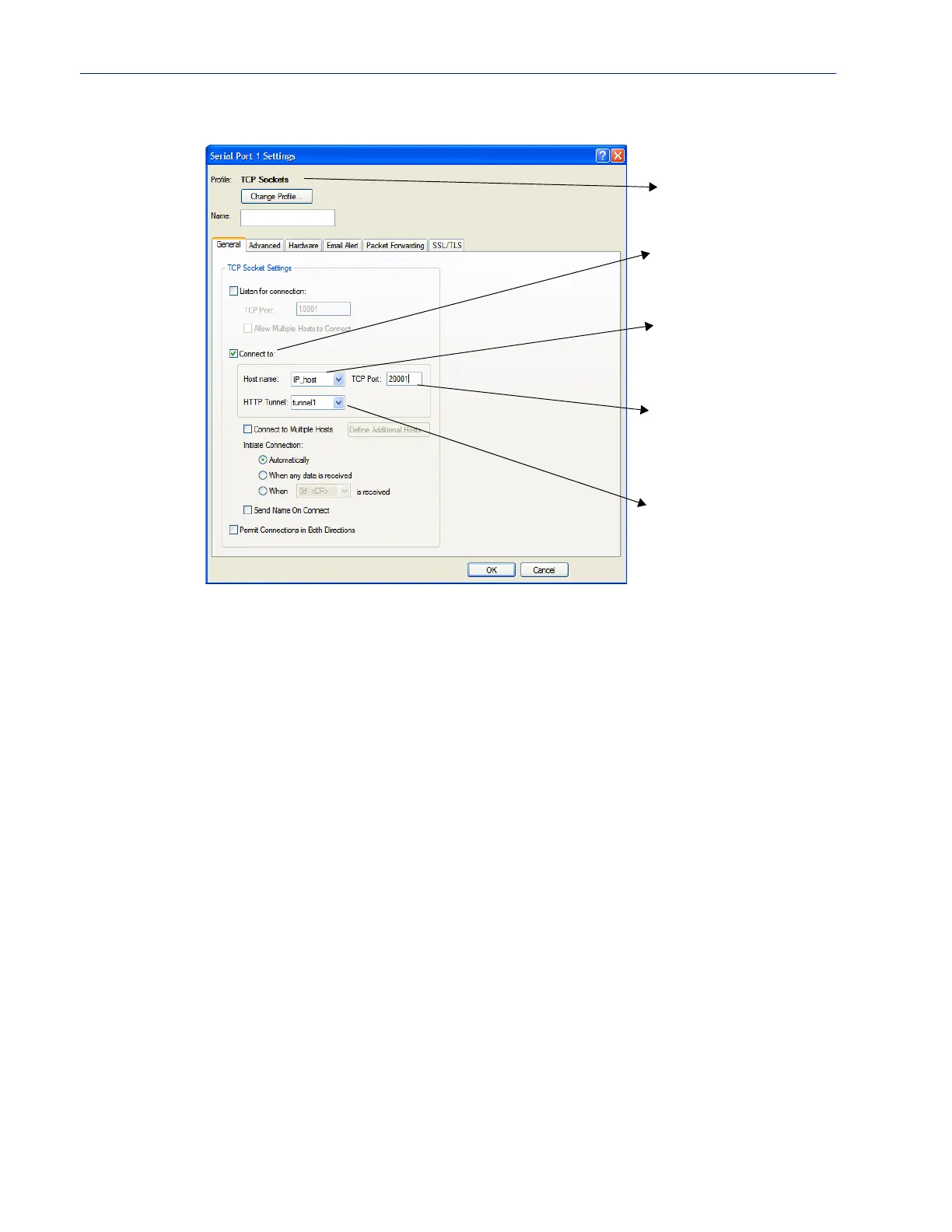
Configure the serial port on IOLAN 2, as follows;
When IOLAN 1 boots, it will establish an HTTP tunnel to IOLAN 2.
IOLAN 2 will initiate a connection between the serial device and the IP host. The connection will use
the destination TCP port 20001.
The setup for HTTP Tunnel Host-to-Serial is now complete.
Host-to Host
The following example will demonstrate how to setup an IP Host (10.10.100.2) to an IP Host
(100.10.50.60) connection via an HTTP tunnel. In this example, the hosts are doing a TFTP transfer
which uses the UDP protocol.
Because IOLAN 1 is behind the firewall, it will need to initiate the tunnel connection to IOLAN 2.
For more HTTP tunneling configuration parameters see HTTP Tunneling
Match TCP port num-
ber IP host is listening
on.
Use TCP Sockets
Select the IP host
from host table.
Select “connect to”
Configure connection
to use “tunnel1”.



 To Next Page