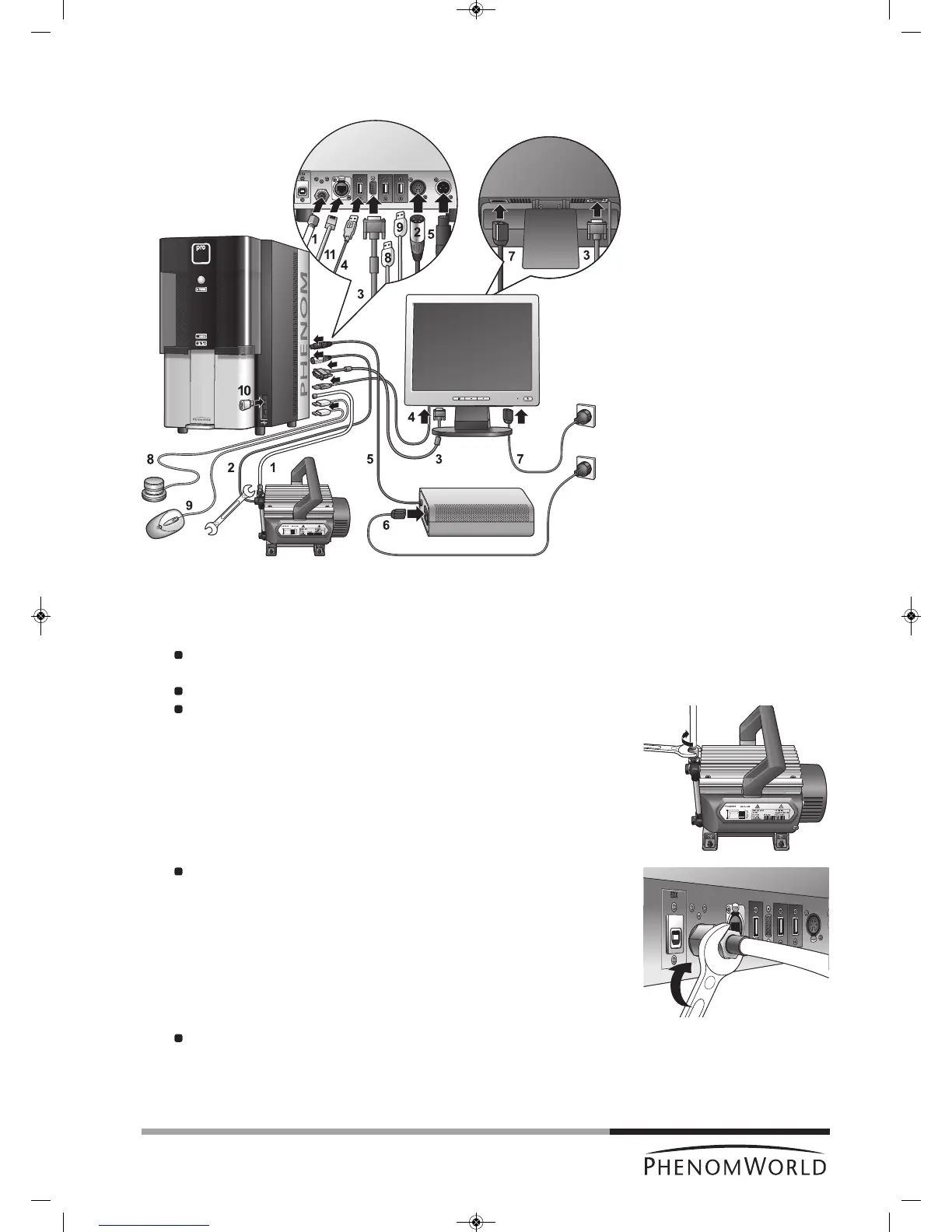
3.3 Connecting the Phenom
The figures between parentheses refer to the corresponding figures in the illustration.
1 Connect the pre-vacuum pumphose (1) between the pump inlet and the Phenom
pre-vacuum pump connector.
Place the nut at one end of the hose onto the pump inlet screw thread and the nut
at the other end of the hose onto the pump connector screw thread.
Turn both nuts clockwise until they are finger tight.
Use a 13 mm (0.51") spanner (wrench) to tighten the nut at the pump side.
It takes 1 to 1.5 full turn to properly tighten the nut.
Tighten the nut at the other end of the hose, using a 14 mm (0.51") spanner
(wrench).
2 Connect the pump power cable (2) to the Phenom pump output connector.
> The Phenom will now provide power to the pre-vacuum pump.
To remove the pump power cable, first press the PUSH button to open the power
connector.
3 Connect the monitor VGA cable (3) between the monitor
VGA connector and the Phenom VGA connector.



 To Next Page