Service Modes, Error Codes, and Fault Finding
EN 27BJ3.0E PA 5.
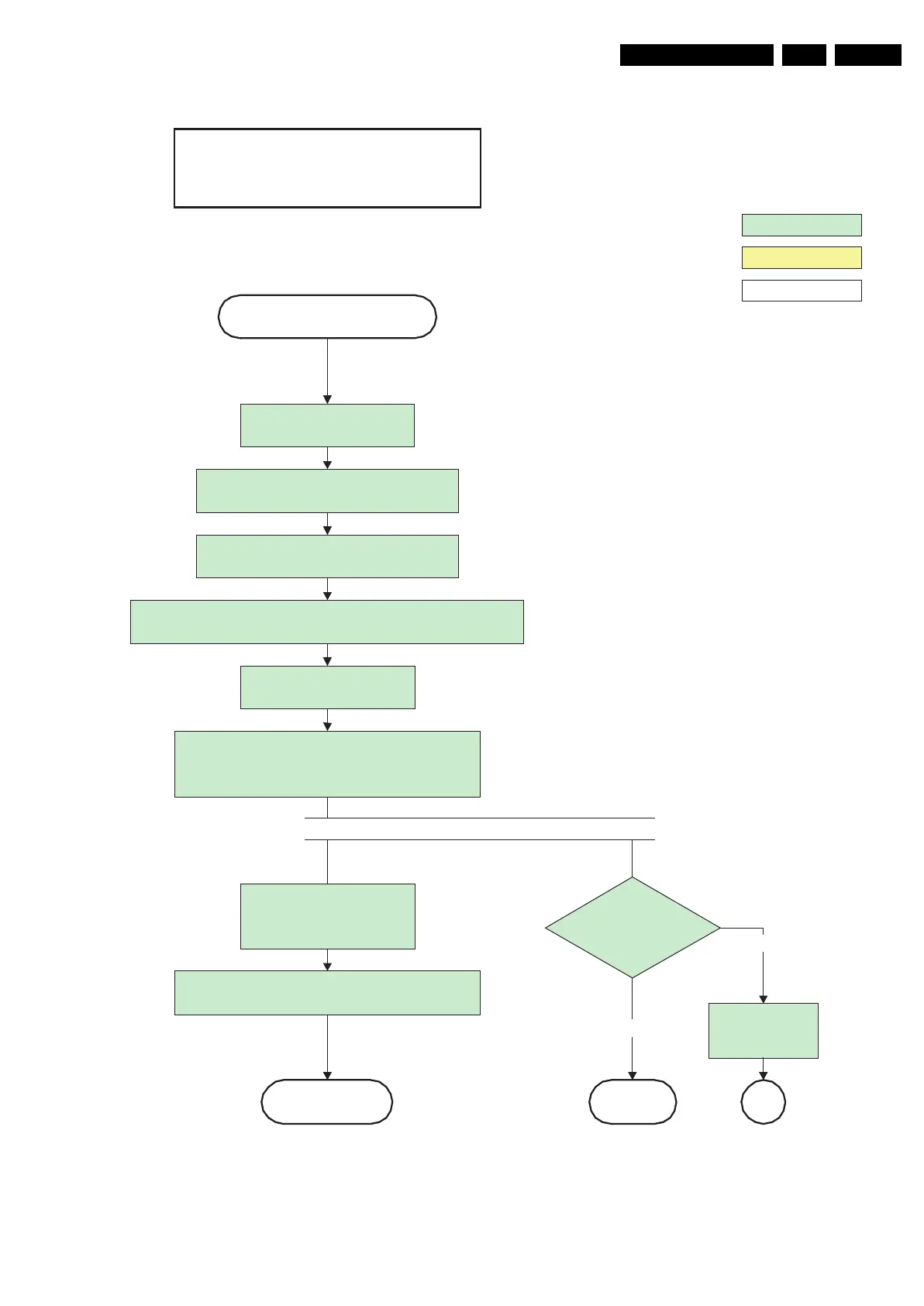
Figure 5-8 “Semi Stand-by” to “Active” flowchart 42 & 50” SDI V5 and 63” SDI V4
G_15960_125.eps
100306
action holder: MIPS
autonomous action
action holder: St-by
Switch off RGB blanking after valid, stable video, corresponding to
the requested output is delivered by the Viper
Active
Semi Standby
Initialize audio and video processing IC's and
functions according needed use case.
Assert RGB video blanking
and audio mute
42" / 50" SDI V5
63" SDI V4
Wait until QVCP generates a valid lvds output
clock.
Switch Audio-Reset and sound enable low and
demute
(see CHS audio LdspMute interface).
Switch on LVDS transmitter
(PNX2015) (if not already on)
Enable anti-aging through
Anti-agingEnable interface of
CHS displays
Switch the SDI Picture Flag low to enable picture. 1.5
seconds later, the display will unblank automatically
and show the lvds content.
Log error and
enter protection
mode
Yes
PWR-OK-PDP
received within 10s
after Picture flag toggle
?
No
SPreturn
This unblank is moved forwards on demand
of SW to allow to obtain valid QVCP output



 To Next Page