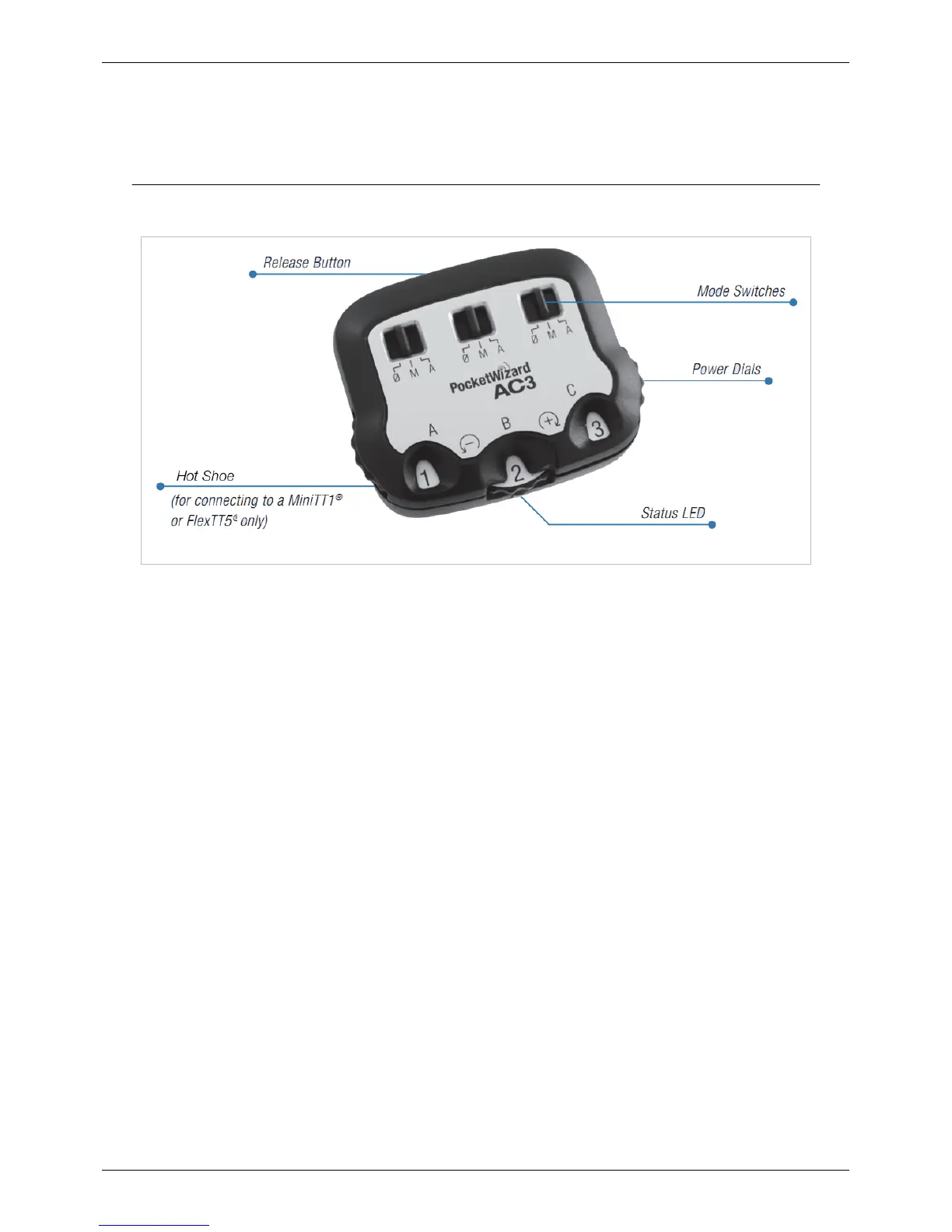
AC3 ZoneController
70
• Note: Make sure the camera is awake (half-press the shutter button) when changing settings to assure AC3
settings are transmitted to remote ControlTL radios.
4. Take pictures normally. (Note: if you are using Canon radios, your first shot will be a calibration shot and will
not trigger your remote flashes)
Operation
Make sure the camera is awake (half-press the shutter button) when changing settings to assure AC3 settings are
transmitted to remote ControlTL radios.
Mode Switches
The mode switches control the modes of operation for ControlTL receiving radios. It also controls zone on/off for
PocketWizard Standard Channel Receivers with Quad-Triggering Zones, like the MultiMAX, Plus III, or flash packs
with built-in PocketWizard radios, when using Standard Channels 17 or higher.
• 0 = OFF - Flashes will not trigger. Set unused zones to 0.
• M = Manual Mode - ControlTL compatible flashes will use the manual power output value set on the AC3
Power Dial. See the power dial chart below for more info.
• A = Auto Mode - ControlTL compatible flashes will use the Flash Exposure Compensation (FEC) as set on the
AC3 Power Dial. Nikon Speedlights will perform i-TTL exposures. When compatible studio flashes are used,
PowerTracking will engage (see PowerTracking section in AC9 AlienBees Adapter, PowerST4 or PowerMC2
Quick Guides for more information).
Manual and Auto modes can be used at same time. Manual zones will not be calculated as part of the E-TTL
exposure. Zones set to 0/ (OFF) will not trigger.
FEC NOTE: In Auto Mode, Flash Exposure Compensation (FEC) can be set in more than one place and the values
are used together - all positive and negative FEC values will be combined.
• FEC can be set:
• On each zone independently using the AC3 Power Dial when the zone is set to A (Auto)
• On each remote Speedlite using the camera’s FEC control. All AC3 zones set to A (Auto) will be affected
equally.
If the combined FEC adjustments are more or less than your flash’s capabilities, then the flash will operate at
maximum or minimum output accordingly



 To Next Page