USER MANUAL
URM18PH392 Rev A. May 2020 Page 29 of 86
3.4.2.2 ADVANCED SETTINGS
The Advanced Settings controls provide access to all available VIPER™ settings in a single “block” display.
Each time the Advanced Settings control is clicked, the tracker is queried to display all of the current settings.
Hover the mouse pointer over buttons in the toolbar at the top of the panel to identify the function of each
button, also described in the table below:
Refresh from device. Re-queries VIPER™ for current settings; overwrites any un-applied changes
displayed in the panel.
Apply changes. Sends commands to VIPER™ to change settings. This button is disabled until a
change has been made in the settings below.
Reset. Sends RESET commands to VIPER™ to restore all displayed settings to factory defaults. The
panel is refreshed to display the factory defaults.
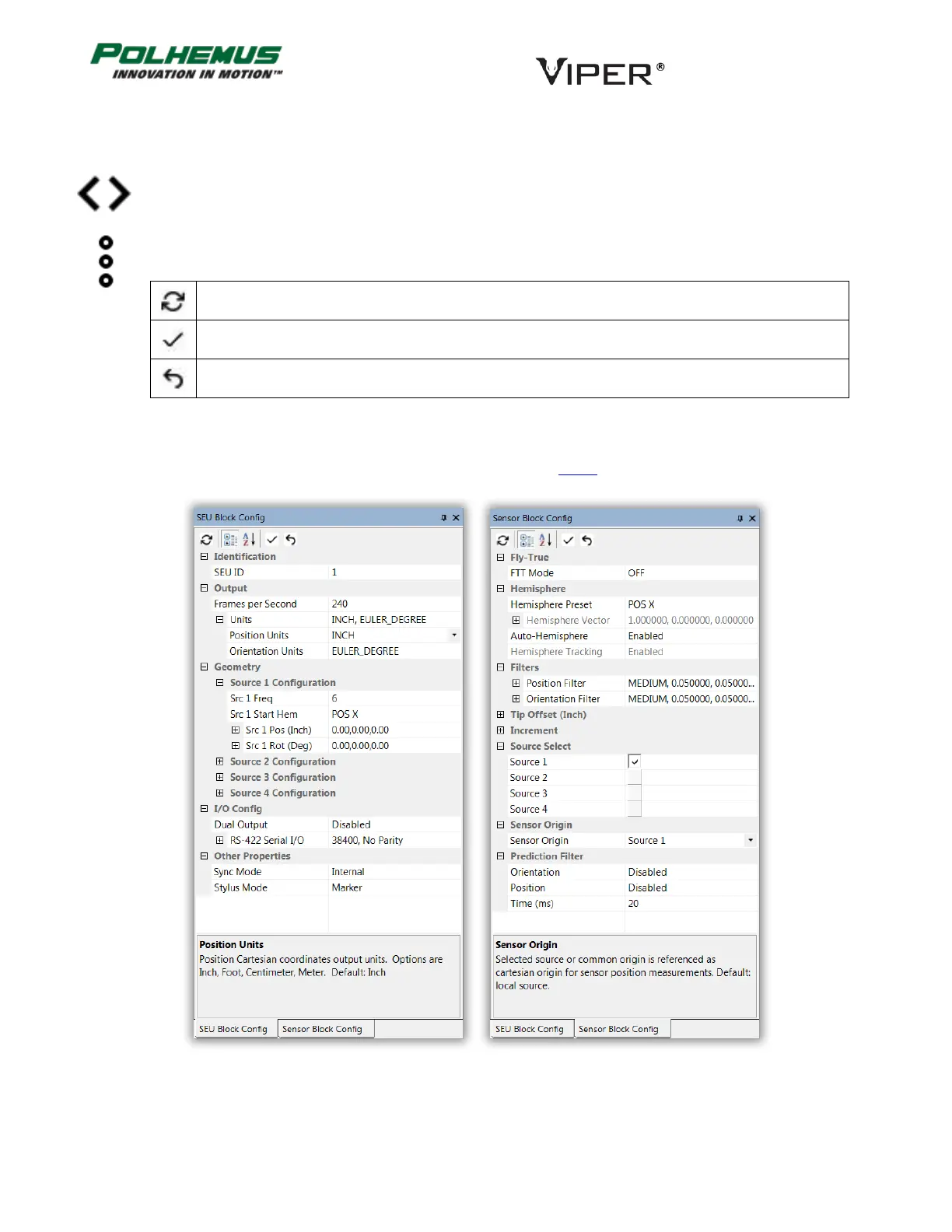
Inside the Block Config panels, click on the listed properties to display information about each setting and default
values in the bottom portion of the display as illustrated in Figure 12 below.
FIGURE 12. SEU AND SENSOR BLOCK CONFIGURATION PANELS



 To Next Page