146
MBOX® USER MANUAL
SYPHON VIDEO INPUT
The Mbox application includes the Syphon framework, which allows Mbox to either send or receive real-time, full-
framerate video or stills between applications on the same machine. For example, it is possible to place the video
output from Quartz Composer, Unity 3, or other applications onto a layer within Mbox.
Note: For more information on the Syphon framework, refer to the webpage: http://syphon.v002.info
Conguring Syphon Inputs
Without any conguration, Mbox will give Syphon inputs an index number in the order they became active on the
computer. This allows for quick use without any setup, but if more than one input is present, it does not guarantee that
the same input source will always have the same index number for selection purposes.
Specic Syphon inputs can be assigned to specic index numbers in the Video Inputs section of the Preferences tab
in Mbox or Mbox Remote. The Mbox v4 application has automatic discovery of active Syphon sources to aid in the
assignment of sources to index numbers.
To assign Syphon sources:
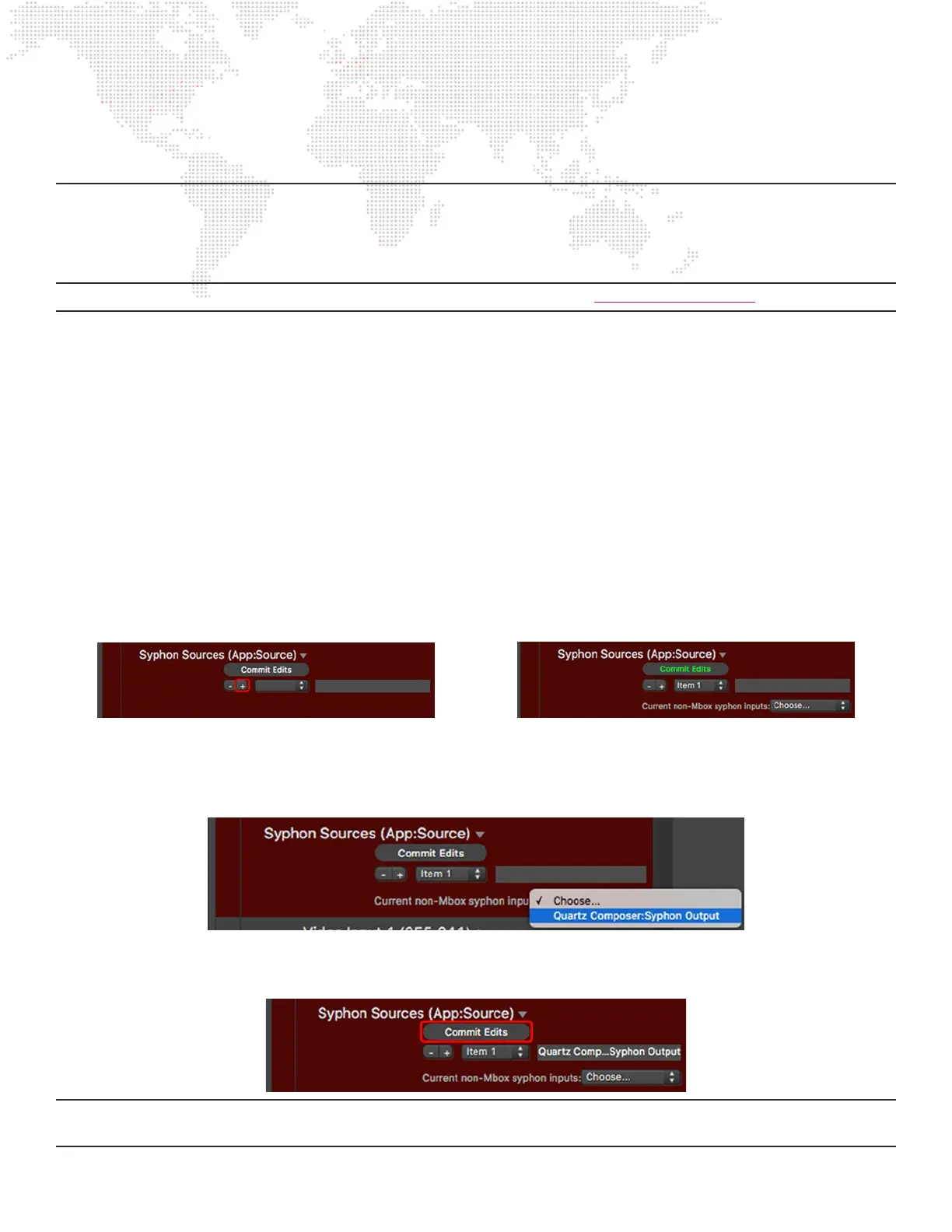
Step 1. Go to the Preferences tab in Mbox or Mbox Remote. In the Video Inputs section, nd the Syphon Sources
item. Click on the disclosure arrow to the right of the item’s name to reveal the conguration pane.
Step 2. Click on the “+” button to add a new Syphon source. A new entry will be added to the pop-up, and given a
name including its index number (e.g. “Item 1”).
Step 3. Click on the pop-up labeled “Choose...” to reveal a list of active non-Mbox Syphon sources found on the
computer. Sources are named using the following syntax: <Application Name>:<Source Name>
Step 4. Select the source to be assigned.
Step 5. Once the source has been selected, the “Commit Edits” button must be click upon to store the
conguration.
Note: Although the Mbox application outputs video using Syphon, it cannot receive its own output. Therefore, all
Syphon sources must be non-Mbox sources.



 To Next Page