103
MBOX® USER MANUAL
PLAYBACK SYNCHRONIZATION
Timecode Synchronization (Timecode Sync Playmodes)
Mbox allows movie playback to be synchronized to external SMPTE or MIDI timecode, input directly into the Mbox
application or over the network when using the TC Reader application. The timecode sync works with all common
timecode rates - 30, 29.97, 25, and 24 - and support non-drop and drop-frame formats.
SMPTE audio timecode (LTC) can be input directly into the Mbox application (refer to “Audio Input” on page 101),
into the TC Reader application (explained later in this section), or the Mbox Remote application. (Refer to the Mbox
Remote User manual for more information) MIDI timecode (MTC) can only be input into the TC Reader or Mbox Remote
applications.
Timecode Start Time
By default, with no action taken by the user, every movie le in the Media folder gets automatically linked to a timecode
start time of 01:00:00:00 (HH:MM:SS:FF). Therefore, to simply trigger any le and have it sync to incoming timecode, set
the layer to the timecode sync playmode (see below) and then run the timecode clock signal up to 1 hour.
Note: The default timecode setting can be changed on the Preferences tab of the Mbox application and through the
Mbox Remote application. The preference is in the Playback section and is called “TC Default”. The preference’s value
is formatted as HH:MM:SS:FF. (Refer to “TC Default” on page 53)
There are three methods for linking movies to a timecode start time on a per-movie basis:
1) Using the MediaInfo.plist le to link les to timecode start times.
2) Using the MediaTimeCodes.plist le (as usd with Mbox v3.x) to create a new MediaInfo.plist le with timecode start
times copied from the MediaTimeCodes.plist le. Thereafter, all edits must be made in the MediaInfo.plist le.
3) Using Layer DMX Timecode Controls. (Refer to “Fixture Parameter Data” on page 182 for info on these controls)
Deprecated Feature: The MediaTimeCodes.plist is deprecated and will be eliminated in a future version of Mbox.
Guidelines:
+ The MediaInfo.plist and Layer DMX controls timecode linking methods can be used at the same time.
+ If a MediaTimeCodes.plist le is placed into the /Mbox/Media folder, Mbox will automatically create the required
entries in a MediaInfo.plist le only if no MediaInfo.plist le already exists. Otherwise no entries are created.
+ Sync times generated by the Layer TC DMX Controls method will override times generated by entries in the
MediaInfo.plist le.
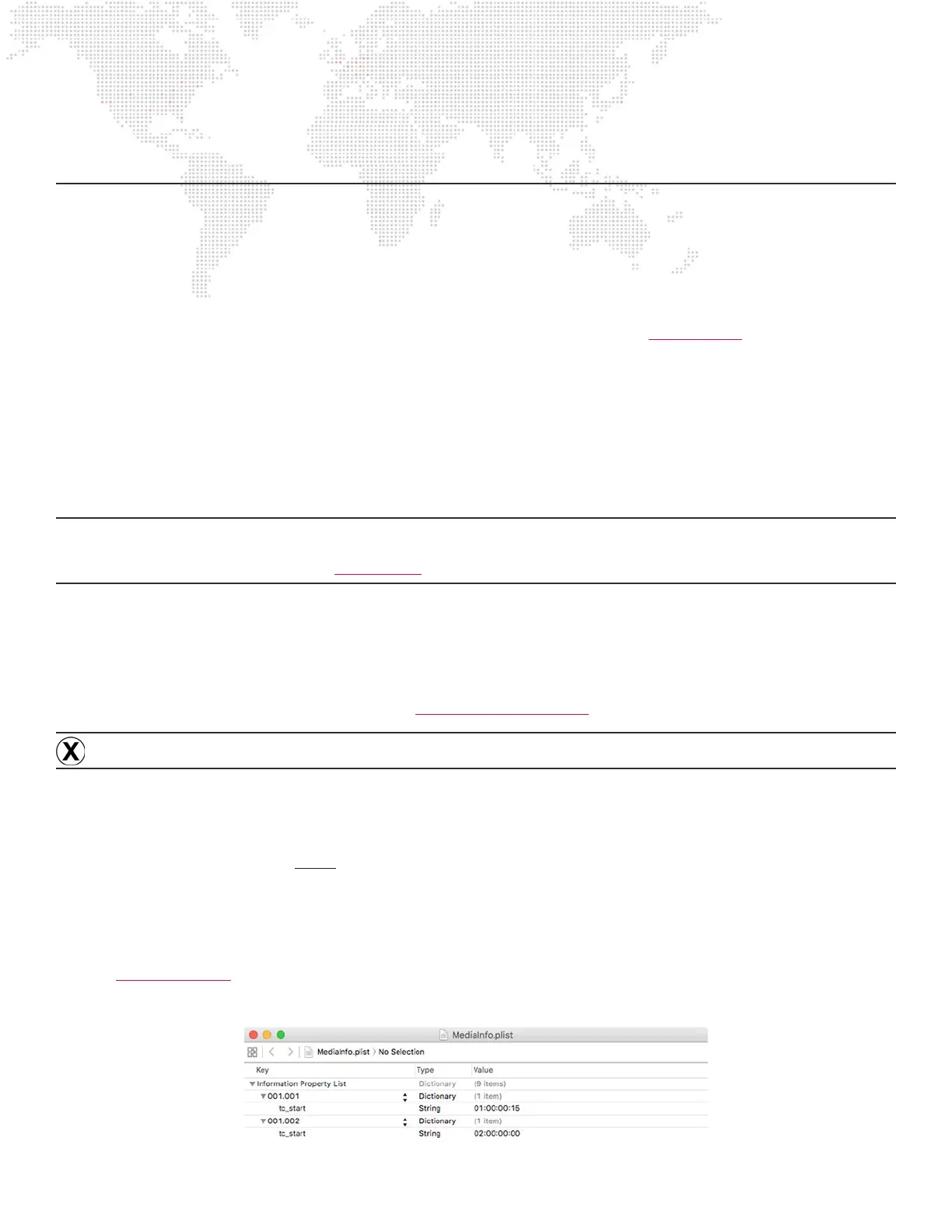
Linking Files to Timecode - MediaInfo.plist le
Refer to “MediaInfo plist” on page 41 for information on the MediaInfo.plist le and the metadata that it holds. In
the illustration below, Folder 001.File 001 has a start time of 01:00:00:15 and Folder 001.File 002 has a start time of
02:00:00:00:



 To Next Page