37
MBOX® USER MANUAL
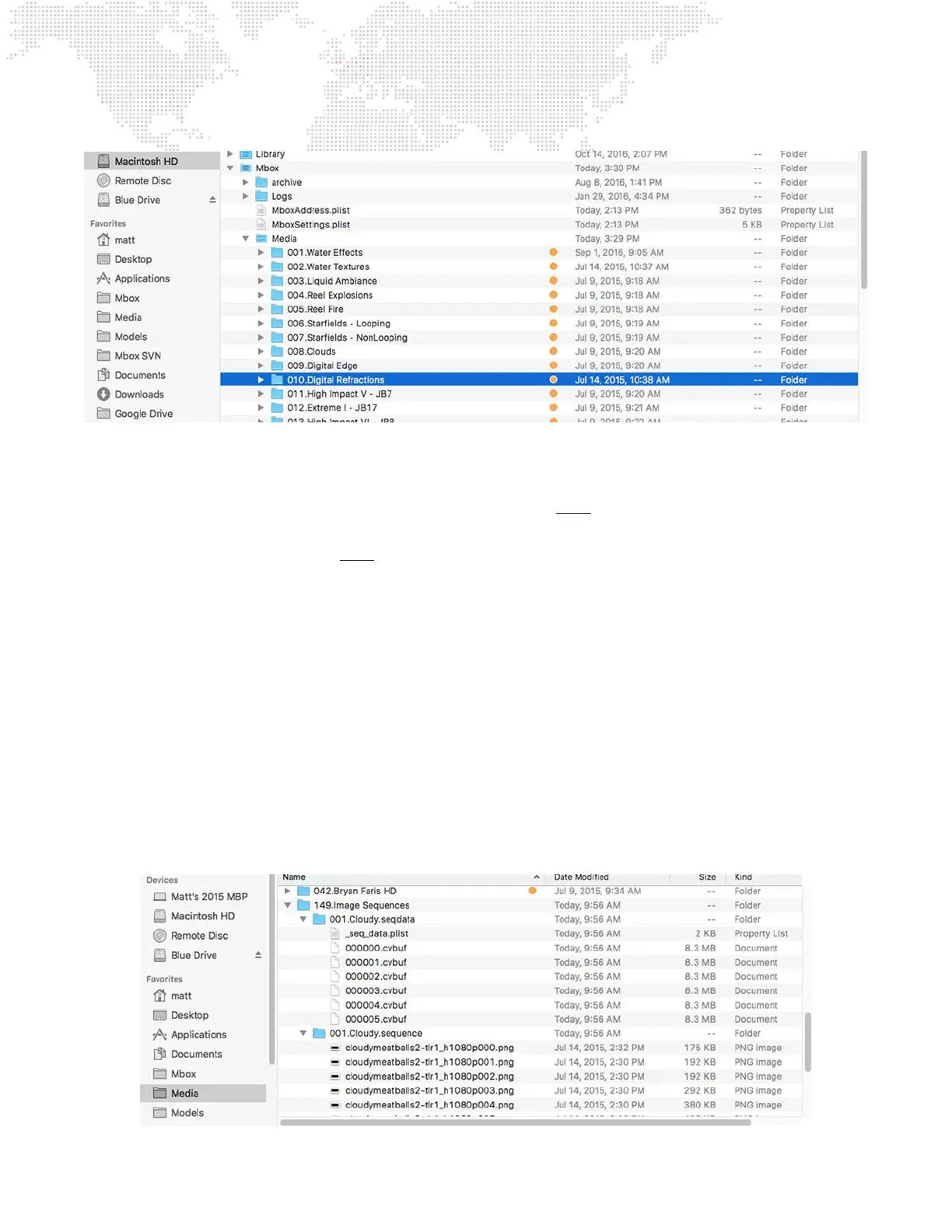
Image sequences require a slightly different folder and le structure:
+ It is recommended that image sequences not be placed in the same content folder as normal movies or still images.
+ Within a content folder for image sequences, each image sequence must be placed into a numbered folder (000 -
255). This folder’s number is used as the equivalent to the le number used as a prex to normal movies or images.
+ Each image sequence folder’s name must follow this format - ###.name.sequence. Without the “.sequence” sufx,
Mbox will not recognize the les in the folder as being part of an image sequence and they will not be indexed or
precessed correctly. For example:
001.My Images.sequence
+ Inside the .sequence folder, the individual image les must be named or numbered such that they are organized
sequentially in the Finder when using alphabetical sorting. When image sequences are created, the le name and its
numbering is typically an option in the export process.
+ When Mbox nds an image sequence upon a rescan, a new folder will be created parallel to the .sequence folder (i.e.
in the content folder that is the “parent” to the .sequence folder). This folder will be named with the same numerical
prex, the same name, and a sufx of “.seqdata”. For example:
001.My Images.seqdata
+ Processed and converted versions of the original images les will be placed into the .seqdata folder, along with a
_seq_data.plist le that holds the information Mbox uses to index the les.



 To Next Page