42
MBOX® USER MANUAL
MediaInfo plist
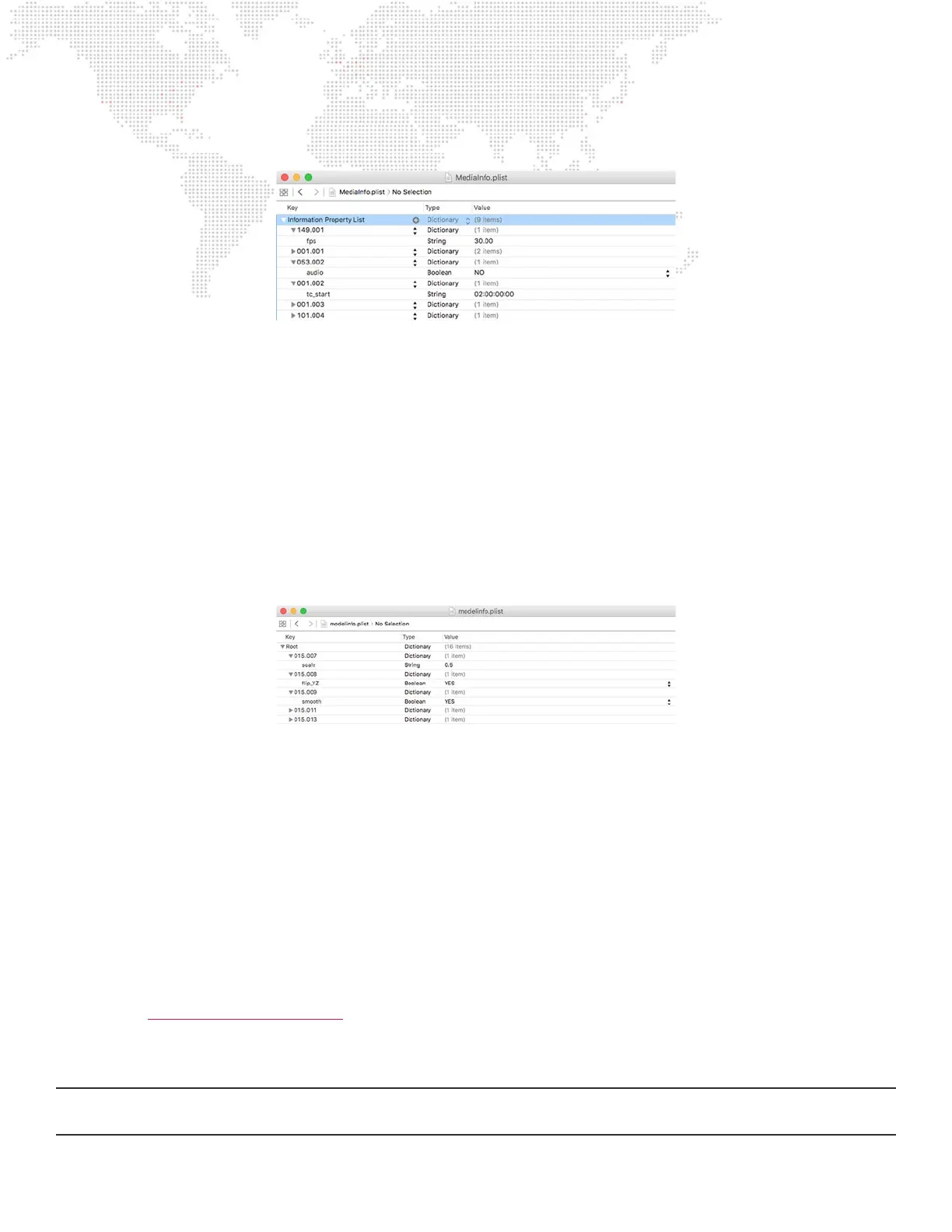
The structure of the MediaInfo.plist le is quite simple. In the root of the le, each piece of media may be given an entry,
which is a dictionary. The dictionary is named using the Folder.File syntax, with each having padding zeros as required
(e.g. 001.054). Inside that dictionary for each media item are various key:value items that apply properties to the
corresponding le.
The supported keys for the MediaInfo.plist le are:
+ audio (boolean) - setting this key to “YES” enables embedded audio playback for the movie.
+ fps (string) - setting this key to a numerical value (e.g. “29.97”) sets the playback framerate for an image sequence.
+ tc_start (string) - setting this key to an HH:MM:SS:FF value (e.g. “02:23:45:12”) links the movie to a timecode start
time for use with the timecode sync playmodes.
+ activerect - setting this key to a value containing X/Y origin, width and height (e.g. “0,0,500,650) crops a piece of
media content, and recenters the visible portion.
ModelInfo plist
The structure of the ModelInfo.plist le is relatively simple, but it can be more complex than the MediaInfo.plist le.
In the root of the le, each object may be given an entry, which is a dictionary. The dictionary key named using the
Folder.File syntax, with each having padding zeros as required (e.g. 007.012). Inside that dictionary for each media item
are various key:value items that apply properties to the corresponding le.
The supported keys for the ModelInfo.plist le are:
+ ip_YZ (boolean) - setting this key to “YES” swaps the Y and Z axes of the model to correct for the difference
between the Y and Z axes in Mbox and some 3D modeling applications.
+ rebuild (boolean) - setting this key to “YES” causes the models corresponding vertex array le to be recompiled
every time media is rescanned.
+ scale (string #.##) - replacing the “#.##” with a numerical value (e.g. “0.50”) to use this key to set the scale factor for
the object when it is compiled. A scale value of “0.004166666” is equal to using the “.pixels” compile-time switch.
(Refer to “3D Objects: Normalization” on page 82)
+ smooth (boolean) - setting this key to “YES” enables smooth shading for the object, which may help jagged objects
look a little smoother under certain lighting situations.
Note: Based on properties applied to objects using the Mbox Remote application’s Projection Editor window, the Mbox
application may create entries or add other information to the ModelInfo.plist le.



 To Next Page