48
MBOX® USER MANUAL
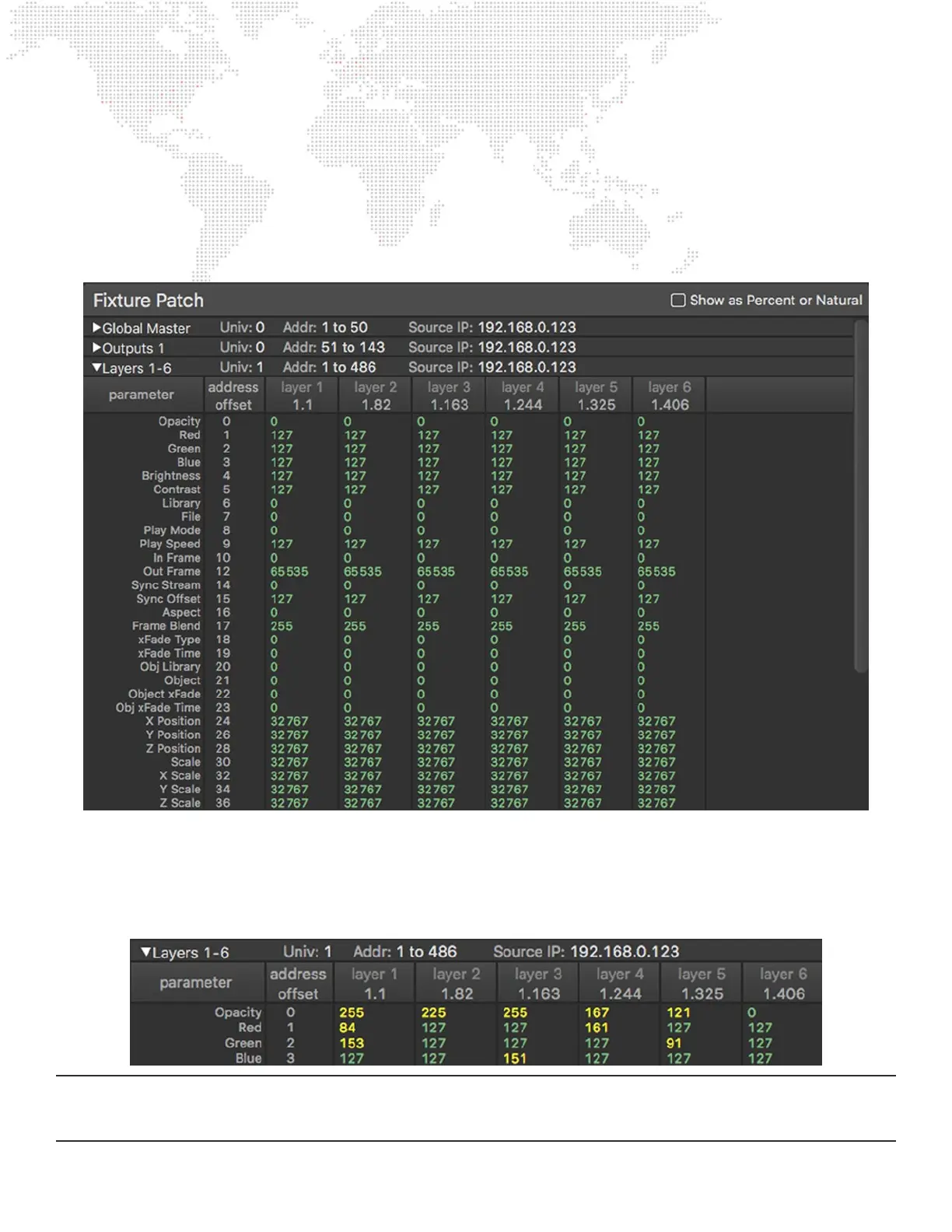
For repeated items like the Outputs and Layers, the table will show multiple columns, with items side by side. The
unique name of the each repeated item is shown in the column header, plus its universe and start address (in univ.
address notation). The left-most column shows the list of parameter names and the column immediately to the right
shows each parameter’s address offset from the start address of the item. e.g. If a layer starts at 1.82, and the rst
parameter (opacity) has an offset of 0, then the address for opacity is 1.82. The aspect parameter has an offset of 16,
therefore its address would be 1.98 (i.e. 82+16).
The patch table will also show the current received value for every parameter if the Mbox application is receiving Art-Net/
sACN on the correct universe. Similar to how the DMX HUDs worked in prior versions of Mbox, the table shows live
changes to incoming control data and colors the values based on whether they are at the default (green text) or at some
other value (yellow text). The patch tab can be used to not only conrm that the correct or expected parameter values
are being received but also to conrm that xtures are patched in the correct order on the console.
Note: If the console has all xtures at default values (no active cues and the programmer cleared out) then one or two
yellow parameter values may indicate errors in the prole. Yellow parameter values for numerous parameters probably
indicates an incorrect patch order or completely wrong proles.



 To Next Page