56
MBOX® USER MANUAL
The top layout view represents the output’s position on the global surface. The position on the global surface dictates
where the pixels for that output will be sampled from. Essentially, an output is a viewport of an area of the global
surface; any imagery in that area will be sampled and copied to the output and therefore will be visible on any display
assigned to the output.
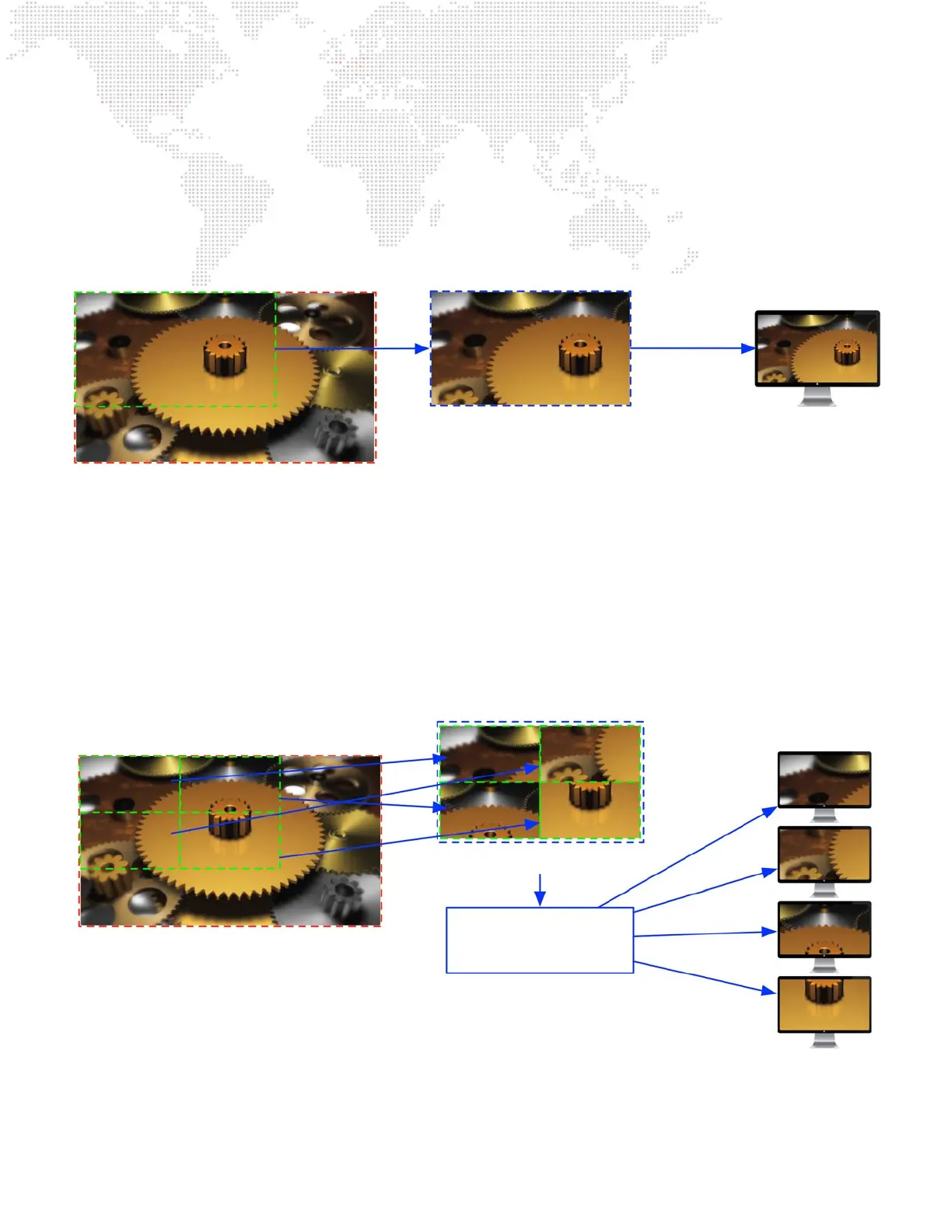
The following illustration shows an output positioned on the global surface creating a rectangular sample, the sample
that is the imagery for the output, and nally that same imagery on the assigned display.
On the bottom layout view, sub-outputs’ positions may be moved relative to their parent output. This positioning allows
each sub-output’s pixels to be copied to a very specic place when they are sent to the output device. Sub-outputs are
often used for video outputs that are part of a multi-head output device (e.g. a Datapath FX4), where the sub-outputs
are generally arranged in an orderly matrix: 2x1, 3x1, 2x2, etc. Typically, the rearrangement of sub-outputs on their
parent output will be unnecessary as the display devices can simply be connected to the correct output of the multi-
head device. But there may be cases where the sub-outputs need to be rearranged on the output to achieve the desired
result.
The following illustration shows one output with four sub-outputs positioned on the global surface, creating four
samples, the rearrangement of those four samples to create the imagery for output to a multi-head device (the “virtual”
display in this case), and then nally each of those four sub-outputs as seen on the actual displays connected to the
multi-head device.
In this manner, imagery from anywhere on the global surface can be sampled and sent to the desired display device,
whether that display is a single device or a multi-head device. Being able to move outputs on the global surface or sub-
outputs on both the global surface and on their parent output is critical to getting the right pixels onto the display, as
displays may want to have imagery that is unique, repeated, or even overlapping.
Output
Global Surface
Output sample Display
Sub-Output 1
Global Surface
Output sample
Displays
Sub-Output 2
Sub-Output 3 Sub-Output 4
Sub-Output 1 Sub-Output 3
Sub-Output 2 Sub-Output 4
Multi-head
Device
“Virtual” Display
Output



 To Next Page