Device Manual CANlink wireless
Operation
PROEMION GmbH | Phone: +49 661 9490-600 | Fax: +49 661 9490-666 | info@proemion.com | proemion.com | Version 1.0 97
© 2016RM MICHAELIDES● VX.X ● Device Manual CANlink 5000 series © 2016RM MICHAELIDES● VX.X ● Device Manual CANlink 5000 series © 2016 PROEMION GMBH > 1.0 EN > Device Manual CANlink wireless 3000 series
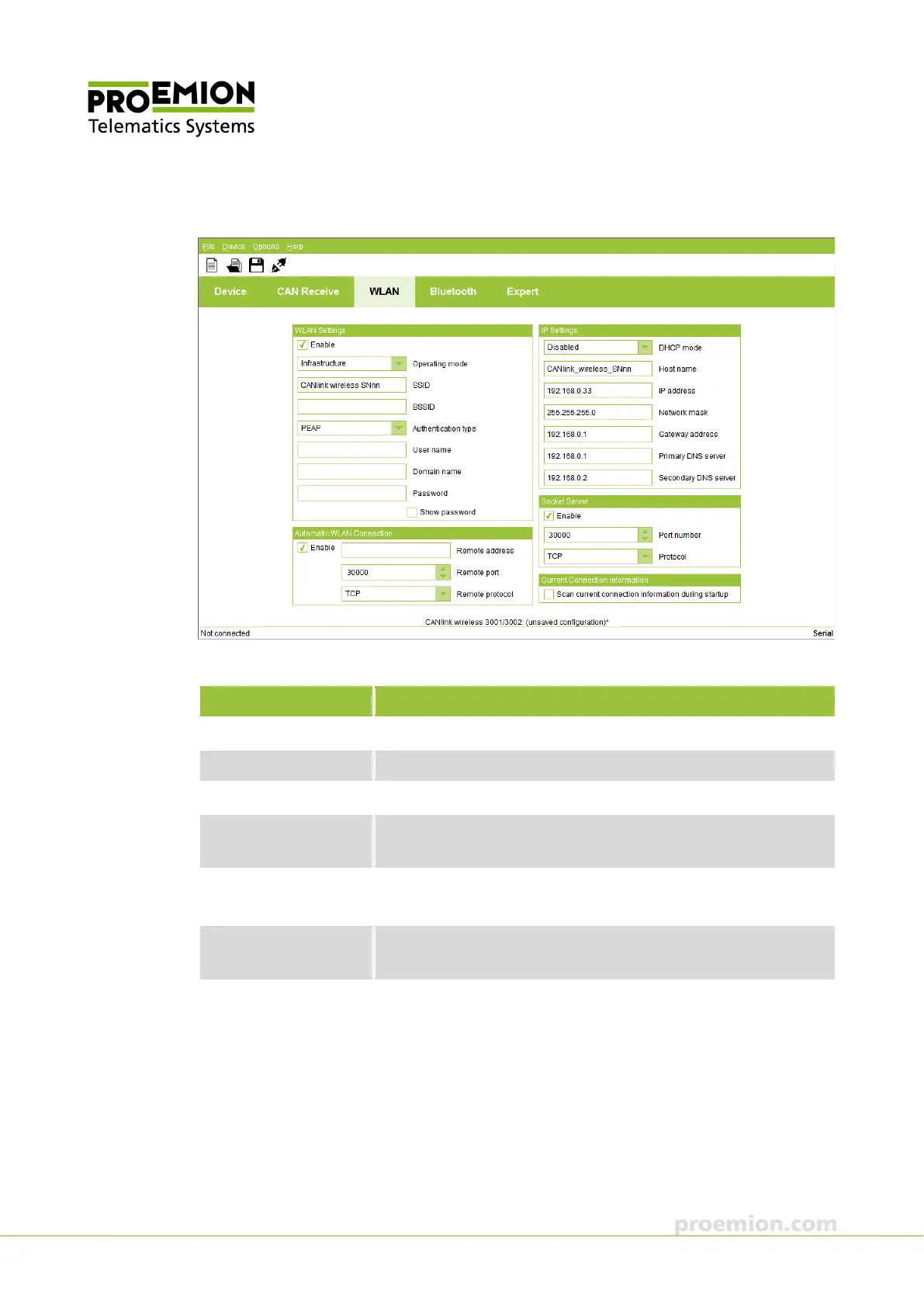
WLAN TAB
In the WLAN SETTINGS field, define the WLAN parameters.
Parameter Description
NABLE
Enable/disable WLAN radio Interface.
PERATING
ODE
WLAN operating mode.
Input field for the WLAN network name.
BSSID
Input field for the MAC address of the WLAN network. The BSSID
is only visible in infrastructure mode.
UTHENTICATION TYPE
Selection of the authentication type:
N
ONE, WEP64/WEP128, WPA/WPA2 MIXED, PEAP
USER NAME
Input field for the user name.
(only visible when PEAP is selected under authentication type.)
OMAIN NAME
Input field for the domain name.
(only visible when PEAP is selected under authentication type.)



 To Next Page