Device Manual CANlink wireless
Getting started
PROEMION GmbH | Phone: +49 661 9490-600 | Fax: +49 661 9490-666 | info@proemion.com | proemion.com | Version 1.0 69
© 2016RM MICHAELIDES● VX.X ● Device Manual CANlink 5000 series © 2016RM MICHAELIDES● VX.X ● Device Manual CANlink 5000 series © 2016 PROEMION GMBH > 1.0 EN > Device Manual CANlink wireless 3000 series
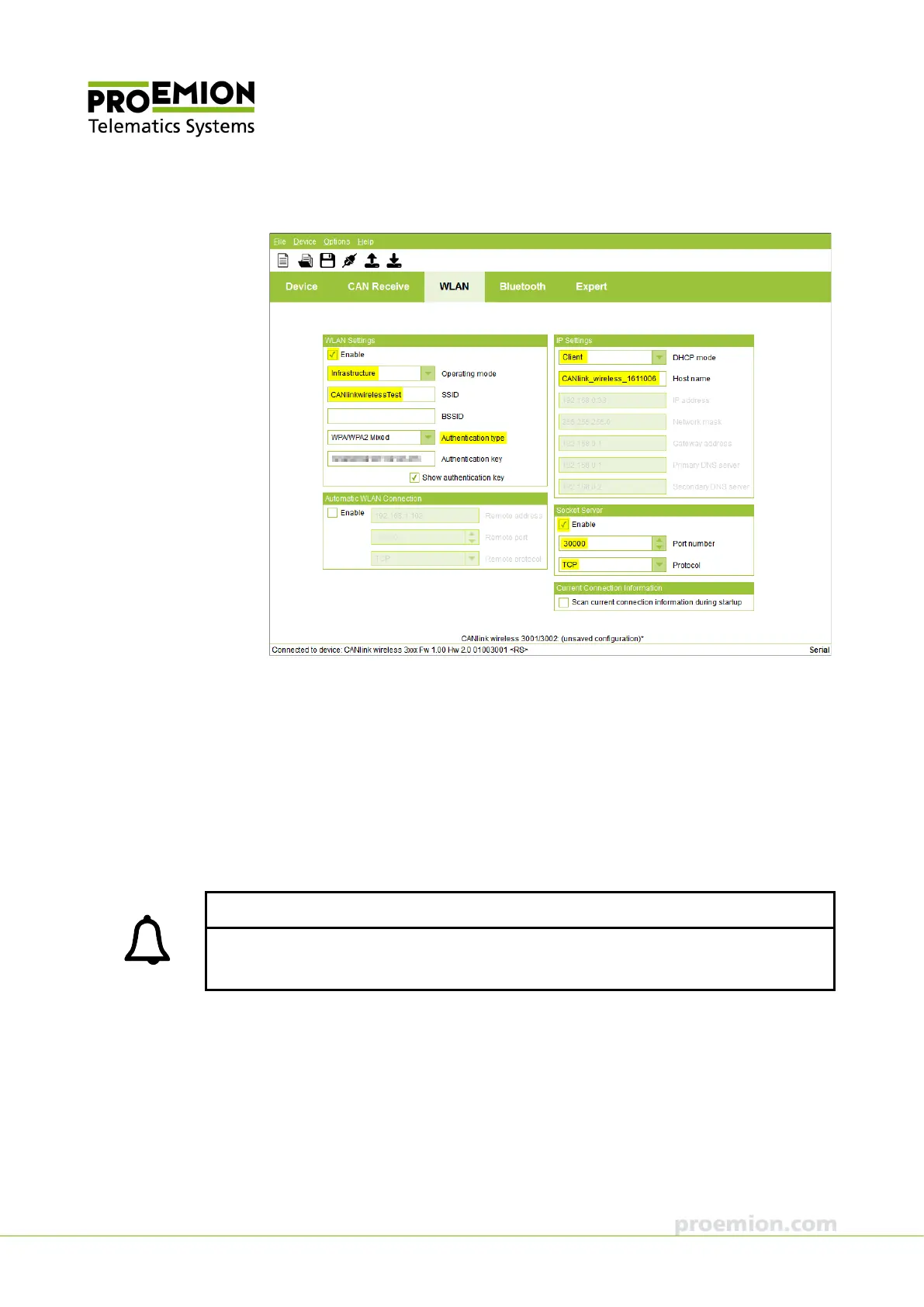
8. Select the WLAN tab.
9. In the WLAN S
ETTINGS field, check the ENABLE box.
10. In the O
PERATING MODE list, select INFRASTRUCTURE.
11. In the SSID box, enter the name of your network.
12. In the A
UTHENTICATION TYPE list, enter the WLAN code of your network.
13. Enter your network password in the
AUTHENTICATION KEY box.
14. In the DHCP
MODE list, select CLIENT mode.
The parameters in IP S
ETTINGS are automatically allocated by your network.
INFORMATION
In the DHCP MODE list, select DISABLED in order to configure the IP SETTINGS yourself and
allocate a fixed IP address.



 To Next Page