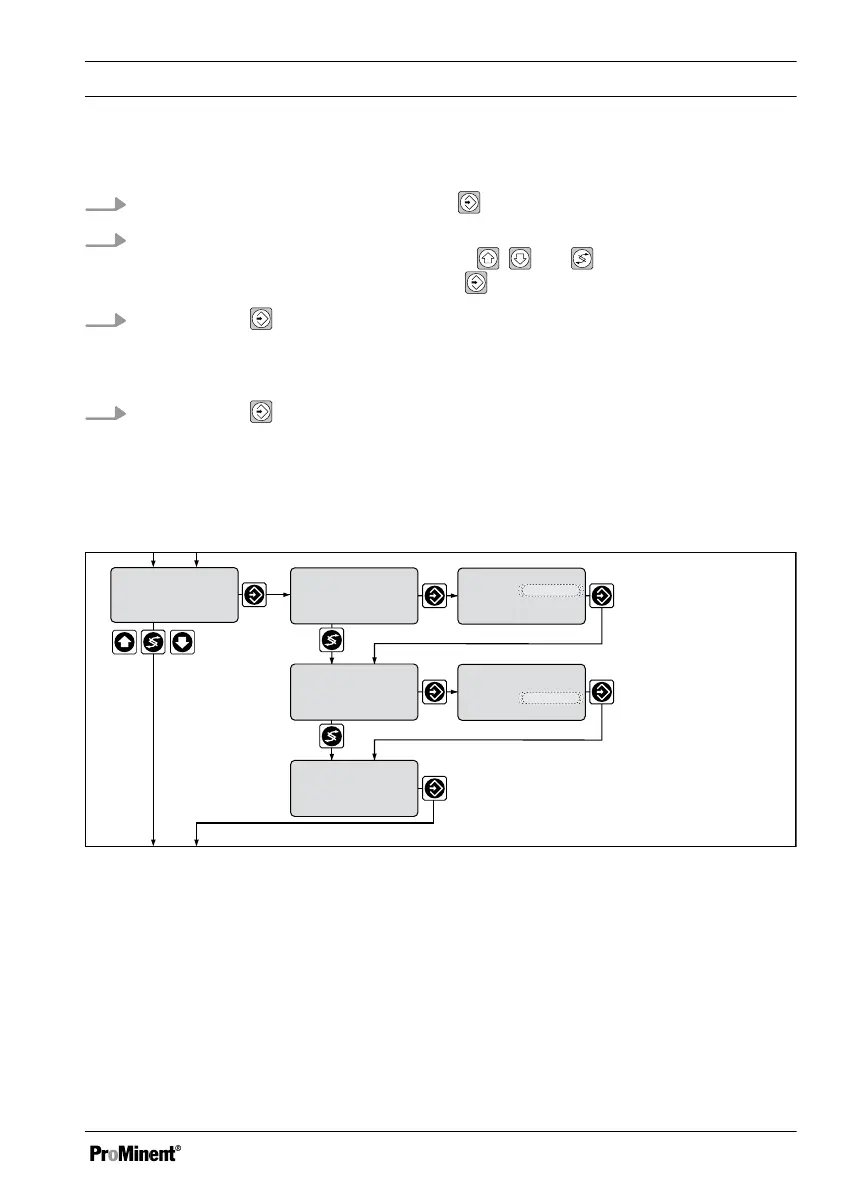
Calibration in the restricted operating menu
1.
Select the calibration menu. Then press
2. Enter the actual value suitable for the respective measured variable determined
using the measuring method with the keys , and in the DULCOMETER
®
D1Cb / D1Cc. Confirm entry with the key
3.
Continue with . Should an error be displayed, see
Ä ‘Error messages in the cali‐
bration menu’ Table on page 110
ð
Calibration is completed.
4.
Continue with
ð
The display now shows the values determined for the zero point and slope.
9.8.2
Two-Point Calibration of the Standard Signal General
mea. val 1
Permanent display 1
D1C2-mA-030-GB
0.16 mA
2m
3
/h
5.04 mA
2m
3
/h
80m
3
/h
13.17 mA
2m
3
/h
80m
3
/h
3.98 mA
0.11 mA
calibration
zero p.:
slope
4.00 mA
calibration
take over value
calibration
value1 :
value2 :
calibration
mea. val 2
take over value
calibration
value1 :
value2 :
calibration
zero p.:
slope
Fig. 54: Two point calibration menu / shown with flow as the measured variable and the
measuring range 0...100 m
3
/h
Measured Variables and Operating Menus for the Standard Signal General
111














 To Next Page