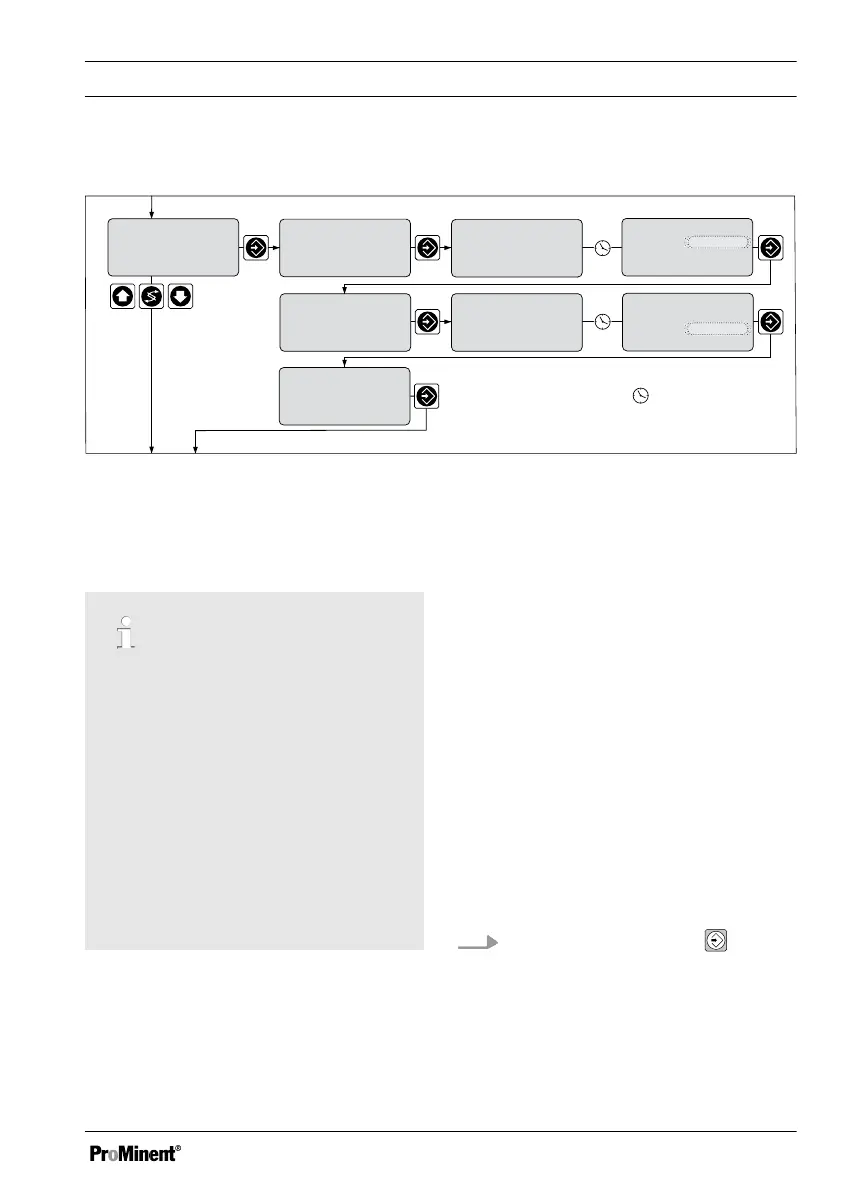
8.5.5 Description of the Calibration of Fluoride Sensors
Temperature setting and specification only with correction value
calibration
slope
1.00ppm= 184.4mV
59.16 mV/dec
calibration
57.81 mV/dec
calibration
sensor insolut. 1
mea. val 1.7 ppm
170.3 mV
calibration
calib. 1 active
please wait !
170.3mV
33.0 °C
calibration
solut. 1
33.0 °C
calibration
calib. 2 active
please wait !
3.97 mV
33.0 °C
calibration
33. 0
°C
1.7 ppm
7.8 ppm
calibration
mea. val 7.8ppm
132.0 mV
= automatic timing
Permanent display 1
sensor insolut. 2
A0202 _GB
1.7 ppm
solut. 2
solut. 1
solut. 2
slope
1.00ppm= 183.5mV
Fig. 46: Calibrating the fluoride sensor
8.5.5.1 Description of the Calibra‐
tion of Fluoride Sensors
Temperature correction variable
When calibrating with temperature as
the correction variable, the tempera‐
ture of the buffer solution has to be
set. in "manual" operating mode
before calibration. Refer to
Ä Chapter 8.6 ‘Temperature correc‐
tion value for pH and fluoride sensors’
on page 99
In "Automatic" operating mode, the
temperature sensor must be
immersed in the buffer solution. The
calibration values are then calculated
allowing for the temperature.
8.5.5.1.1 Description of 2-Point Cal‐
ibration for Fluoride Sen‐
sors
Material required for calibration of fluoride
sensors
n Two test containers with calibrating
solution
n A thermometer for measuring in fluids
(in "Temperature Correction Value
manual" operating mode)
Two test containers with calibrating solu‐
tion are required for calibration. The fluo‐
ride content of the calibrating solutions
should be at least 0.5 ppm F apart from
each other. The sensor should be rinsed
thoroughly with fluoride-free water when
changing the calibrating solution.
1.
Select Calibration menu
ð
In "Temperature Correction
Value manual" operating mode,
the calibration display appears
and the temperature value
flashes.
Measured Variables and Operating Menus for Potentiometric Sensors
95














 To Next Page