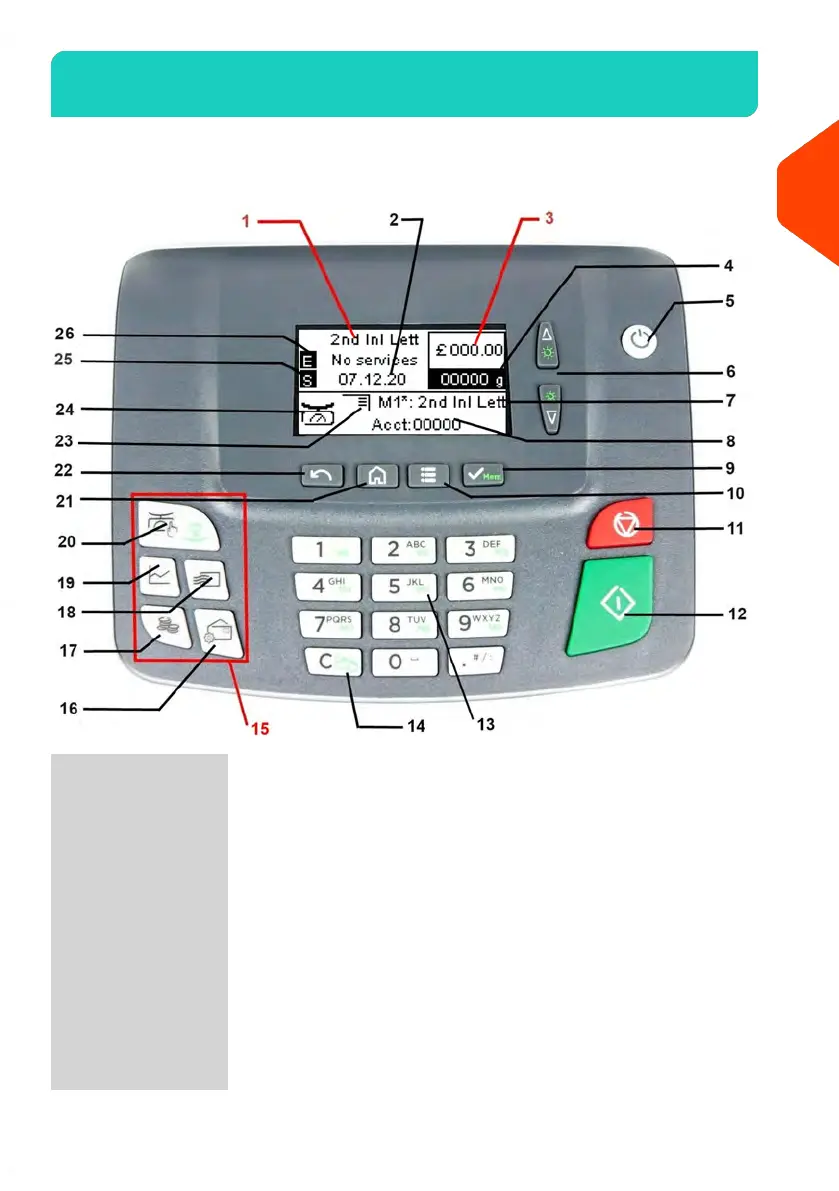
Control Panel Features2.3
Display Areas
Indicates the current rate and services selected.1Rate and Services
Displays the date that will be printed.2Date
Indicates the amount to be printed on the envelope.3Postage
Current weight used to calculate postage amount.4Weight
Displays selected job memory.7Job Memory
Displays account currently selected.8Account
Indicates the printing offset status (imprint
position shifting for thick envelopes).
23Print Offset
Current weighing method.24Weighing Type
Allows your selection of a Slogan. Indicates that a Slogan
will be printed at the closest place of imprint.
25Slogan
17
| Page 17 | | Jun-21-2021 09:24 |
2
Meet Your Mailing System















 To Next Page