8-58 Accessories
External Operating Panel
Delivery Contents
• External Operating Panel
• Cable SUB-D-9 socket - USB A
• 2 Screws DIN7984-M4x10
Function
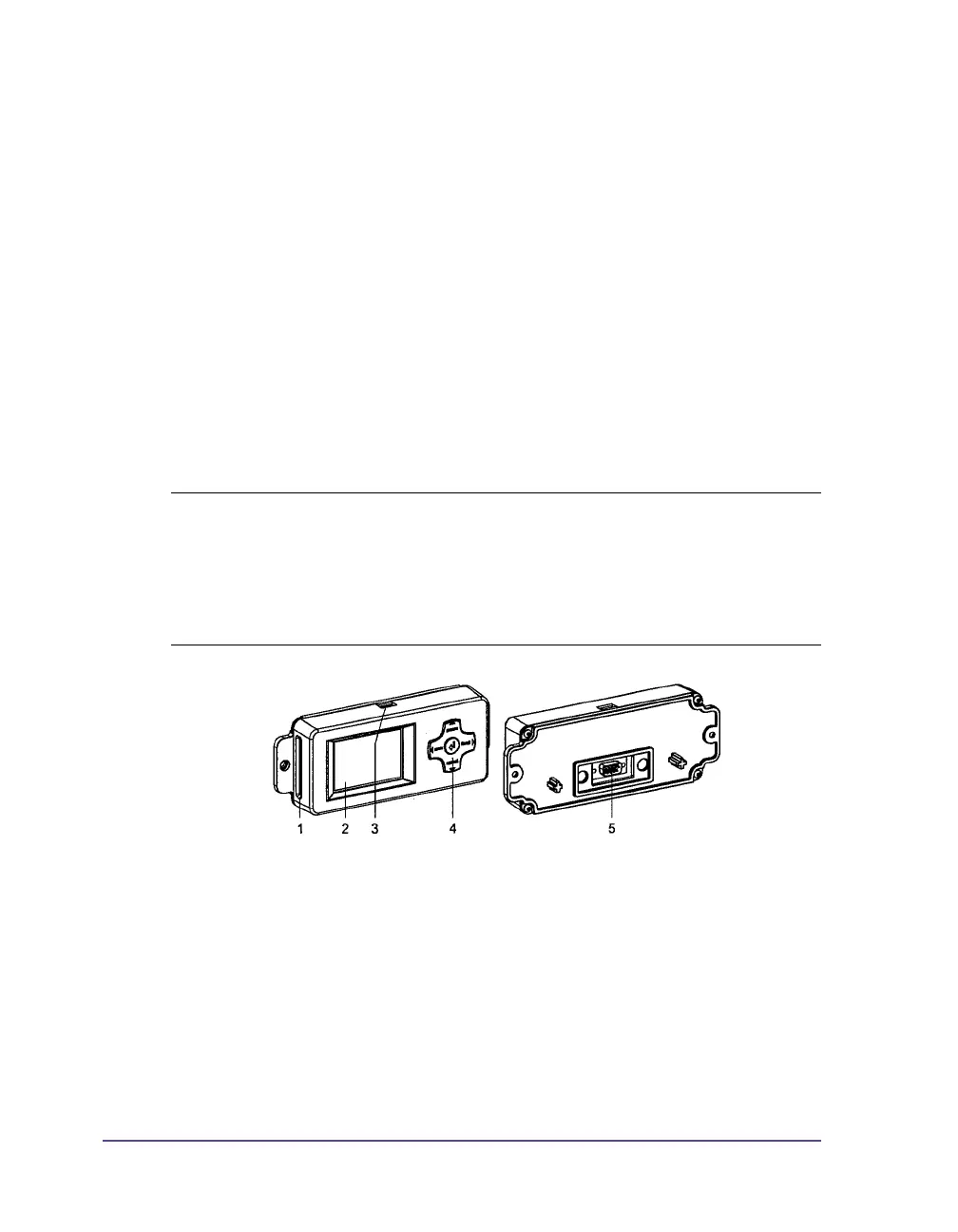
The external operating panel is designed as a build-in module and has the
same functionality as the printer integrated operating panel.
Additionally the external operating panel is equipped with a slot (1) for a
CompactFlash memory card and a USB master interface (3) to connect a
keyboard, a scanner or an USB flash drive.
If both panels are connected to the printer you can use both with the same
priority. The displays show the same.
1 Slot for CompactFlash memory card
2 Display
3 USB master interface
4 Navigator pad
5 9-pin SUB-D plug
Note: It is possible to operate the memory cards both in the printer and in the
external operating panel. But you can only operate the card slot set in the
setup menu “Interfaces > Default card slot” via the operating panels (see
Chapter 5: Configuration). When operating via an interface, each card slot can
be addressed via a path (see “QuickLabel Pronto 482/486/682/863
Programmer's Guide“).



 To Next Page