MANUAL – REFLEX EZ-TRAC™ | 56
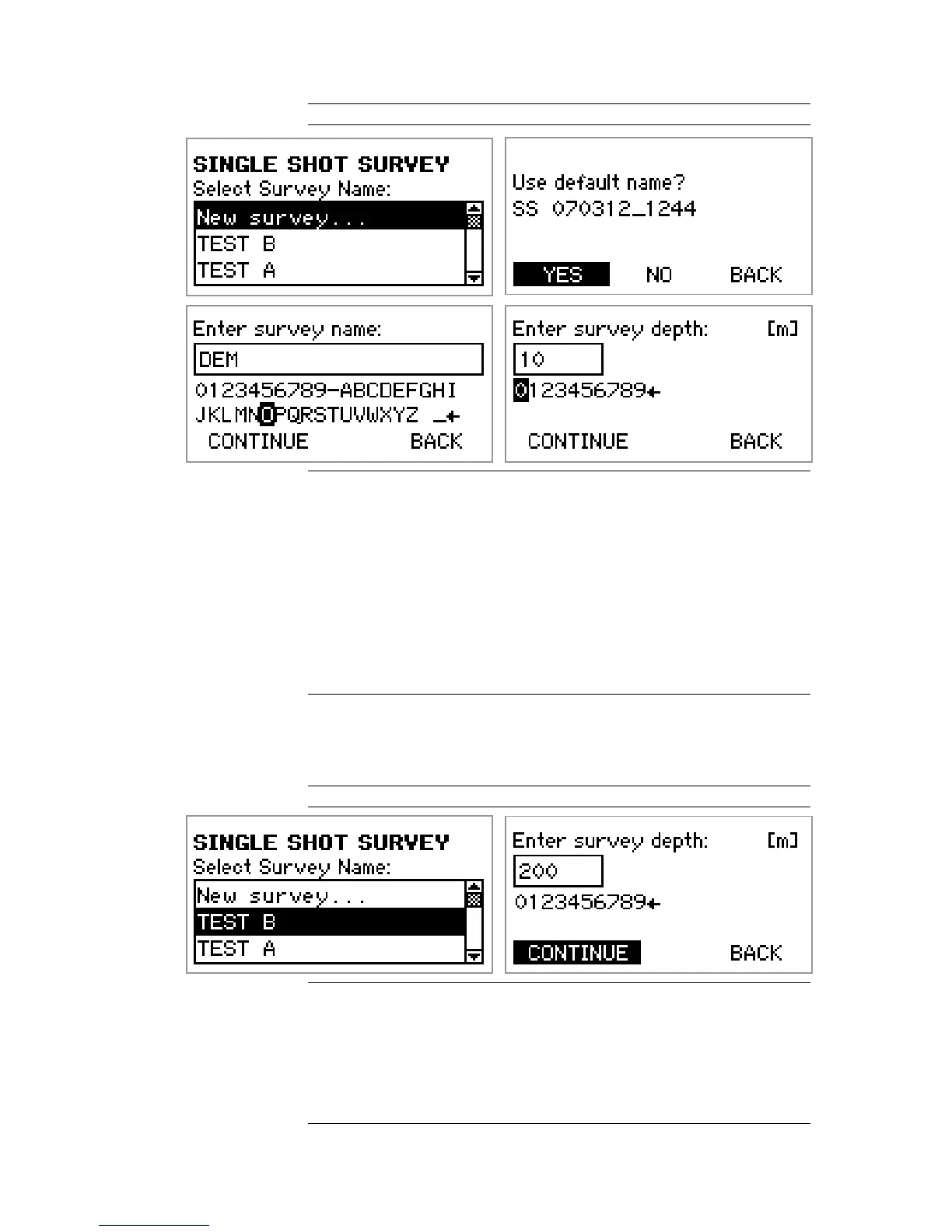
Figure 64 New Single Shot
New Single Shot
1. From the SINGLE SHOT SURVEY menu, select New survey….
2. To use the default name, select YES. Continue to step 5 below.
3. To enter a survey name, select NO.
4. Use the navigation keys to enter the Survey Name. Select
CONTINUE when finished.
5. Use the navigation keys to enter the Survey Depth. Select
CONTINUE when finished.
6. Continue to the section Initialise instrument.
9.3.2 Add to existing survey
The name of the existing survey to add a Single Shot measurement
to is selected, and the survey depth is entered.
Figure 65 Add to existing survey
Add to existing survey
1. From the SINGLE SHOT SURVEY menu, select the name of the
survey to add the Single Shot measurement to.
2. Use the navigation keys to enter the Survey Depth. Select
CONTINUE when finished.
3. Continue to the section Initialise instrument.


 To Next Page