PG-FP5 CHAPTER 4 PROGRAMMING GUI USAGE
R20UT0008EJ0400 Rev. 4.00 Page 100 of 240
Jul 15, 2010
[Disable Chip Erase] check box
If the [Set Security
] command is executed with this check box selected, the [Erase] command will be disabled for
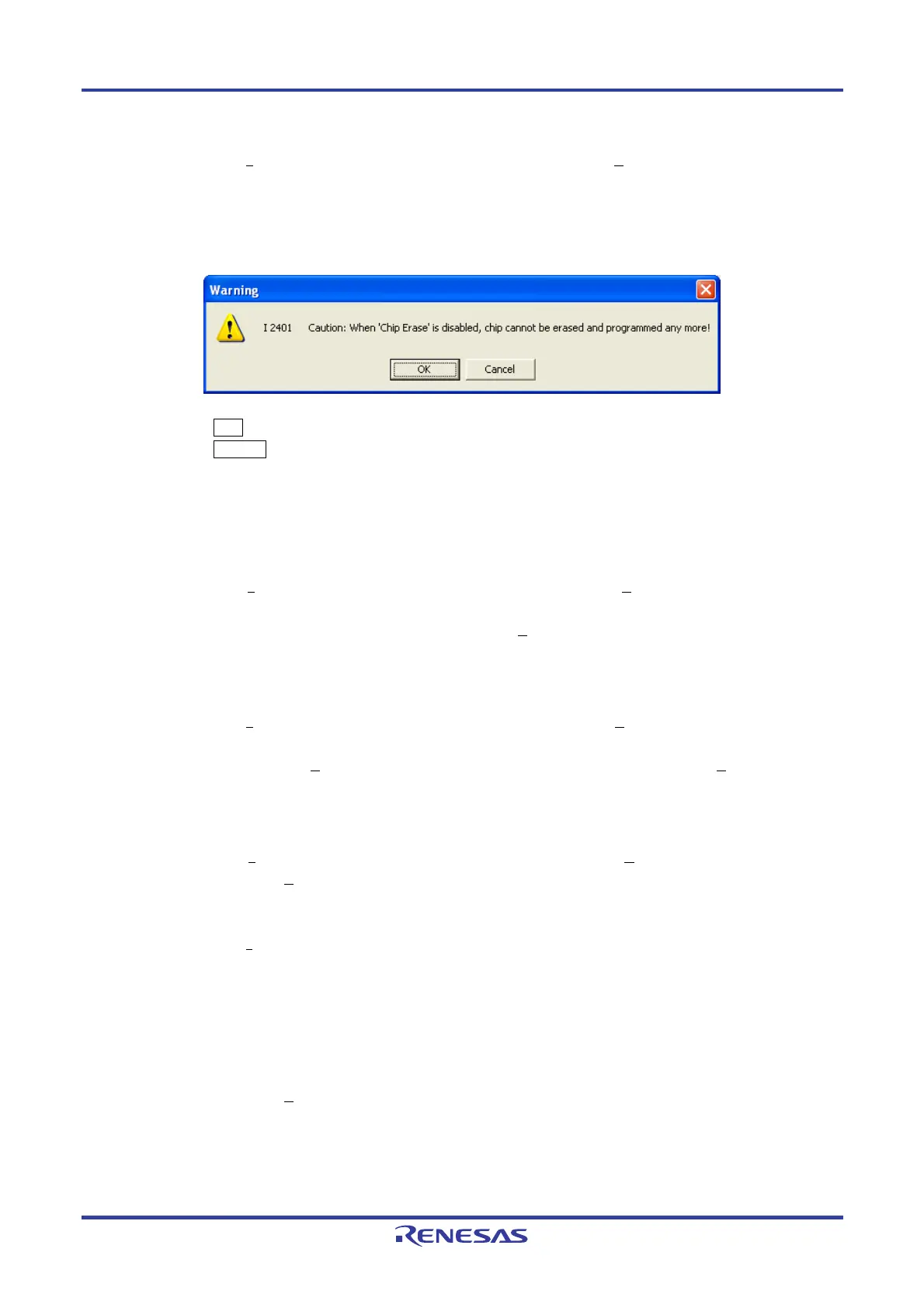
the entire area of the flash memory in the target device. When this check box is selected, the following dialog box
appears.
Figure 4-71. [Disable Chip Erase] Warning Dialog Box
Clicking the OK button determines the selection of the [Disable Chip Erase] check box.
Clicking the Cancel button cancels the selection of the [Disable Chip Erase] check box.
Caution If the [Disable Chip Erase] function is enabled, erasure for the device will no longer be possible,
and the [Disable Chip Erase] function will no longer be able to be disabled.
[Disable Block Erase] check box
If the [Set Security
] command is executed with this check box selected, the [Erase] command is disabled for all
the selected blocks in the flash memory selected with “Block” in the [Operation Mode] area on the [Standard] tab
in the Device Setup dialog box. This setting is cleared if the [E
rase] command is executed with “Chip” selected in
the [Operation Mode] area.
[Disable Program] check box
If the [Set Security
] command is executed with this check box selected, the [Erase] command for all the selected
blocks in the flash memory selected with “Block” in the [Operation Mode] area on the [Standard] tab in the Device
Setup dialog box and the [P
rogram] command is disabled. This setting is cleared if the [Erase] command is
executed with “Chip” selected in the [Operation Mode] area.
[Disable Read] check box
If the [Set Security
] command is executed with this check box selected, the [Read] command is disabled. This
setting is cleared if the [Erase] command is executed with “Chip” selected in the [Operation Mode] area.
[Disable Boot block cluster reprogramming] check box
If the [Set Security
] command is executed with this check box selected, the boot block set in the [Boot Block end]
drop-down list is regarded as the last block in the [Block protection settings] area and then the boot area is set,
and rewriting to the area is prohibited. If this check box is selected, the following dialog box appears.
[Disable FSW re-setting] check box
If the [Set Security] command is executed with this check box selected, rewriting the block specified by using the
[FSW Block start] and [FSW Block end] drop-down lists in the [Block protection settings] area is disabled. This
setting is cleared if the [E
rase] command is executed with “Chip” selected in the [Operation Mode] area.
<R>


 To Next Page