PG-FP5 CHAPTER 5 EXAMPLE OF OPERATION USING PROGRAMMING GUI
R20UT0008EJ0400 Rev. 4.00 Page 121 of 240
Jul 15, 2010
(7) Execution of [A
utoprocedure(E.P.)] command
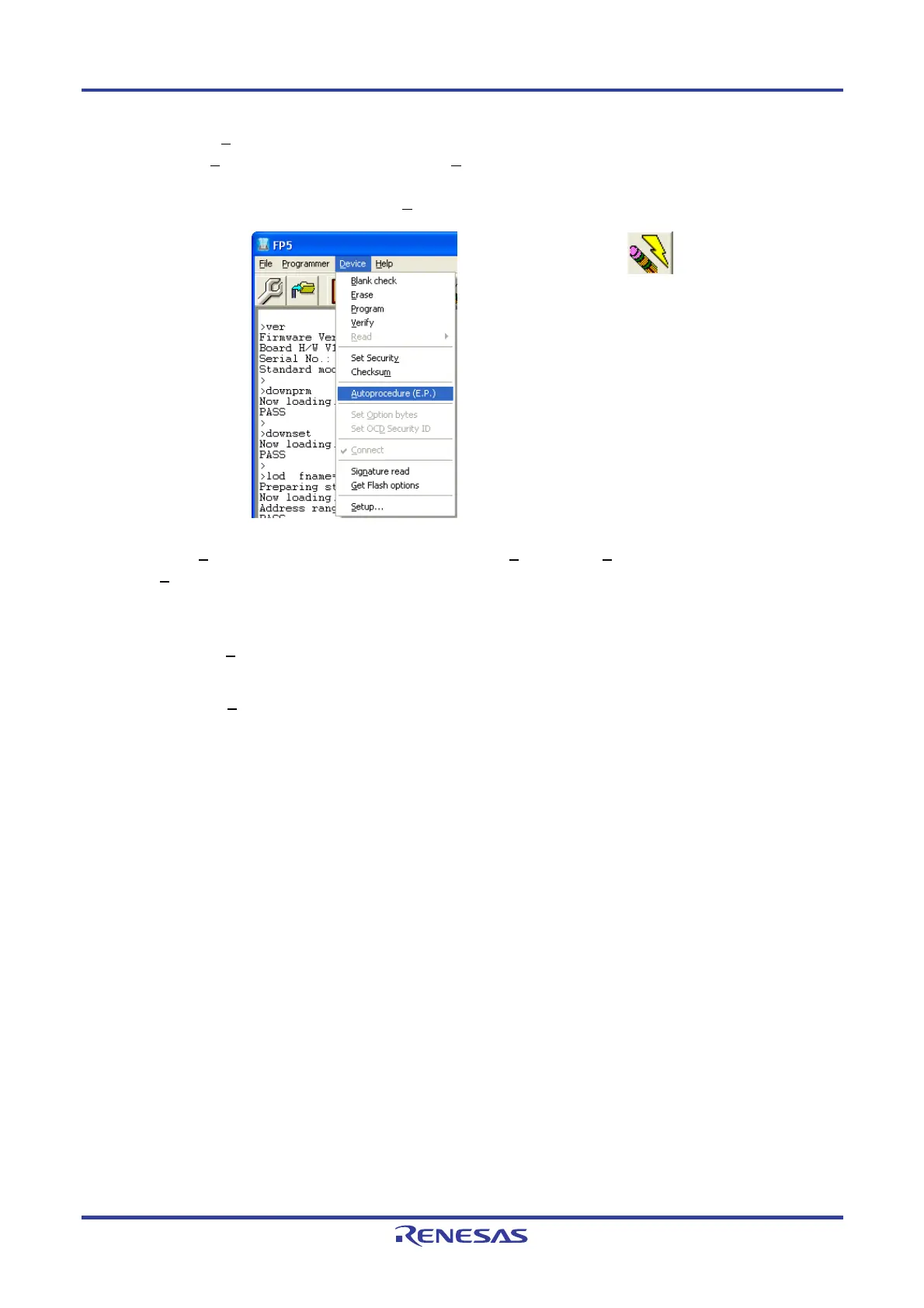
Execute the [A
utoprocedure(E.P.)] command in the [Device] menu.
Figure 5-17. [Autoprocedure(E.P.)] Command
Toolbar:
When the [A
utoprocedure(E.P.)] command is executed, the [Blank check], [Erase] (if the target area is not blank)
and [P
rogram] commands are executed in that order for the UPD78F1166.
Remarks 1. If necessary, insert the target device to be newly written to in the program adapter, and execute the
[A
utoprocedure(E.P.)] command.
2. Turn off power, connect the target system to be newly written to, and execute the
[Autoprocedure(E.P.)] command after power is supplied, before supplying VDD/VDD2 power from the
target system.


 To Next Page