When You Cannot Use the Machine As You Want
157
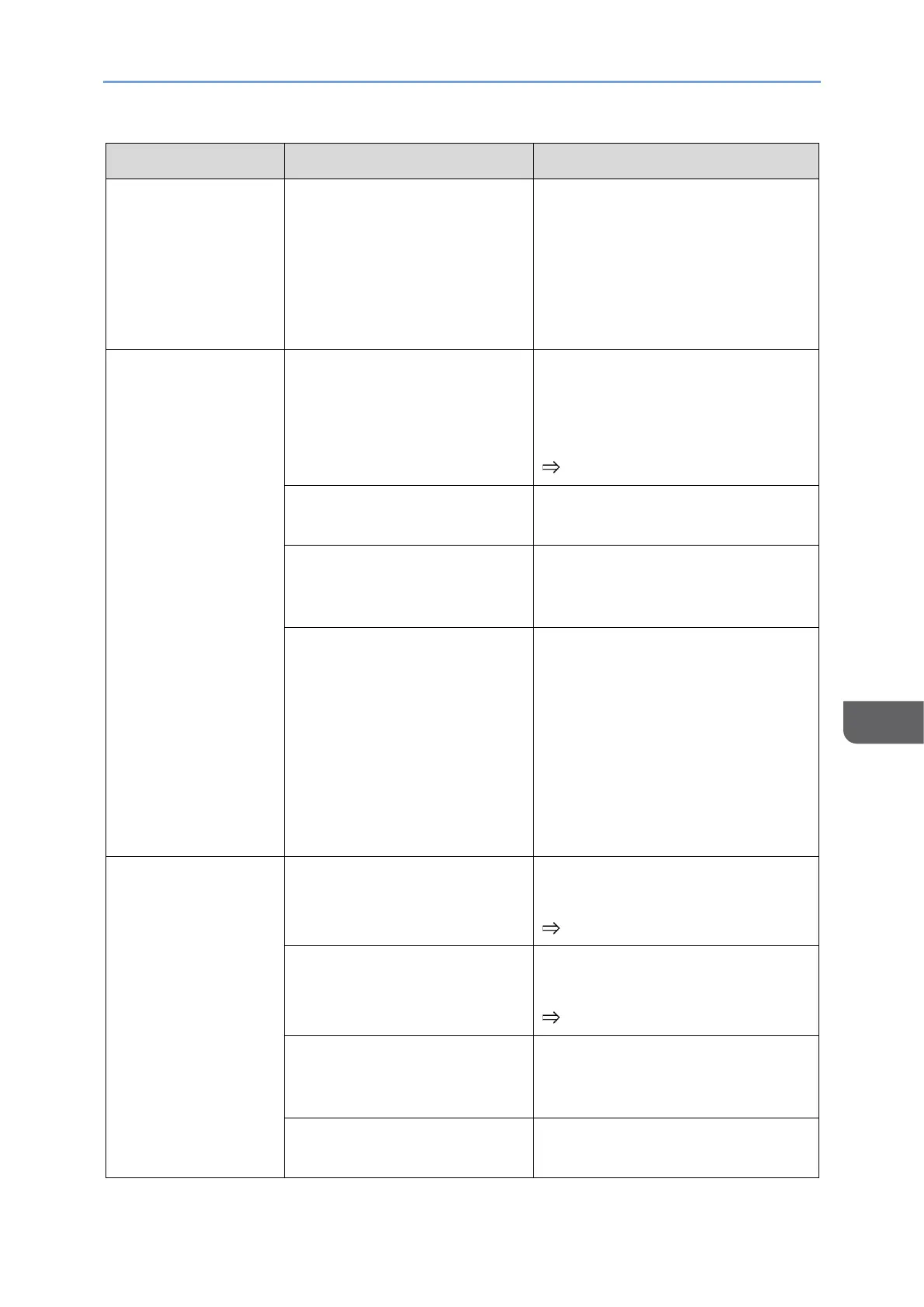
• Check that there are no
devices in the surroundings
that generate radio waves
that could interrupt wireless
communication, and then try
the wireless connection
again.
The desired
network does not
appear in the list
under "Select
network".
The network is configured
with stealth features.
After confirming the SSID, touch
the "Network" entry field on the
Wi-Fi screen and enter the SSID
directly.
page 100 "Wi-Fi"
The access point is turned
OFF.
Turn ON the access point.
The signal from the access
point does not reach this
machine.
Move to a location where the
access point's signal can be
received.
The network signal condition
is poor.
• Check the network status
and reconnect.
• Check that there are no
devices in the surroundings
that generate radio waves
that could interrupt wireless
communication, and then try
the wireless connection
again.
Unable to connect
to network
An incorrect SSID has been
entered.
Enter the correct SSID, and then
reconnect to the network.
page 100 "Wi-Fi"
An incorrect password has
been entered.
Enter the correct password, and
then reconnect to the network.
page 100 "Wi-Fi"
The signal from the access
point does not reach this
machine.
Move to a location where the
access point's signal can be
received.
The network signal condition
is poor.
• Check the network status
and reconnect.










 To Next Page