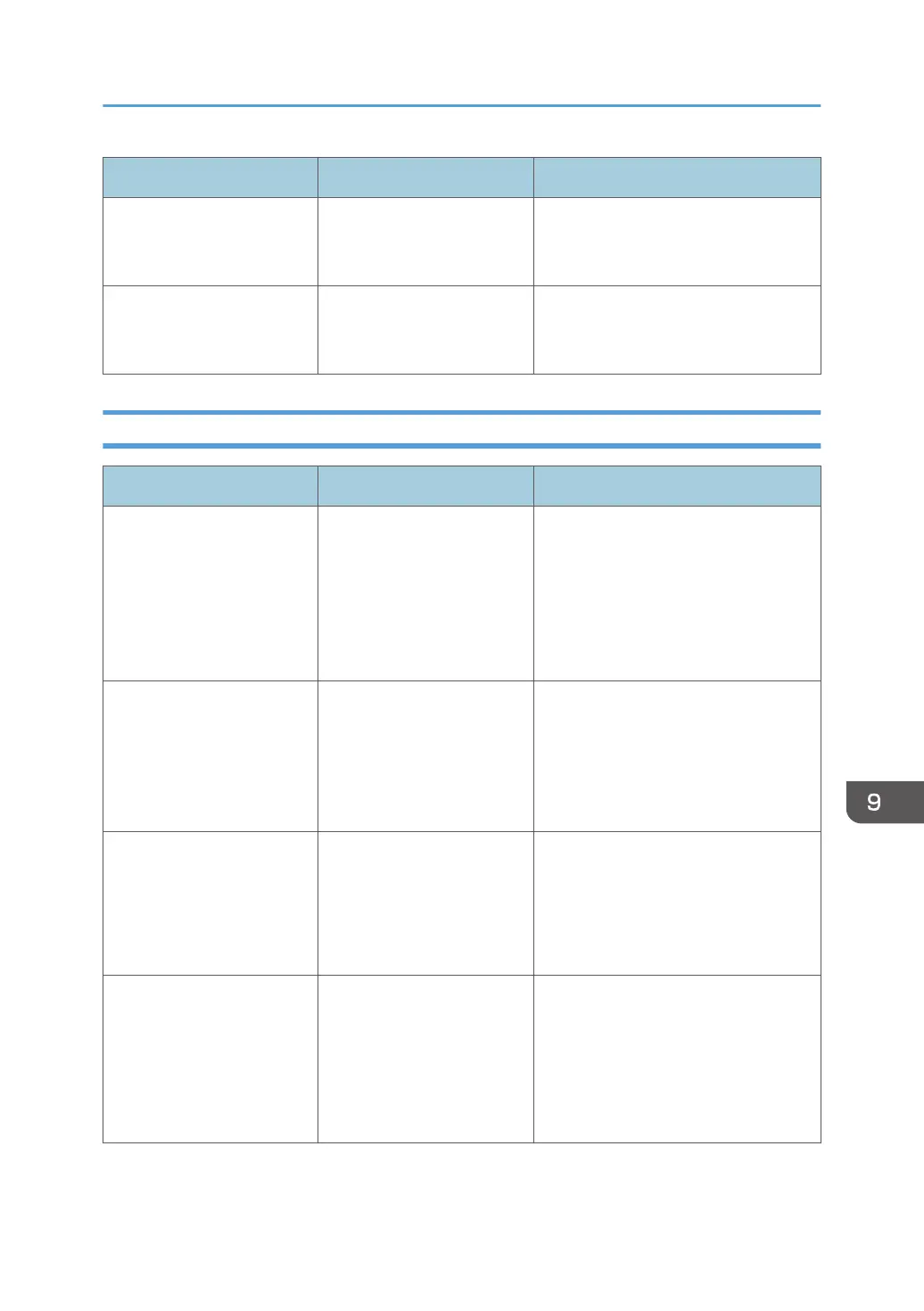
Message Causes Solutions
Cannot delete the page
Try again later.
The file that you are trying to
delete is still being
downloaded.
Wait for a while and then try to delete
the page again.
Cannot add the page(s) A network failure may occur
on a device using remote
whiteboard.
Wait for a while and then try to add
the page again.
Error Messages Related to PDF File Importing/Saving
Message Causes Solutions
Cannot add the page(s)
The number of pages has
reached the limit (100
pages).
Delete some pages and try
again.
The number of pages has
reached the upper limit.
Delete unnecessary pages, and then
import the file again.
Cannot access the folder
Access control is set on the
folder.
Cancel access control on the
folder and try again.
Access control is set on the
folder.
Cancel access control on the folder
and try again.
Cannot import the file
Security is set on this file.
Select another PDF file.
• Security setting is
specified for the PDF
file.
• Printing the PDF file is
prohibited.
Select another PDF file.
Cannot import the file
The file may be corrupted.
Select another PDF file.
• The PDF file is
corrupted.
• The file is not a PDF file.
For instance, the file
extension of a text file
was changed to .pdf.
Select another PDF file, or check that
the PDF file opens on a computer, and
then try again.
If a Message is Displayed during Operation
205



 To Next Page