7.
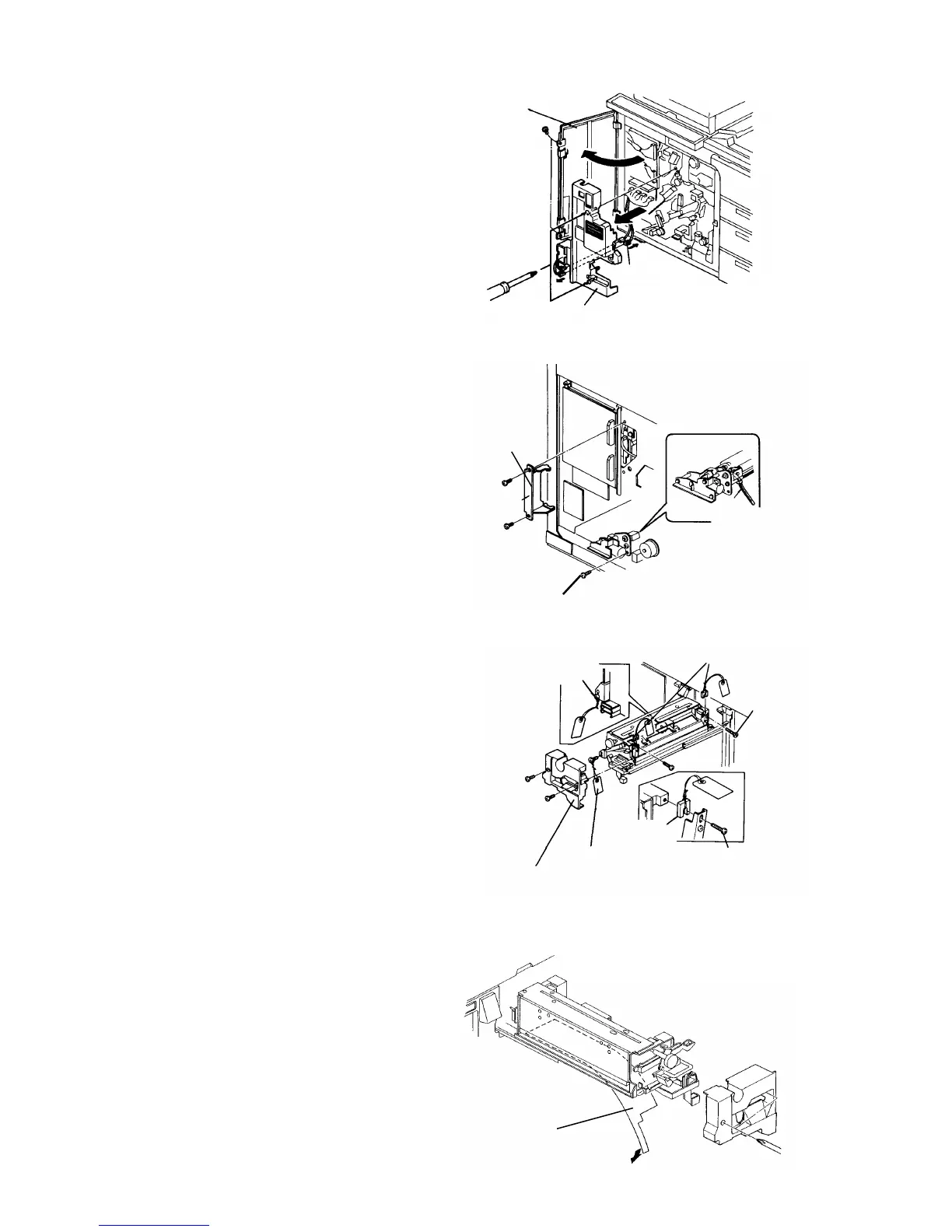
To remove the inner cover, remove the left door
fixing screw (2 screws), and disconnect the cooling
fan connector.
8.
Remove the first mirror bracket (red bracket).
9.
To enable accessing the service tool password,
turn on DIPSW101-2.
10.
Remove the OPC cleaning unit fixing screw to pull
out the unit, and cut the unit fastener.
11.
To pull out the fusing unit, remove the front fusing
cover (2 screws) and one unit fixing screw.
12.
Remove the cover from the right side of the unit (4
screws).
13.
Loosen the pressure fixing screws to remove the
wedges on the front and far side. Re-tighten the
pressure fixing screws.
14.
Install the fusing right side cover.
NOTE
Install the front fusing cover after pouring silicon oil.
15.
Peel off the plain sheet behind the fusing oil pan.
Sheet
Left door
Inner cover
Cooling fan
connector
Mirror
bracket
Unit fixing screw
Unit fastener
Unit fixing screw
(before removal)
Wedges
Pressure
fixing screw
Wedge
Pressure fixing screw
Unit fixing screw
Front fusing cover
Copier Installation 1 July 1994
1-6













 To Next Page