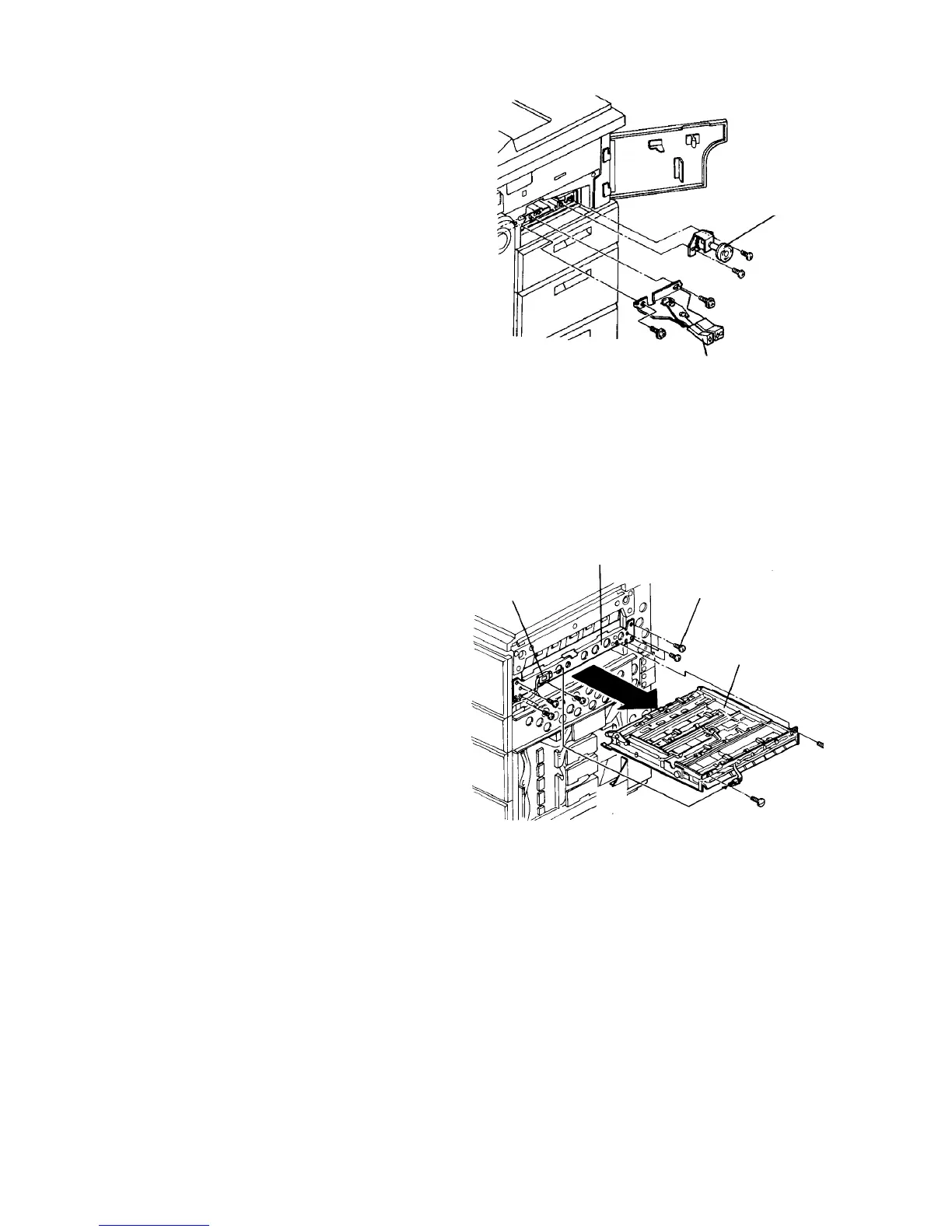
2.10.17 Removing the duplex tray unit
1. Turn off the main switch. If peripherals are
installed, remove them from the copier.
2. Remove the copier’s right cover (2 screws).
3. If the machine is equipped with the LCT, remove
the horizontal transport unit as follows:
1) Remove the lock lever and knob assemblies.
2) Disconnect the connector at the right side of the
horizontal transport unit from the main body.
3) Remove two screws and pull out the unit from
the right side.
CAUTION
• Be careful not to damage the paper guide
plates when pulling out or installing the unit.
• When reinstalling the lock lever assembly,
be sure that the assembly completely locks
the upper guide plates and that the lock
lever bracket pushes down the upper left
paper guide plate of the unit. Otherwise,
paper misfeeds may occur there.
4. Remove the horizontal transport connector bracket
(one screw).
5. Open the copy tray. Raise the exit transport guide,
then remove the duplex transport belt unit (one
stepped screw on the rear side and one pan head
screw on the front).
6. Disconnect two connectors going to the jogger
motor from the space where the duplex transport
belt unit was removed.
7. Remove eight screws, then slide out the duplex
tray unit to the right side of the copier.
Knob assembly
Lock lever assembly
Horizontal
transport
connector
bracket
Duplex tray unit
Unit fixing screw
Horizontal
transport unit













 To Next Page