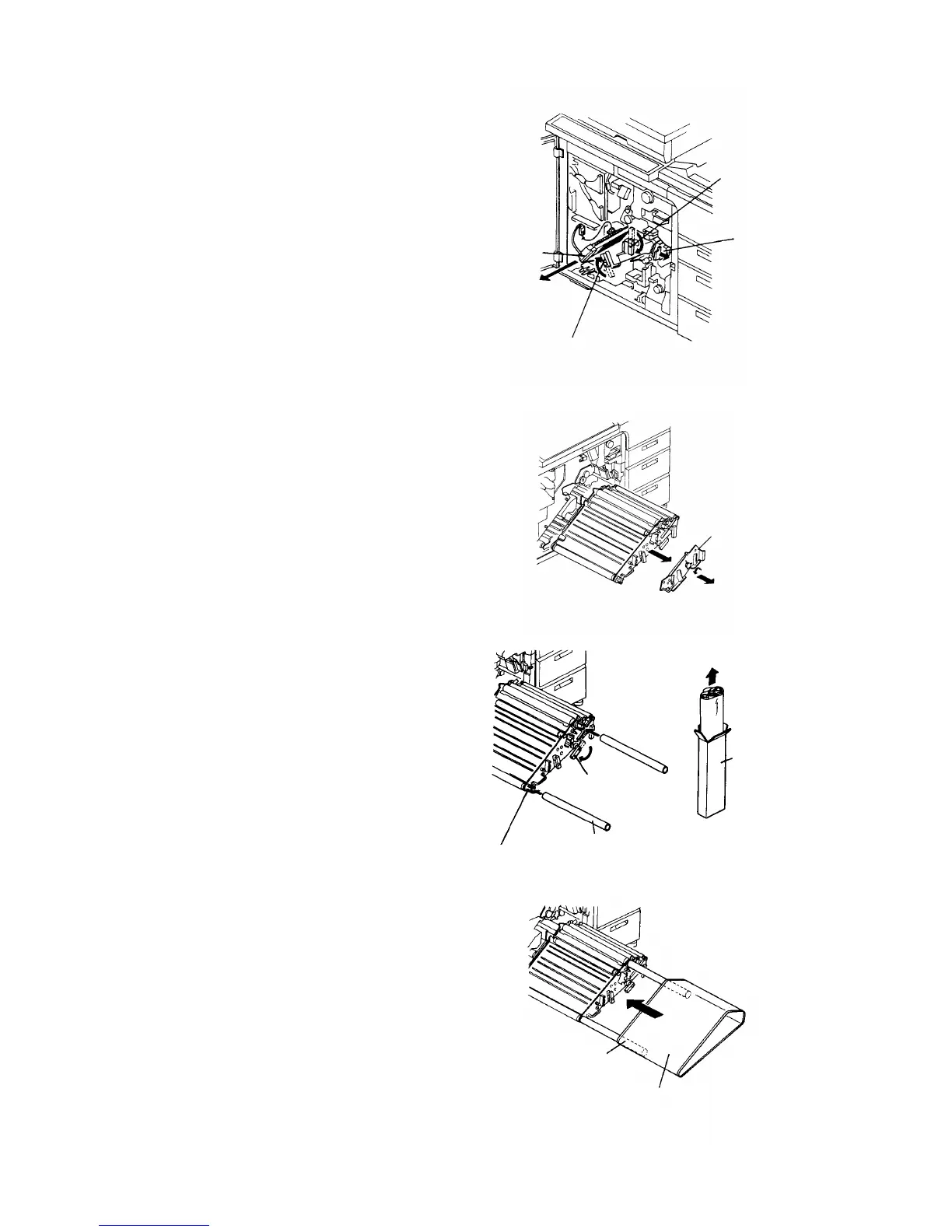
9.
Pull out the charge corona unit, and release the
transport unit.
10.
Release the development and cleaning back-up
levers, and turn the development knob in the
direction of the arrow. Then, remove the OPC unit
stay to pull out the OPC unit.
CAUTION
Be sure to return the developer from the
development roller to the inside of the unit
before pulling out the OPC unit. Do this by
turning the development knob.
11.
Insert two paper tubes (OPC belt accessories) in
the two guide holders of the OPC unit. Then,
release the pressure release lever to loosen the
tension, and pull the OPC belt out of the case.
12.
Use the paper tubes as guides to fit the OPC belt
to the unit.
CAUTION
• As you fit the OPC belt, be sure to prevent
folds and contact between the side plate of
the OPC unit and the belt end. Do not
touch the OPC surface directly.
•
Set the OPC belt so that the OPC home
mark is on the rear side of the machine.
• The rear side of the OPC belt must be under
the OPC sensor.
Charge corona unit
Development back-up lever
Cleaning
back-up lever
Transport unit
OPC unit stay
OPC belt case
Pressure
release lever
Paper tube
Guide holder
OPC home
mark side
OPC belt
1 July 1994 Copier Installation
1-9













 To Next Page