2.11.17 Adjusting the motor speed (Free run mode)
CAUTION
• This procedure is required when the ADF
control board is replaced.
• The ADF rear cover is made of metal. So,
the cover may touch electric elements on
the boards shorting them out when you
remove the cover. Be sure to turn off the
main switch when you remove the ADF rear
cover.
• The power line for the motors is common
with the one for the recycle arm solenoid.
While adjusting the speed of the motors, if
the speed decreases, the solenoid will
vibrate. This will cause the solenoid to heat.
Therefore, finish the speed adjustment
quickly. Otherwise, disconnect the
connector going to the solenoid.
NOTE
To stop the motor, turn off all DIP switches or raise
the ADF to turn off the lift switch. The original setting
for all DIP switches is OFF.
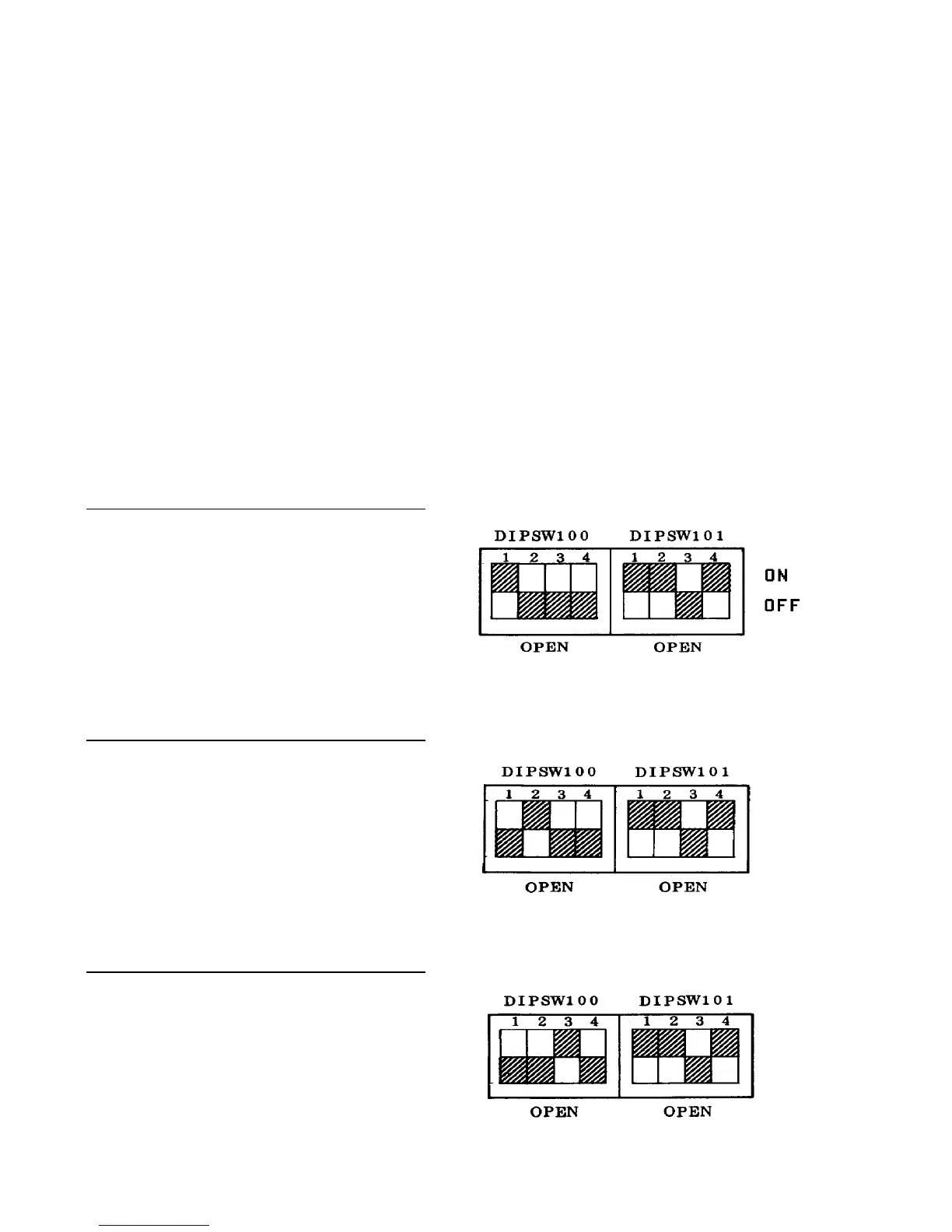
Adjusting the speed of the original feed motor
1. Turn on DIP switches 101-1, 2 and 4 on the ADF
control board.
2. Turn on DIP switch 100-1. The motor will start
rotating.
3. After the original feed motor is turned on, adjust
VR102 to light LED 112.
Adjusting the speed of the transport motor
1. Turn on DIP switches 101-1, 2 and 4 on the ADF
control board.
2. Turn on DIP switch 100-2. The motor will start
rotating.
3. After the transport motor is turned on, adjust
VR100 to light LED112.
Adjusting the speed of the reverse motor
1. Turn on DIP switches 101-1, 2 and 4 on the ADF
control board.
2. Turn on DIP switch 100-3. The motor will start
rotating.
3. After the reverse motor is turned on, adjust VR101
to light LED 112.













 To Next Page