2.11.18 Adjusting the speed of the ADF blower motor
CAUTION
• This adjustment is usually prohibited. When
you replace the ADF blower control board,
you do not need to adjust the blower speed.
They are adjusted at the factory (including
spare parts).
• The ADF rear cover is made of metal. So,
the cover may touch electric elements on
the boards shorting them out when you
remove the cover. Be sure to turn off the
main switch when you remove the ADF rear
cover.
NOTE
To stop the motor, turn off all DIP switches or raise
the ADF to turn off the lift switch. The original setting
for all DIP switches is OFF.
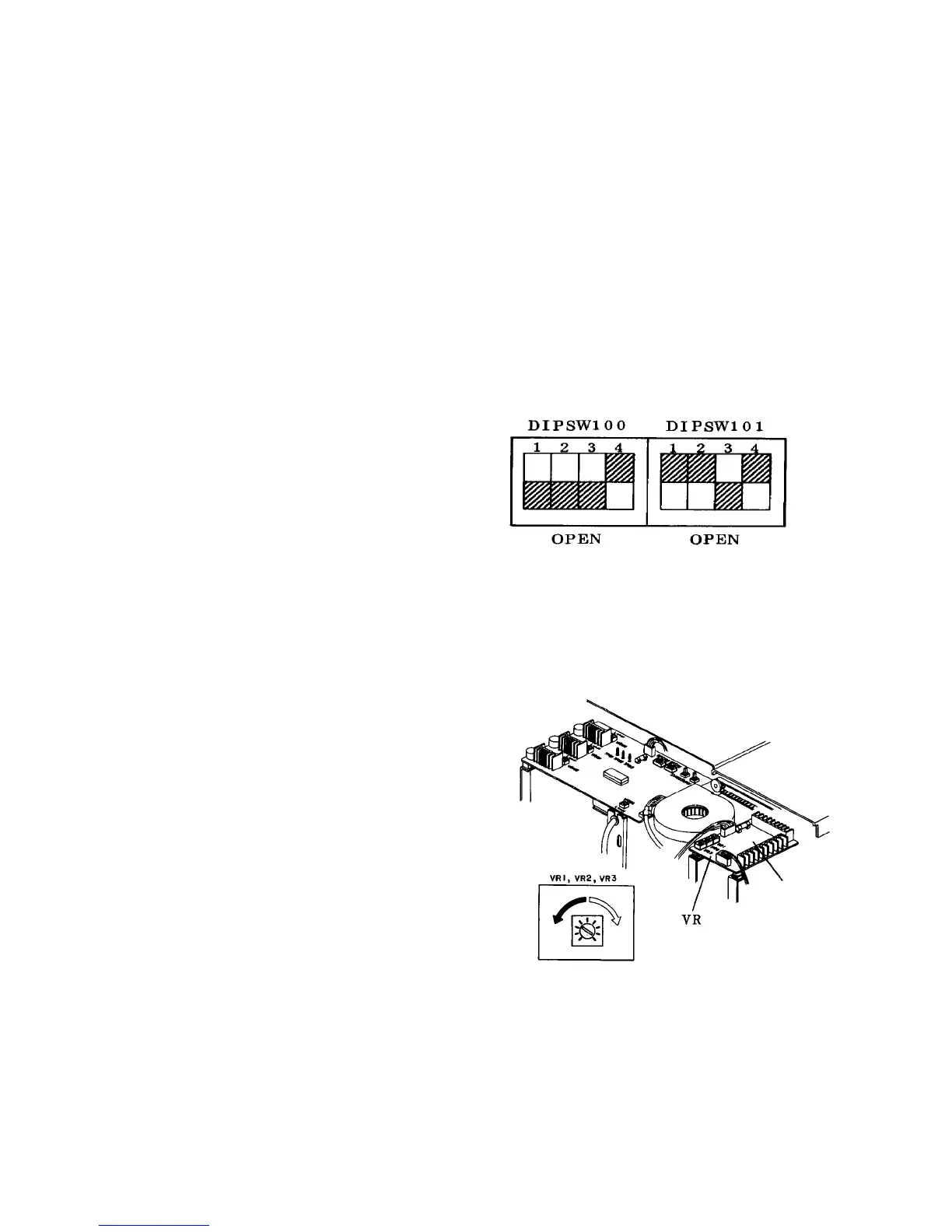
1. Turn on DIP switches 101-1, 2 and 4 on the ADF
control board.
2. Turn on DIP switch 100-4. The motor will start
rotating.
3. After the blower motor is turned on, use a digital
tachometer to measure revolutions of the fan. Put
a mark on the flat part of the fan to let the
tachometer read it.
4. Adjust VR1 on the blower control board so that the
speed is 4,500 rpm when 10 or less originals are
set on the original table (the recycle arm height
sensor OFF).
5. Set more than 20 sheets of the original to turn on
the recycle arm height sensor. Next, adjust VR3 on
the blower control board so that the speed comes
to 7,000 rpm.
Blower
control board













 To Next Page