2.11.19 Original transport test mode
CAUTION
The ADF rear cover is made of metal. So, the
cover may touch electric elements on the
boards shorting them out when you remove the
cover. Be sure to turn off the main switch when
you remove the ADF rear cover.
NOTE
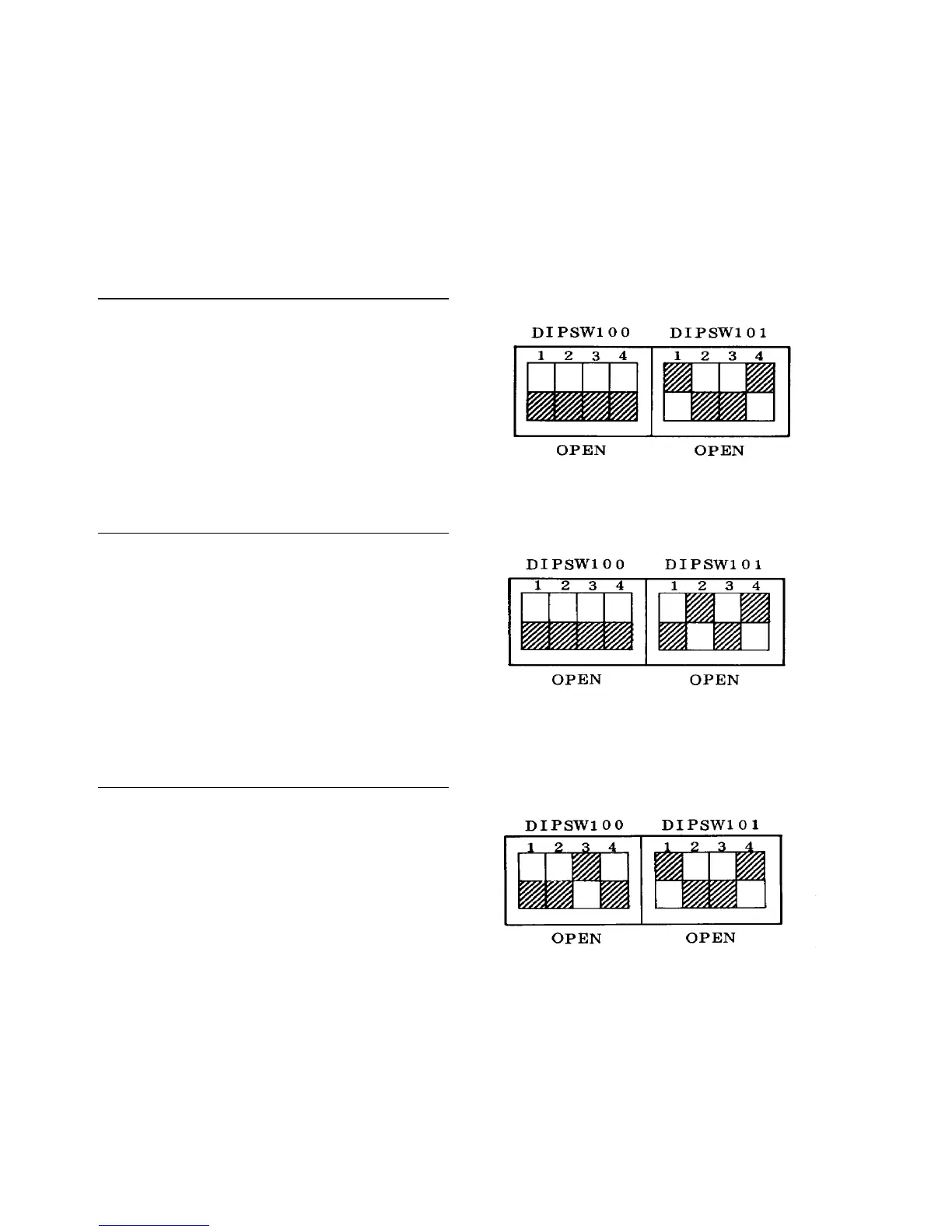
The original setting for all DIP switches is OFF.
Single-side original mode
1. Turn on DIP switches 101-1 and 4 on the ADF
control board.
2. Put some originals on the original table.
3. Operation starts when SW101 is pressed.
4. Operation stops when SW 100 is pressed.
5. Raise the ADF and press SW101 again for restart.
2-sided original to single-side copies mode
1. Turn on DIP switches 101-2 and 4 on the ADF
control board.
2. Follow the same steps as the above.
2-sided original to 2-sided copy mode
1. Turn on DIP switches 101-1, 101-4 and 100-3.
2. Follow the same steps as the above.













 To Next Page