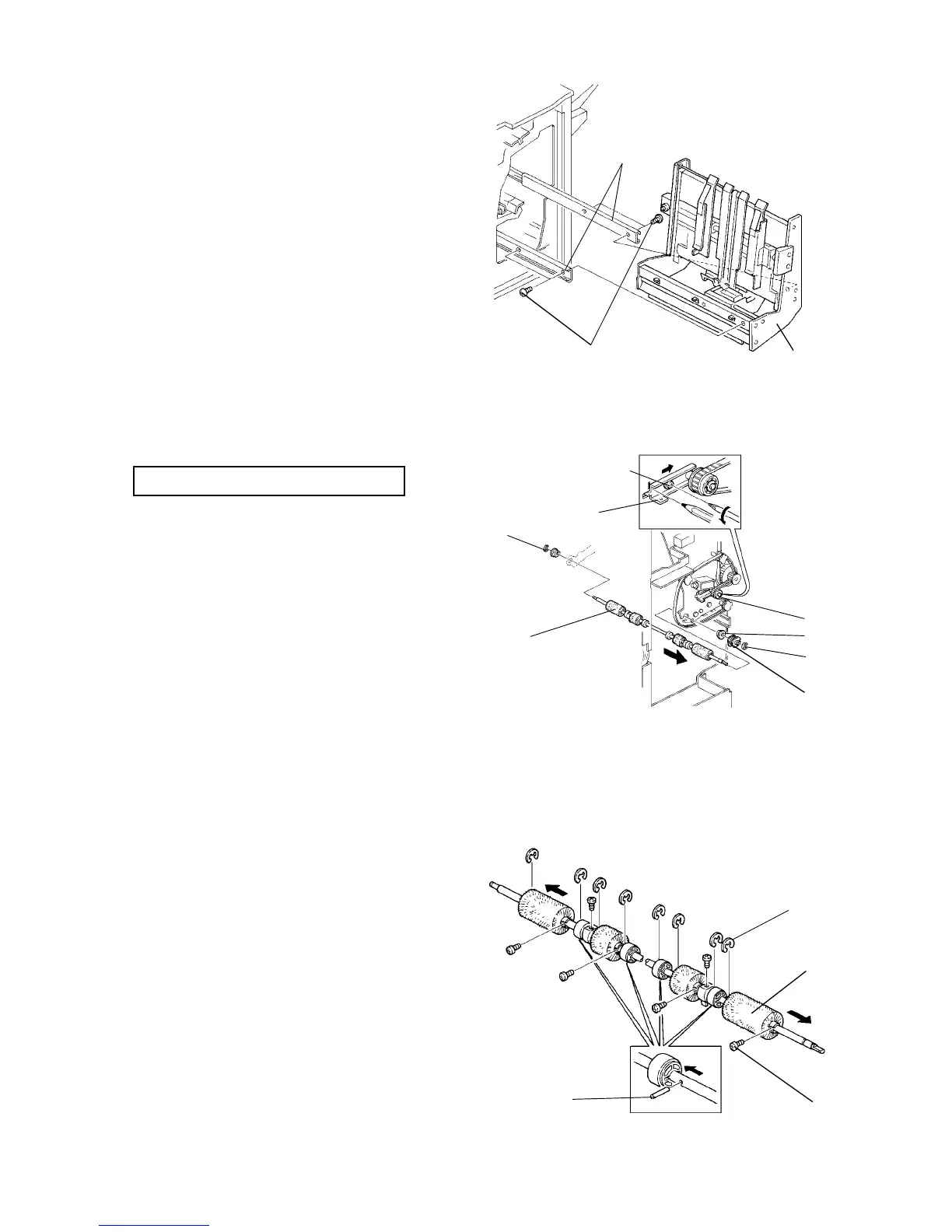
2.15.3 Removing the staple unit
1. Turn the main switch off and unplug the copier.
2. Open the front door.
3. Slide out the staple unit [A].
4. Remove the four screws [B] fixing the unit to the
slide rails [C].
5. Lift the staple unit off from the slide rails.
2.15.4 Replacing the Alignment Brush Rollers
PM cycle: Replace every 2,000K
1. Turn the main switch off and unplug the copier.
2. Remove the rear cover.
3. Mark the position of the tension bracket [A] and
loosen the screw [B].
4. Remove the 2 E-rings [C], slide out the pulley [D]
and bushing [E], and remove the alignment brush
roller assembly [F].
5. Remove the screws [G], E-rings [H], pins [I], and
remove the brush rollers [J].
NOTE:
• When reassembling, put the bracket [A] back
to the marked position.
• Do not lose the pins [I].
[C]
[B]
[A]
[B]
[A]
[A]
[E]
[C]
[D]
[F]
[C]
[H]
[J]
[G]
[I]
Finisher 1 July 1994
2-122













 To Next Page