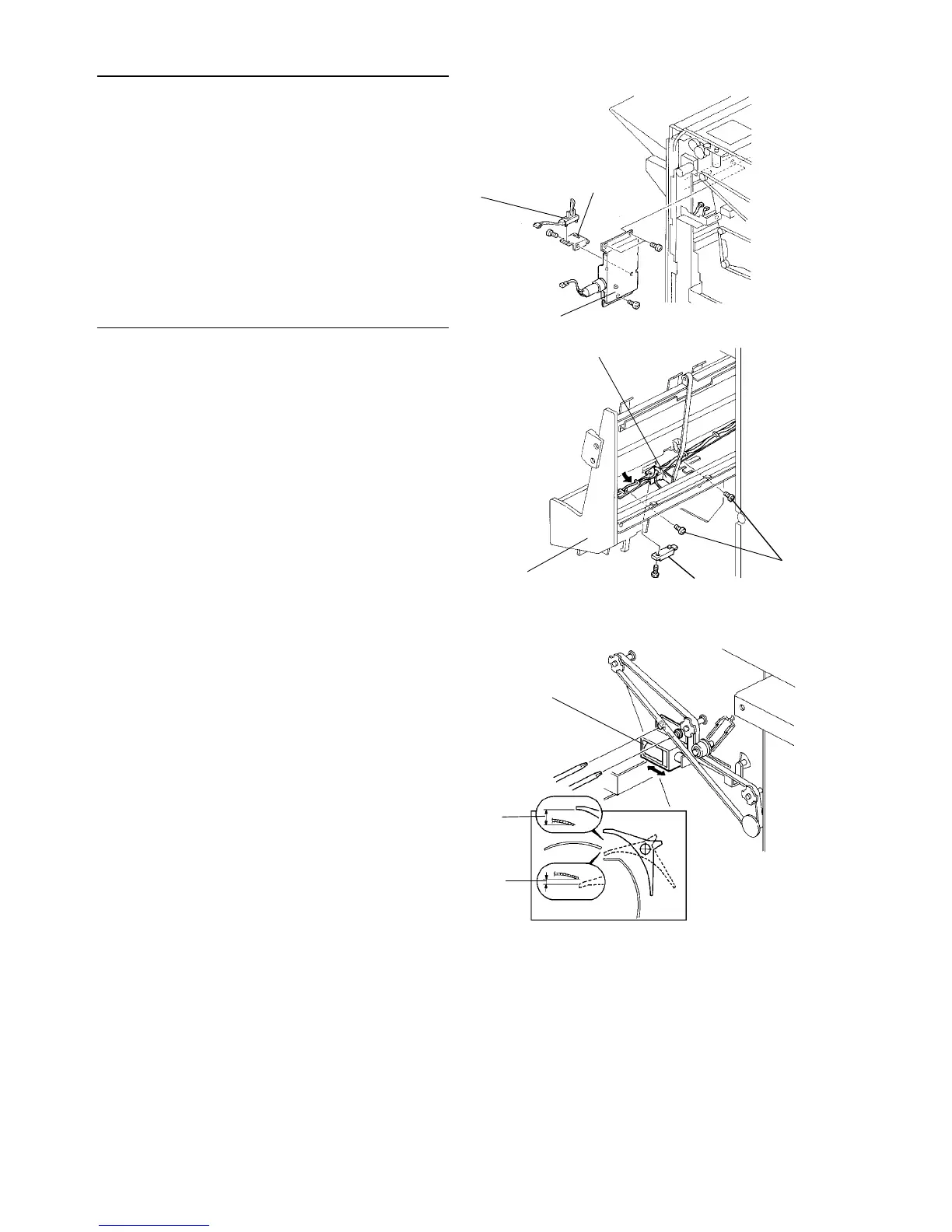
Shift tray half turn sensor
1. Turn the main switch off and unplug the copier.
2. Remove the rear cover.
3. Remove the shift motor bracket [A] (3 screws).
4. Remove the sensor bracket [B] (1 screw) and
replace the shift tray half turn sensor [C].
Jogger unit paper sensor
1. Turn the main switch off and unplug the copier.
2. Open the front cover and slide out the staple unit
[D].
3. Remove the 2 screws [E] fixing the bracket [F].
4. Slightly pull out the bracket in the direction shown
and remove the jogger unit paper sensor [G] (1
screw).
2.15.9 Adjusting the finisher junction gate solenoid paotion
1. Turn the main switch off and unplug the copier.
2. Remove the finisher rear cover (3 screws).
3. Open the finisher front door and check the gap
between the paper guide plate and junction gate
pawl end. Be sure that the gap is as shown in the
above illustration when the solenoid is pressed
and pulled manually.
4. If the gap is not correct, adjust the position of the
solenoid [A].
[A]
[B]
[C]
[F]
[E]
[G]
[D]
[A]
7 mm or
more
4 mm or more
1 July 1994 Finisher
2-125













 To Next Page