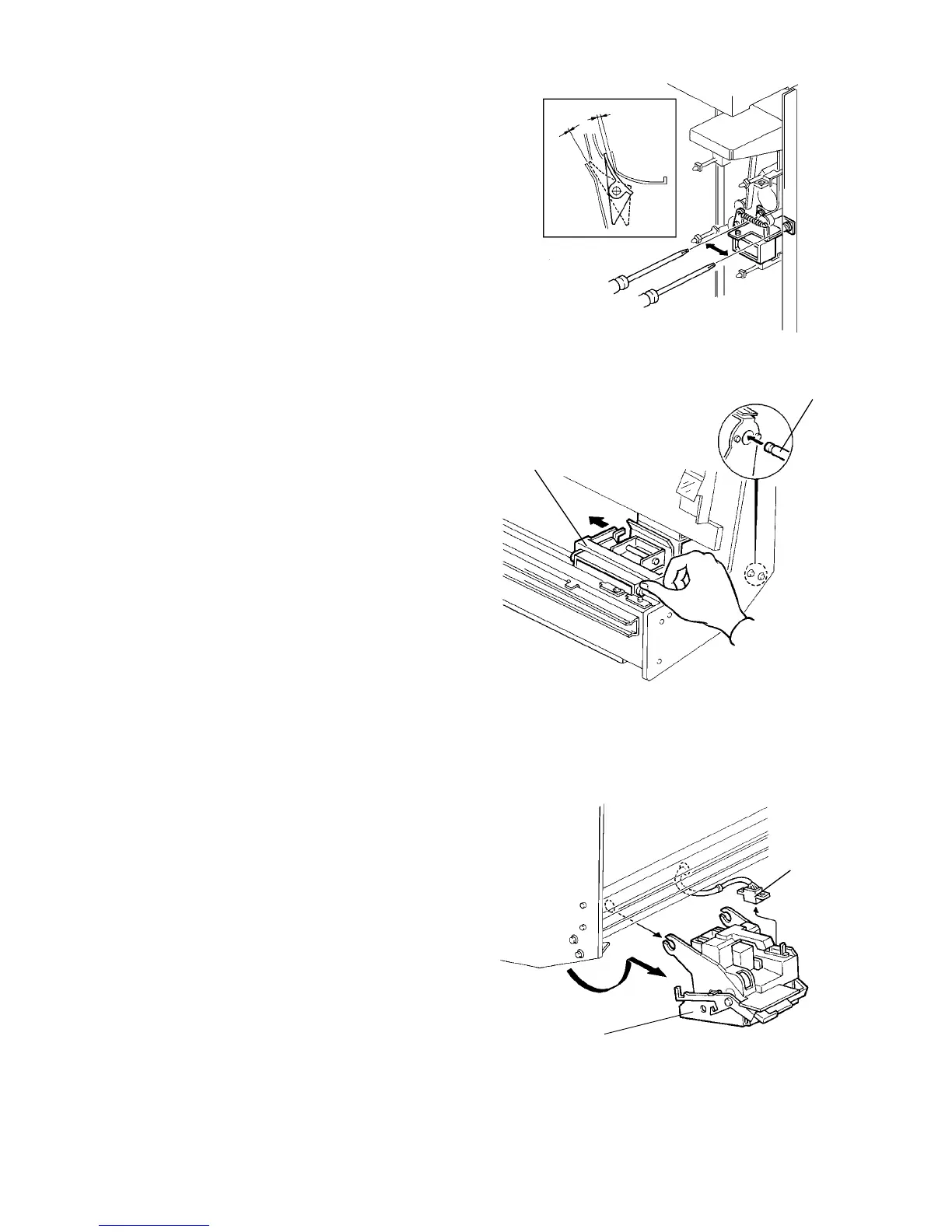
2.15.12 Adjusting the inverter junction gate solenoid position
1. Turn the main switch off and unplug the copier.
2. Remove the inverter rear cover (4 screws).
3. Open the inverter front door then check the gap
between the junction gate pawl end and paper
guide plate. Be sure that the gap is as shown in
the above illustration when the solenoid plunger is
pressed and released manually.
4. If the gap is not correct, remove the inverter
control PCB and adjust the solenoid position.
2.15.13 Removing the stapler and clearing a staple jam
1. Turn the main switch off and unplug the copier.
2. Open the finisher front door and slide out the
staple unit.
3. Move the stapler [B] toward the rear manually as
shown until the stapler is released from the shaft
[A].
CAUTION:
Do not slide the stapler by holding other parts
than those shown. The stapler support plates
might easily be deformed.
4. While holding the stapler release lever (light blue
lever), gradually turn the stapler [D] until it stops.
5. Disconnect the connector [C] and pull out the
stapler.
Less
than 1
mm
Less
than 2.5
mm
[A]
[B]
[C]
[D]
1 July 1994 Finisher
2-127













 To Next Page