Item Description Setting Method
2-03
(Screen will change.)
⇓
6) Set a desired reproduction ratio as
follows:
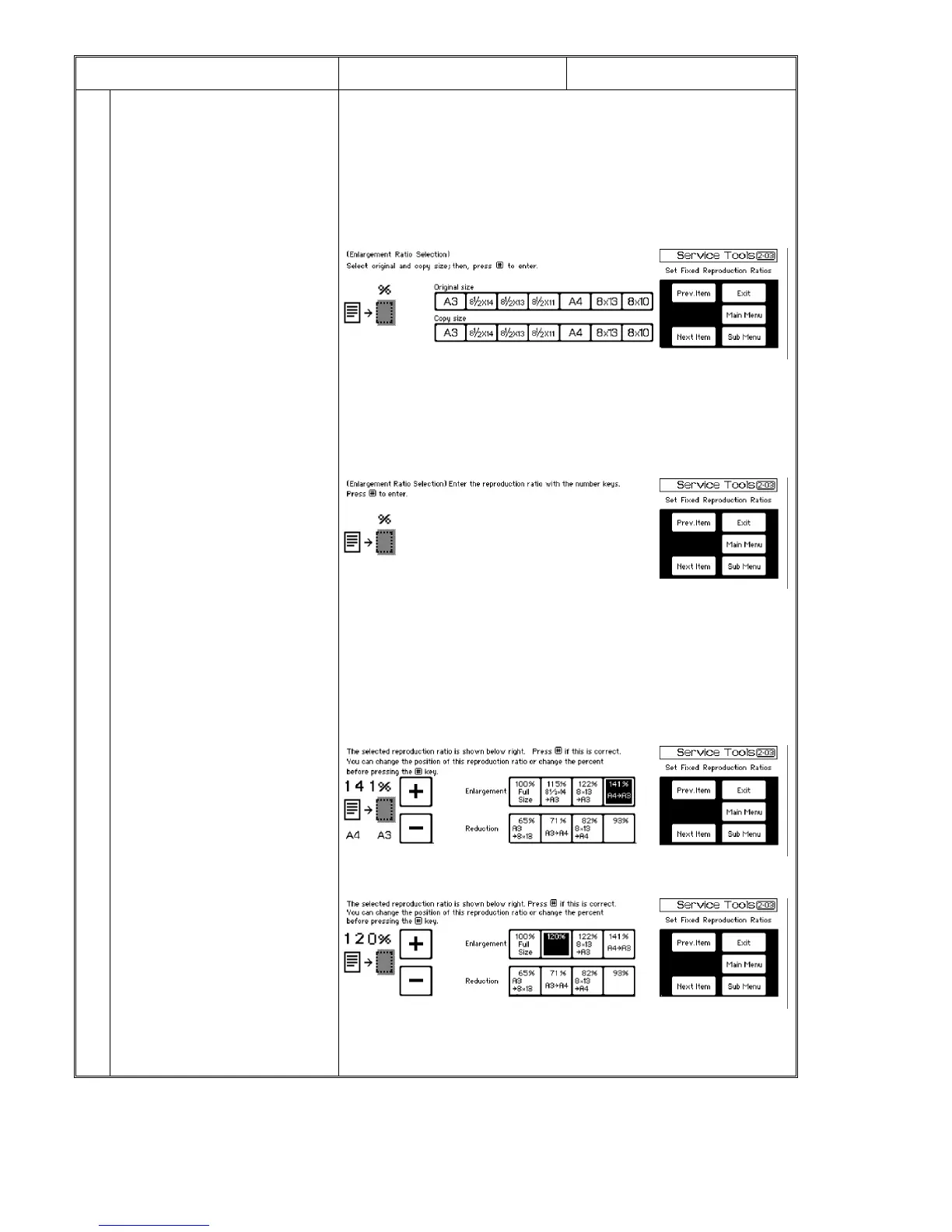
When the "Paper size entry" has been
selected, the screen shown below will be
displayed. Select the original and copy
sizes. (The proper reproduction ratio will
be displayed automatically.)
[Paper size entry display]
When the "Percent entry" has been
selected, the screen shown below will be
displayed. Input a desired reproduction
ratio using the numeric keys. (Paper size
will not be displayed in this method.)
[Percent entry display]
⇓
7) Press the Enter [#] key.
⇓
8) Set ratio is displayed in the set area as
shown below. Press the Enter [#] key to
store the data, or fine adjustment
possible by "+" and " --" keys, then press
the Enter [#] key
[Paper size entry display]
[Percent entry display]
⇓
9) Repeat 2) to 8) above and set other
display areas one by one.
1 July 1994 User Functions
7-5













 To Next Page