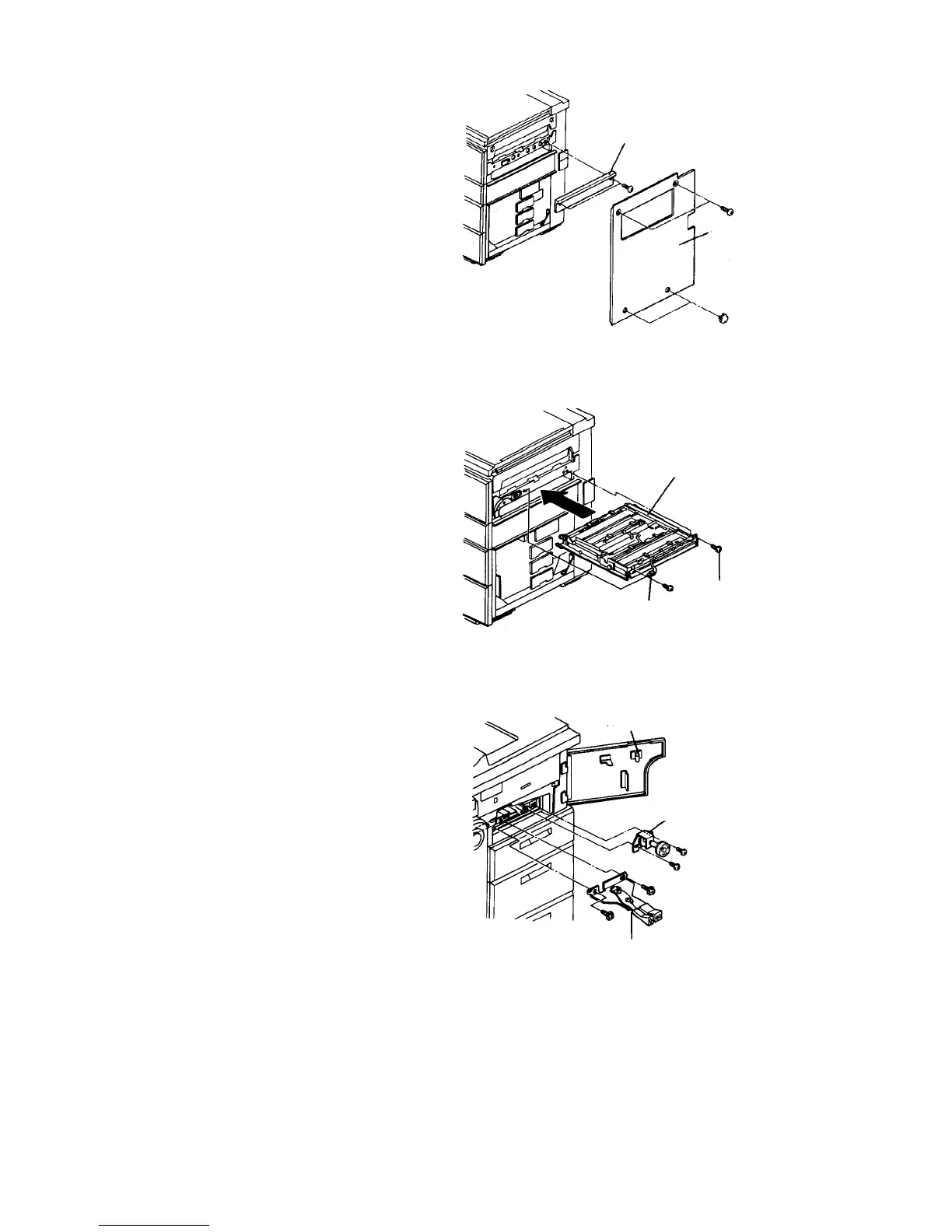
1.8.3 Setting up the LCT
1. Remove the copier right cover, rear right cover and
sub-tray auxiliary plate.
NOTE
The sub-tray auxiliary plate is no longer needed.
2. Insert the horizontal transport unit (accessory) in
the lower side of the duplex unit, and fasten the
unit with the two M4 x 6 screws (accessory). At
the same time, connect 4P connector of the unit to
the copier.
3. Open the right cover and fasten the lock lever
assembly and knob assembly with each of two M4
x 6 screws (all are the accessories).
CAUTION
While holding down the small white roller of the
upper left guide plate, tighten the lock lever
assembly. Be sure that the lock lever bracket
pushes down the upper left guide plate when it
is locked.
Sub-tray auxiliary plate
Right cover
Horizontal transport unit
M4 x 6 (2)
4P connector
Right cover
Knob assembly
Lock lever assembly













 To Next Page