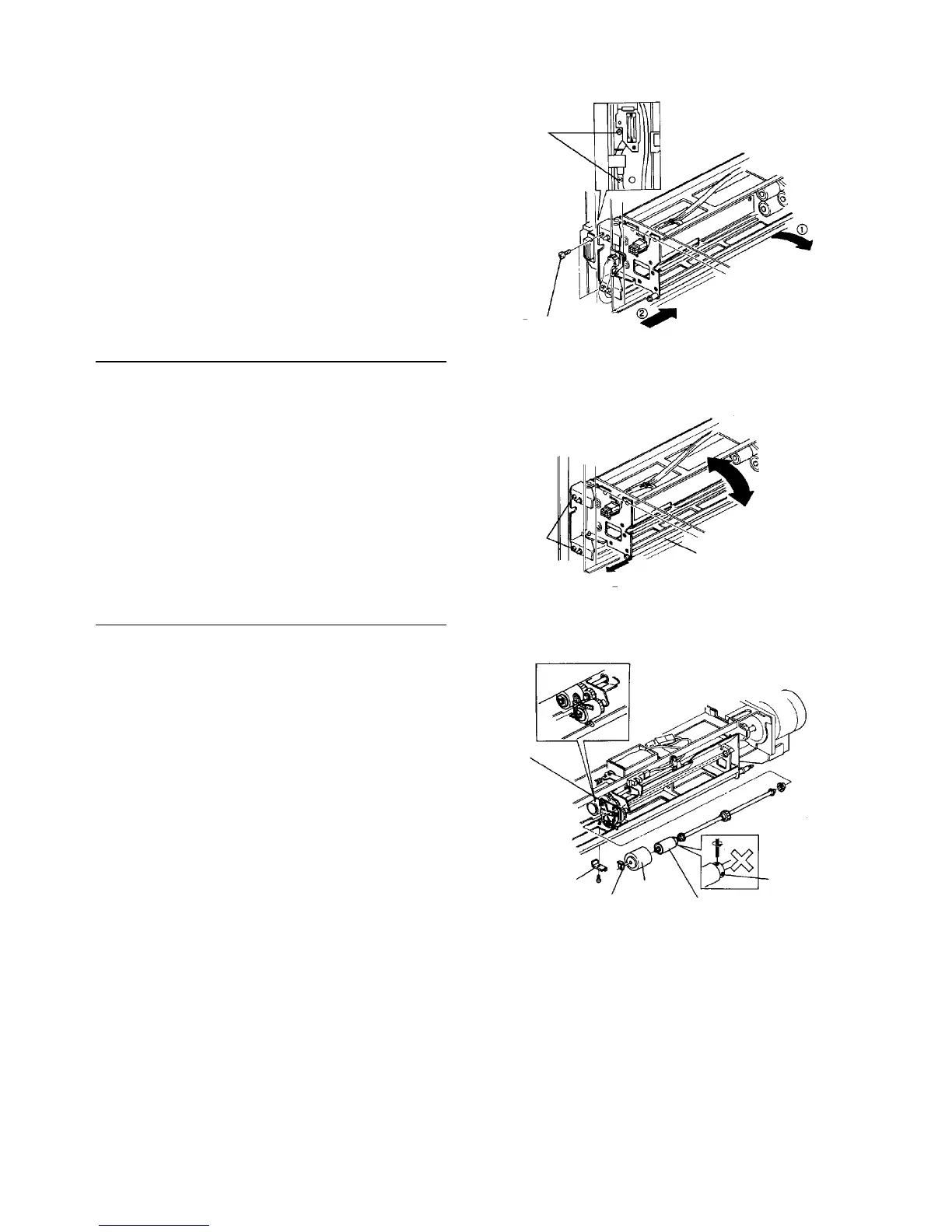
6. Remove the screws from the paper feed unit fixing
bracket.
7. Hold the far side of the unit to move it to the right
and push the front to the far side to remove the
unit.
Checking the unit
1. Remove the paper tray.
2. Loosen and pull the (slot head) fixing shaft without
removing the two screws from the paper feed unit
fixing bracket.
3. The far side of the unit can be opened and closed
using the front as a fulcrum.
Replacing the torque limiter
1. Remove the paper feed unit.
2. To pull out the reverse roller, remove the stop ring.
3. Remove the reverse roller pressure arm stopper
(one screw).
4. To replace the torque limiter, lower the reverse
roller pressure arm.
CAUTION
• Because the torque limit pressure is
properly adjusted, do not loosen the torque
limiter stopper screws.
• Never touch the reverse roller surface with
bare hands.
Bracket
fixing
screw
Bracket fixing screw
Breaker
fixing
screw
(Minus head) fixing shaft
Reverse roller
pressure arm
Stopper
Stop ring
Reverse
roller
Torque limiter
Stopper
[NG]













 To Next Page