2.3.2 Replacing parts in the OPC unit
PM cycle: Every 400K clean: The OPC
back cleaning pad, all rollers, OPC
sensor, and quenching lamp filter.
Every 800K: Lubricate the tracking
sliders, and check the timing belt tension.
1. Remove the OPC belt by following the procedure
on the preceding page. Keep the OPC belt in its
case.
2. Clean each part as follows:
Cleaning pad Wipe with a cloth damp with alcohol. Reverse
if it becomes dirty.
Drive and
driven rollers
Wipe with a dry cloth. Never use either,
toluene or another organic cleaning solvent.
OPC sensor Blower brush
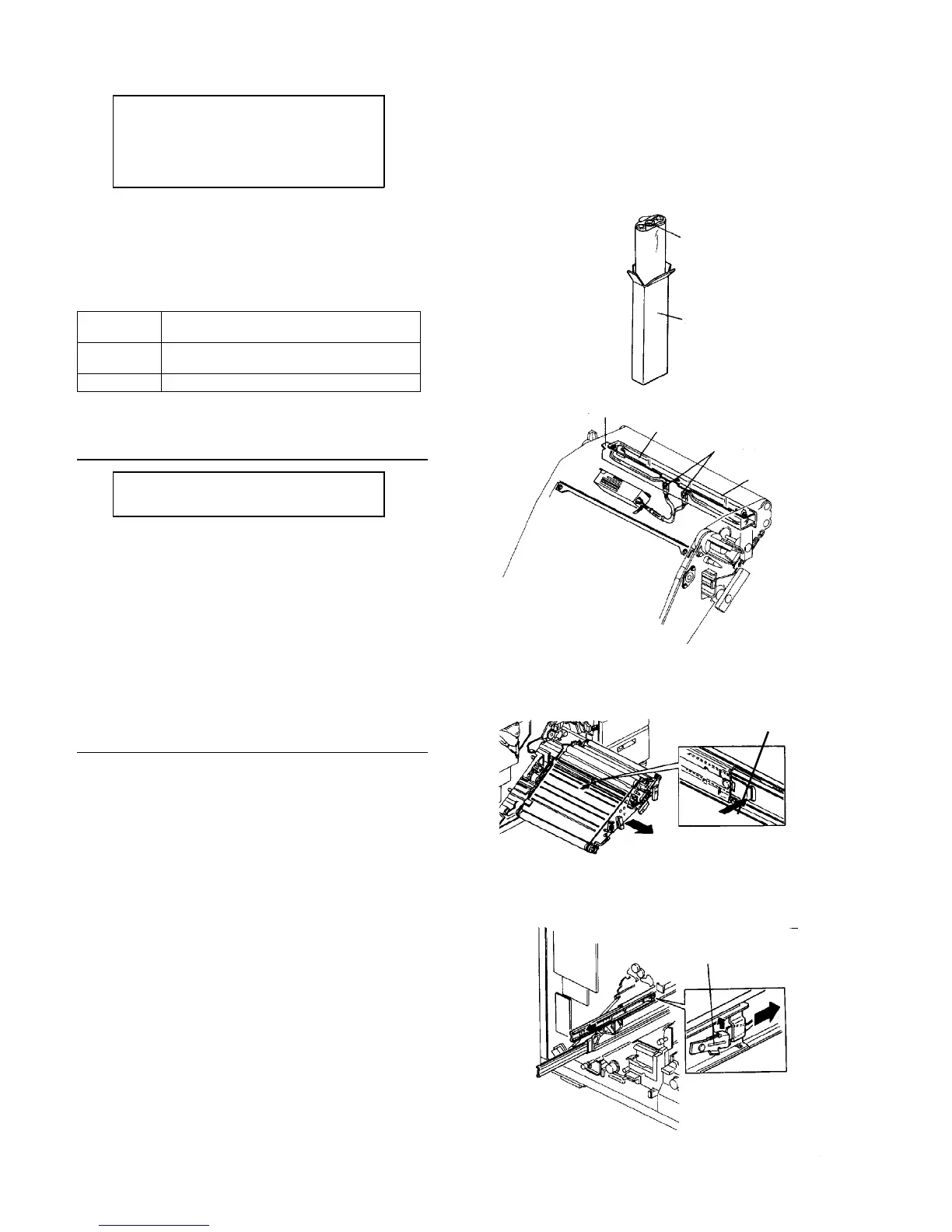
Replacing the quenching lamp
PM cycle: Clean the lamp filter every
400K
1. Remove the OPC belt.
2. Pull down the two lamp connectors.
3. Remove two screws to remove the lamp fixing
bracket.
4. Remove three screws to remove the lamp filter.
5. Remove and replace the quenching lamp.
Removing the OPC unit
1. Remove the OPC belt.
2. From the back of the OPC unit, while holding down
the lock pawl with your fingers, pull out the OPC
unit.
3. Erect the unit on the floor with the far side down.
WARNING
• Do not hold the frame and stays inside the unit
when you pull out it. Their edges are very sharp.
• If the slide guides keep slid out, it is dangerous
during working. Set the release lever on the far
side of the rail parallel, and put slide guide on
the main body side.
CAUTION
To reinstall the OPC unit, bring the roller
bearing unit inside the slide guide to the front
end of the rail. If the roller baring unit is kept on
the far side, the roller bearings may drop when
the unit is inserted.
OPC belt
Packing case
Lamp fixing bracket
Quenching lamp
Lamp connector
Lamp filter
Lock pawl
Release lever













 To Next Page